EasyManua.ls Logo

Technics RS-CH770 - Deck 2 Mechanism Check

Technics RS-CH770
37 pages
Print Icon
To Next Page IconTo Next Page
To Previous Page IconTo Previous Page
Loading...
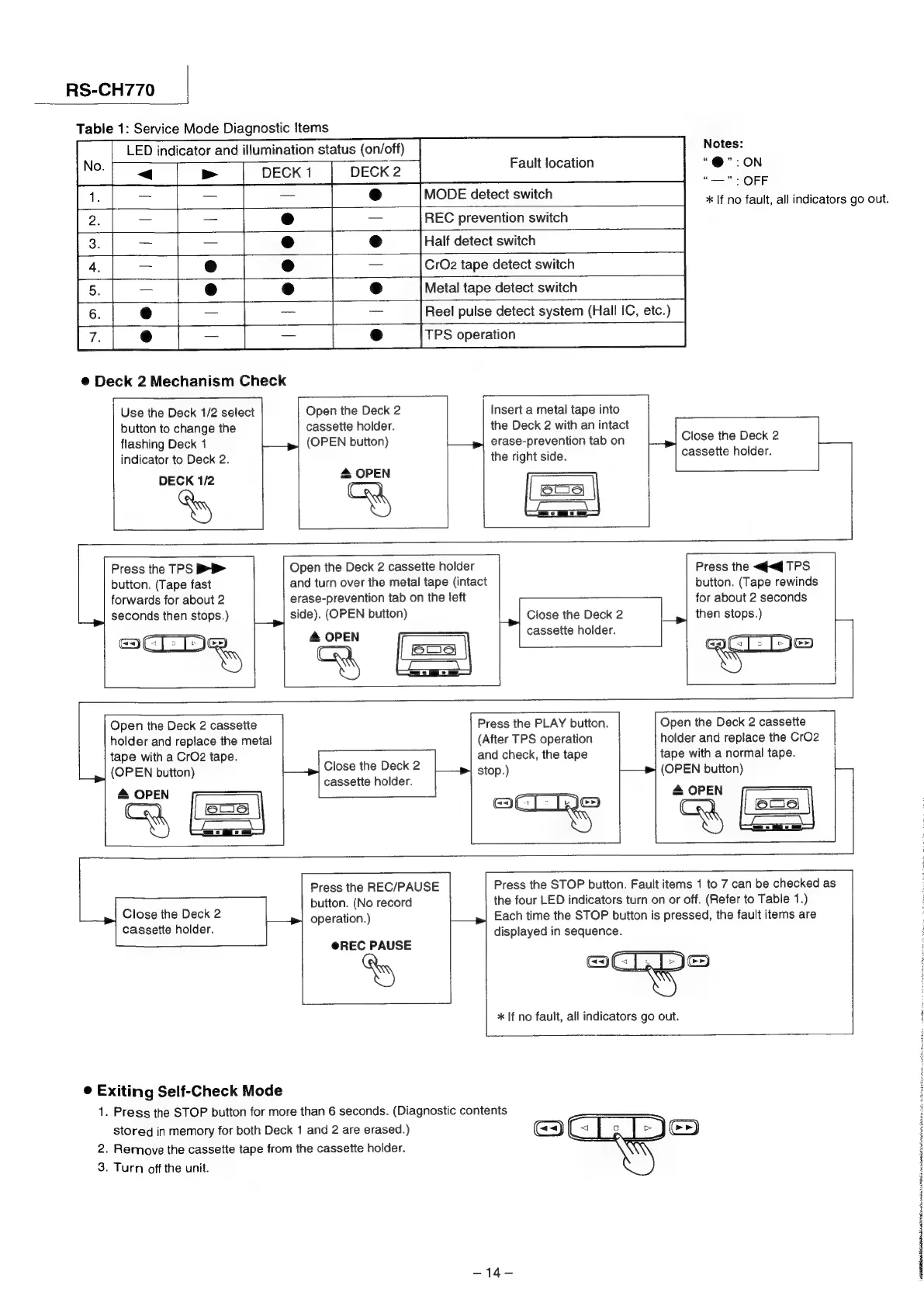
RS-CH770
|
Table
1:
Service
Mode
Diagnostic
Items
LED
indicator
and
illumination
status
(on/off)
Notes:
DECK
1
DECK
2
Fault
location
;
©
:
eee
MODE
detect
switch
*
If
no
fault,
all
indicators
go
out.
REC
prevention
switch
Half
detect
switch
CrO2
tape
detect
switch
Metal
tape
detect
switch
Reel
pulse
detect
system
(Hall
IC,
etc.)
TPS
operation
®
Deck
2
Mechanism
Check
Use
the
Deck
1/2
alact
|
Open
the
Deck
2
|
Insert
a
metal
tape
into
button
to
change
the
cassette
holder.
the
Deck
2
with
an
intact
flashing
Deck
1
|—
ey
(OPEN
button)
erase-prevention
tab
on
Close
the
Deck
2
indicator
to
Deck
2.
the
right side.
cassette
holder.
DECK
1/2
&
OPEN
(slums)
{roy
oy
aw
Press
the
TPS
>>
|
Open
the
Deck
2
cassette
holder
Press
the
«qq
TPS
button.
(Tape
fast
and
turn
over
the
metal
tape
(intact
button.
(Tape
rewinds
forwards
for
about
2
erase-prevention
tab
on
the
left
for
about
2
seconds
seconds
then
stops.)
|_|
side).
(OPEN
button)
Close
the
Deck
2
|_,|
then
stops.)
cassette
holder.
Press
the
PLAY
button.
Open
the
Deck
2
cassette
(After
TPS
operation
holder
and
replace
the
CrO2
and
check,
the
tape
tape
with
a
normal
tape.
stop.)
hag
(OPEN
button)
Pa
oon,
|
|S
Open
the
Deck
2
cassette
holder
and
replace
the
metal
tape
with
a
CrO2
tape.
Close
the
Deck
2
(OPEN
button)
cassette
holder.
4
[=|
4
cM
Press
the
REC/PAUSE
Press
the
STOP
button.
Fault
items
1
to
7
can
be
checked
as
button.
(No
record
the
four
LED
indicators
turn
on
or
off.
(Refer
to
Table
1.)
Close
the
Deck
2
operation.)
Each
time
the
STOP
button
is
pressed,
the
fault
items
are
cassette
holder.
displayed
in
sequence.
@REC
PAUSE
@Cis
NS
*
If
no
fault,
all
indicators
go
out.
©
Exiting
Self-Check
Mode
1.
Press
the
STOP
button
for
more
than
6
seconds.
(Diagnostic
contents
stored
in
memory
for
both
Deck
1
and
2
are
erased.)
(<=)
2.
Remove
the
cassette
tape
from
the
cassette
holder.
3.
Turn
off
the
unit.
444
stamens
shia
ha
pu
IN
iPM
ALBA
i
Ne
icp
ccc
phasic
taine
eubchind
ning
eid
eg

Related product manuals