EasyManua.ls Logo

Technics RS-CH770 - Measurements and Adjustments; Power Supply and Signal Checks

Technics RS-CH770
37 pages
Print Icon
To Next Page IconTo Next Page
To Previous Page IconTo Previous Page
Loading...
RS-CH770
M@
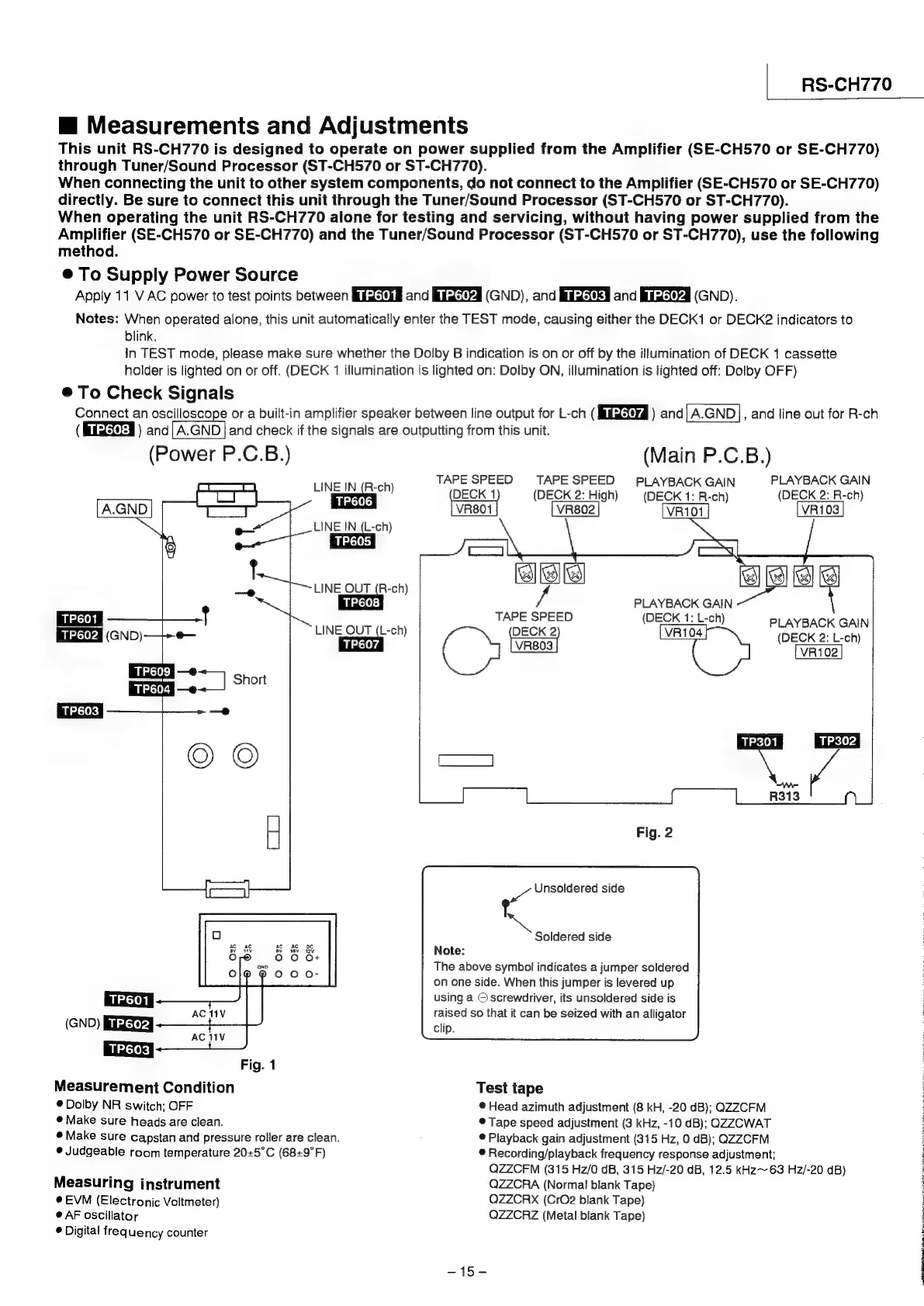
Measurements
and
Adjustments
This
unit
RS-CH770
is
designed
to
operate
on
power
supplied
from
the
Amplifier
(SE-CH570
or
SE-CH770)
through
Tuner/Sound
Processor
(ST-CH570
or
ST-CH770).
When
connecting
the
unit
to
other
system
components,
do
not
connect
to
the
Amplifier
(SE-CH570
or
SE-CH770)
directly.
Be
sure
to
connect
this
unit
through
the
Tuner/Sound
Processor
(ST-CH570
or
ST-CH770).
When
operating
the
unit
RS-CH770
alone
for
testing
and
servicing,
without
having
power
supplied
from
the
Amplifier
(SE-CH570
or
SE-CH770)
and
the
Tuner/Sound
Processor
(ST-CH570
or
ST-CH770),
use
the
following
method.
®@
To
Supply
Power
Source
Apply
11
V
AC
power
to
test
points
between
BUEMS¢g
and
Bilase74
(GND),
and
Bulsek#
and
Buldsievd
(GND).
Notes:
When
operated
alone,
this
unit
automatically
enter
the
TEST
mode,
causing
either
the
DECK1
or
DECK2
indicators
to
blink.
In
TEST
mode,
please
make
sure
whether
the
Dolby
B
indication
is
on
or
off
by
the
illumination
of
DECK
1
cassette
holder
is
lighted
on
or
off.
(DECK
1
illumination
is
lighted
on:
Dolby
ON,
illumination
is
lighted
off:
Dolby
OFF)
®
To
Check
Signals
Connect
an
TaN
or
a
built-in
amplifier
soeaker
between
line
output
for
L-ch
(
Eiiteryd
)
and|A.GND},
and
line
out
for
R-ch
(Meds
)
and|
A.GND
|
and
check
if
the
signals
are
outputting
from
this
unit.
(Power
P.C.B.)
(Main
P.C.B.)
LINE
IN
(R-ch)
TAPE
SPEED
TAPESPEED
PLAYBACK
GAIN
PLAYBACK
GAIN
TP606
DECK
1
(DECK
2:
High)
(DECK
1:
R-ch)
(DECK
2:
R-ch)
A.GND
VR801
VR802
VR103
LINE
IN
(L-ch)
7
PLAYBACK
GAIN
DECK
2
VR104
(DECK
2:
L-ch)
LvR803
|
VR102
LINE_OUT
(R-ch)
TP608
TP601
cen
ae
fied
GND)
—+-+e—
LINE
QUT
(L-ch)
Fig.
2
~~
Unsoldered
side
Soldered
side
Note:
The
above
symbol
indicates
a
jumper
soldered
on
one
side.
When
this
jumper
is
levered
up
using
a
©
screwdriver,
its
unsoldered
side
is
raised
so
that
it
can
be
seized
with
an
alligator
Clip.
Fig.
1
Measurement
Condition
Test
tape
®
Dolby
NR
switch;
OFF
®
Head
azimuth
adjustment
(8
kH,
-20
dB);
QZZCFM
@
Make
sure
heads
are
clean.
©
Tape
speed
adjustment
(3
kHz,
-10
dB);
QZZCWAT
®
Make
sure
capstan
and
pressure
roller
are
clean.
®
Playback
gain
adjustment
(315
Hz,
0
dB);
QZZCFM
©
Judgeable
room
temperature
205°C
(68+9°F)
®
Recording/playback
frequency
response
adjustment;
QZZCFM
(315
Hz/0
dB,
315
Hz/-20
dB,
12.5
kHz~
63
Hz/-20
dB)
Measuring
instrument
QZZCRA
(Norma!
blank
Tape)
EVM
(Electronic
Voltmeter)
QZZCRX
(CrO2
blank
Tape)
@
AF
oscillator
QZZCRZ
(Metal
blank
Tape)
®
Digital
frequency
counter
S15
E
§
5;
3
F
i
El
Ne

Related product manuals