EasyManua.ls Logo

Technics RS-M13 - Page 10

Technics RS-M13
21 pages
Print Icon
To Next Page IconTo Next Page
To Previous Page IconTo Previous Page
Loading...
Borsvi3
ns-mi3
es
RS-M13
ELECTRICAL
PARTS
LOCATION
ITEM
MEASUREMENT
&
ADJUSTMENT
NOTE:
A
indicates
that
only
parts
specified
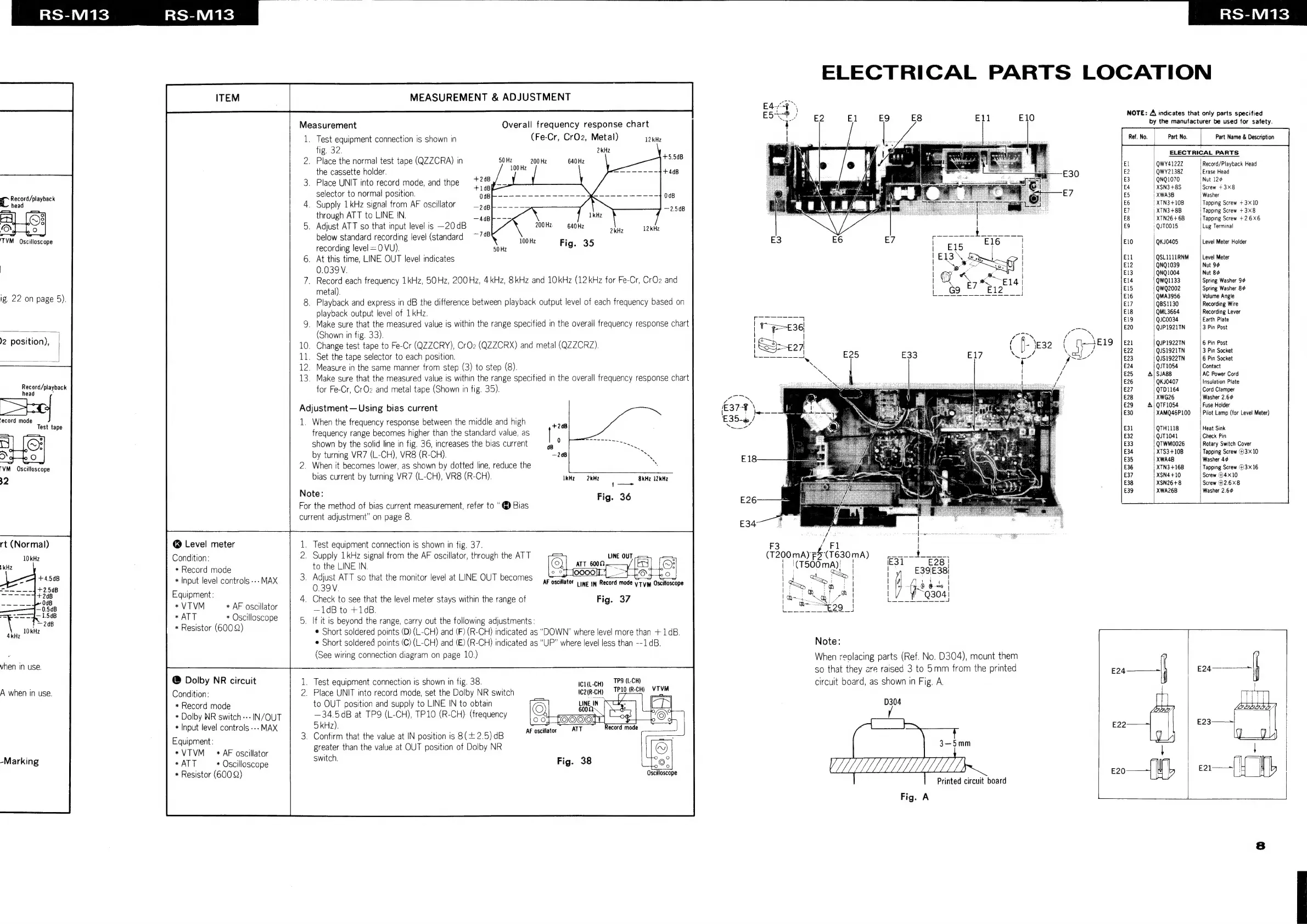
Measurement
Overall
frequency
response
chart
by
the
manufacturer
be
used
for
safety.
1.
Test
equipment
connection
is
shown
in
(Fe-Cr,
CrO2,
Metal)
12kHz
Part
Name
&
Description
fig.
32.
2kHz
y
:
ELECTRICAL
PARTS
2.
Place
the
normal
test
tape
(QZZCRA)
in
50Hz
——.200Hz
640
Hz
popes
EE
Eee
100
Hz
QWY4122Z
'
Record/Playback
Head
the
cassette
holder.
+448
|
QWY2138Z
Erase
Head
3.
Place
UNIT
into
record
mode,
and
thpe
eae
Nut
126
+4
XSN3+8S
Screw
+
3X8
IL
Record/olayback
selector
to
normal
position.
0dB
'
XWA3B
Washer
head
4.
Supply
1kHz
signal
from
AF
oscillator
er
|
XTN3+10B
Tapping
Screw
+3X10
through
ATT
to
LINE
IN
,
nettes
Tapping
Screw
+3X8
:
|
XT
+6B
T
S
2.6X6
5.
Adjust
ATT
so
that
input
level
is
—20dB
200Hz
40
Hz
QuTO015
tne
Tevinal
.
below
standard
recording
level
(standard
TM
Oscilloscope
recording
level
=O
VU).
8
(
50H
100
Hz
Fig.
35
QKJ0405
Level
Meter
Holder
6.
At
this
time,
LINE
OUT
level
indicates
QSLILIIRNM
|
Level
Meter
0.039V
QNQ1039
Nut
:
:
QNQ1004
Nut
7.
Record
each
frequency
1kHz,
50Hz,
200Hz,
4kHz,
8kHz
and
10kHz
(12kHz
for
Fe-Cr,
CrO2
and
QWQ1133
Spring
Washer
i
29
metal).
QwQ2002
Spring
Washer
Ig.
22
on
page
5).
8.
Playback
and
express
in
dB
the
difference
between
playback
output
level
of
each
frequency
based
on
peers
pelea
as
playback
output
level
of
1
kHz.
QML3664
Recording
Lever
QJC0034
Earth
Plate
9.
Make
sure
that
the
measured
value
is
within
the
range
specified
in
the
overall
frequency
response
chart
Grou:
Saree
position)
(Shown
in
fig.
33).
!
10.
Change
test
tape
to
Fe-Cr
(QZZCRY),
CrOz
(QZZCRX)
and
metal
(QZZCRZ).
=
11.
Set
the
tape
selector
to
each
position.
12.
Measure
in
the
same
manner
from
step
(3)
to
step
(8).
13.
Make
sure
that
the
measured
value
is
within
the
range
specified
in
the
overall
frequency
response
chart
Record/playback
for
Fe-Cr,
CrOz
and
metal
tape
(Shown
in
fig.
35).
QUP1922TN
6
Pin
Post
QJS1921TN
3
Pin
Socket
QJS1922TN
6
Pin
Socket
QJT1054
Contact
SJA88
AC
Power
Cord
QKJ0407
Insulation
Plate
QTD1164
Cord
Clamper
XWG26
Washer
2.6¢
Adjustment—
Using
bias
current
QTF1054
Fuse
Holder
.
.
XAMQ46P
100
Pilot
Lamp
(for
Level
Meter)
=e
OE
ria
-
1.
When
the
frequency
response
between
the
middle
and
high
frequency
range
becomes
higher
than
the
standard
value,
as
arta
peg
shown
by
the
solid
line
in
fig.
36,
increases
the
bias
current
QTWMO0026
Rotary
Switch
Cover
by
turning
VR7
(L-CH),
VR8
(R-CH).
XTS3+10B
Tapping
Screw
43x10
‘VM.
Oscilloscope
2.
When
it
becomes
lower,
as
shown
by
dotted
line,
reduce
the
.
aide
eta
3x16
32
bias
current
by
turning
VR7
(L-CH),
VR8
(R-CH).
IkH
2H?
BKM?
12kMz
XSN4+10
Screw
@4X10
{—-
XSN26+8
Screw
#2.6X8
Note:
Fig
36
XWA26B
Washer
2.6¢
For
the
method
of
bias
current
measurement,
refer
to
“@
Bias
current
adjustment”
on
page
8.
|
rt
(Normal)
@
Level
meter
1.
Test
equipment
connection
is
shown
in
fig.
37.
Condition:
2.
Supply
1kHz
signal
from
the
AF
oscillator,
through
the
ATT
(F400
mA)
ve
(7630
mA)
*
Record
mode
to
the
LINE
IN.
|
|\(T500mA)!
|
LOL
|
ay,
|
*
Input
level
controls
---
MAX
3
se
ATT
so
that
the
monitor
level
at
LINE
OUT
becomes
praia,
cane
in
Recor
neds
vives
ataties
|
de,
“ph
P|
;
oN.
is!
ee
aera
Equipment:
,
4.
Check
to
see
that
the
level
meter
stays
within
the
range
of
Fig.
37
|
Gm
a
al
*
|
*VTVM
+
AF
oscillator
—1dB
to
+14B.
res
as
01218
:
ce
;
haope
5.
If
it
is
beyond
the
range,
carry
out
the
following
adjustments:
eolster
)
Short
soldered
points
(D)
(L-CH)
and
(F)
(R-CH)
indicated
as
“DOWN”
where
level
more
than
+1dB.
¢
Short
soldered
points
(C)
(L-CH)
and
(E)
(R-CH)
indicated
as
“UP”
where
level
less
than
--1dB.
Note:
a
(See
wiring
connection
diagram
on
page
10.)
When
reolacing
parts
(Ref.
No.
D304),
mount
them
eninge:
so
that
they
are
raised
3
to
5mm
from
the
printed
nf
£24————
@
Dolby
NR
circuit
.
Test
equipment
connection
is
shown
in
fig.
38.
ici-cyy
TP9(L-CH)
circuit
board,
as
shown
in
Fig.
A.
A
when
in
use.
Condition:
2.
Place
UNIT
into
record
mode,
set
the
Dolby
NR
switch
icayecH)
Try
(RCH)
VTVM
*
Record
mode
to
OUT
position
and
supply
to
LINE
IN to
obtain
*
Dolby
NR
switch
---
IN/OUT
—34.5dB
at
TP9
(L-CH),
TP10
(R-CH)
(frequency
*
Input
level
controls
---
MAX
5
kHz).
a
_
Confirm
that
the
value
at
IN
position
is
8(+2.5)dB
AF
oscar
greater
than
the
value
at
OUT
position
of
Dolby
NR
D304
E23———
coo
—{
caa—[f
Ub
Equipment:
*VTVM_
*
AF
oscillator
F
*ATT
«Oscilloscope
Sunt
Fig.
38
*
Resistor
(600
Q)
Oscilloscope
-Marking
Printed
circuit
board
Fig.
A

Related product manuals