EasyManua.ls Logo

Technics RS-M13 - Page 9

Technics RS-M13
21 pages
Print Icon
To Next Page IconTo Next Page
To Previous Page IconTo Previous Page
Loading...
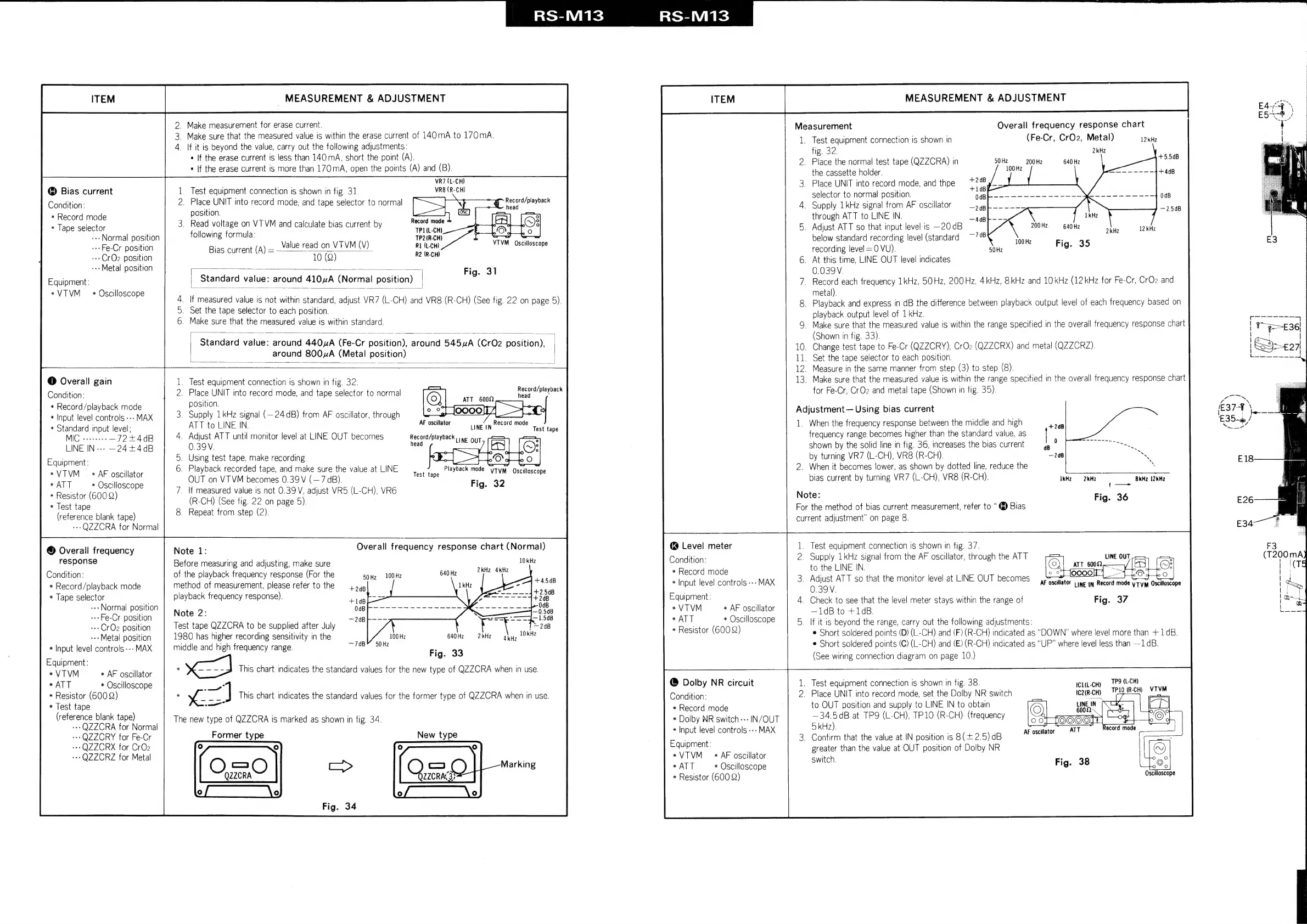
RS-M13
ITEM
_
MEASUREMENT
&
ADJUSTMENT
Bias
current
Condition:
*
Record
mode
*
Tape
selector
--
Normal
position
--Fe-Cr
position
--CrQ2
position
--Metal
position
Equipment:
*VTVM
*
Oscilloscope
@
Overall
gain
Condition:
*
Record/playback
mode
*
Input
level
controls
---
MAX
*
Standard
input
level;
MIC
veeeeee
—72+4dB
LINE
IN---
~24+4dB
Equipment:
*VTVM
_
*
AF
oscillator
*
ATT
*
Oscilloscope
*
Resistor
(600
2)
*
Test
tape
(reference
blank
tape)
---QZZCRA
for
Normal
©
Overall
frequency
response
Condition:
*
Record/playback
mode
*
Tape
selector
--
Normal
position
--Fe-Cr
position
--CrOz
position
--Metal
position
*
Input
level
controls
---
MAX
Equipment
:
*VTVM
*
AF
oscillator
*
ATT
*
Oscilloscope
*
Resistor
(6002)
*
Test
tape
(reference
blank
tape)
---QZZCRA
for
Normal
++»
QZZCRY
for
Fe-Cr
---QZZCRX
for
CrOz
--QZZCRZ
for
Metal
_
Make
measurement
for
erase
current.
_
Make
sure
that
the
measured
value
is
within
the
erase
current
of
140mA
to
170mA.
_
If
it
is
beyond
the
value,
carry
out
the
following
adjustments:
*
If
the
erase
current
is
less
than
140
mA,
short
the
point
(A).
*
If
the
erase
current
is
more
than
170
mA,
open
the
points
(A)
and
(B).
VR7
(L-CH)
Test
equipment
connection
is
shown
in
fig.
31.
VR8(R-CH)
.
Place
UNIT
into
record
mode,
and
tape
selector
to
normal
position.
.
Read
voltage
on
VTVM
and
calculate
bias
current
by
Record
mode
following
formula:
een
Value
read
on
VT
VM
(V)
RI
(L-CH)
10
(Q)
R2
(R-CH)
og
Record/playback
mM
head
VTVM
Oscilloscope
Bias
current
(A)
=
Fig.
31
Standard
value:
around
410uA
(Normal
position)
|
=
.
If
measured
value
is
not
within
standard,
adjust
VR7
(L-CH)
and
VR8
(R-CH)
(See
fig.
22
on
page
5).
.
Set
the
tape
selector
to
each
position.
.
Make
sure
that
the
measured
value
is
within
standard.
Standard
ire
around
440uA
Ags
cr
necition.
round
545
uA,
(CrO2
Basitiot
|
around
800A
(Metal
position)
|
.
Test
equipment
connection
is
shown
in
fig.
32.
.
Place
UNIT
into
record
mode,
and
tape
selector
to
normal
position.
.
Supply
1kHz
signal
(—24
dB)
from
AF
oscillator,
through
ATT
to
LINE
IN.
AF
oscillator
LINEIN
Record
mode
.
Adjust
ATT
until
monitor
level
at
LINE
OUT
becomes
Record/playback
0.39V.
head
.
Using
test
tape,
make
recording.
.
Playback
recorded
tape,
and
make
sure
the
value
at
LINE
OUT
on
VTVM
becomes
0.39
V
(—7
dB).
7.
\f
measured
value
is
not
0.39V,
adjust
VR5
(L-CH),
VR6
(R-CH)
(See
fig.
22
on
page
5).
8.
Repeat
from
step
(2).
Record/playback
head
Test
tape
LINE
OUT
Playback
mode
“yTvM
Oscilloscope
Fig.
32
Test
tape
Note
1:
Overall
frequency
response
chart
(Normal)
Before
measuring
and
adjusting,
make
sure
1kte
of
the
playback
frequency
response
(For
the
50Hz
100Hz
rare
method
of
measurement,
please
refer
to
the
4
»gp
playback
frequency
response)
;
+14B
Note
2:
‘Cae
Test
tape
QZZCRA
to
be
supplied
after
July
ce
1980
has
higher
recording
sensitivity
in
the
100
Hz
640
Hz
middle
and
high
frequency
range.
eB
20H
Fig.
33
*
This
chart
indicates
the
standard
values
for
the
new
type
of
QZZCRA
when
in
use.
<A"
*
~
me
]
This
chart
indicates
the
standard
values
for
the
former
type
of
QZZCRA
when
in
use.
—*
The
new
type
of
QZZCRA
is
marked
as
shown
in
fig.
34.
Former
type
OO
QZZCRA
New
type
RS-M13
ITEM
MEASUREMENT
&
ADJUSTMENT
@
Level
meter
Condition:
*
Record
mode
*
Input
level
controls
---
MAX
Equipment:
*VTVM
*
AF
oscillator
*
ATT
*
Oscilloscope
*
Resistor
(600
2)
@
Dolby
NR
circuit
Condition:
*
Record
mode
*
Dolby
NR
switch
---
IN/OUT
*
Input
level
controls
---
MAX
Equipment:
*VTVM
«AF
oscillator
*
ATT
*
Oscilloscope
*
Resistor
(600
Q)
Measurement
Overall
frequency
response
chart
1.
Test
equipment
connection
is
shown
in
(Fe-Cr,
CrOz,
Metal)
12kHz
fig.
32.
2kHz
-
2.
Place
the
normal
test
tape
(QZZCRA)
in
a
200
Hz
640
Hz
oa
Z
the
cassette
holder.
+408
3.
Place
UNIT
into
record
mode,
and
thpe
selector
to
normal
position.
0dB
4.
Supply
1kHz
signal
from
AF
oscillator
Siete
through
ATT
to
LINE
IN.
5.
Adjust
ATT
so
that
input
level
is
—20dB
200H2
40
Hz
below
standard
recording
level
(standard
:
recording
level
=0
VU).
Ma
OR
OFig.
35
6.
At
this
time,
LINE
OUT
level
indicates
0.039V.
7.
Record
each
frequency
1kHz,
50Hz,
200Hz,
4kHz,
8kHz
and
10kHz
(12
kHz
for
Fe-Cr,
CrO2
and
metal).
8.
Playback
and
express
in
dB
the
difference
between
playback
output
level
of
each
frequency
based
on
playback
output
level
of
1
kHz.
9.
Make
sure
that
the
measured
value
is
within
the
range
specified
in
the
overall
frequency
response
chart
(Shown
in
fig.
33).
10.
Change
test
tape
to
Fe-Cr
(QZZCRY),
CrOz
(QZZCRX)
and
metal
(QZZCRZ).
11.
Set
the
tape
selector
to
each
position.
12.
Measure
in
the
same
manner
from
step
(3)
to
step
(8).
13.
Make
sure
that
the
measured
value
is
within
the
range
specified
in
the
overall
frequency
response
chart
for
Fe-Cr,
CrOz
and
metal
tape
(Shown
in
fig.
35).
Adjustment
Using
bias
current
1.
When
the
frequency
response
between
the
middle
and
high
frequency
range
becomes
higher
than
the
standard
value,
as
shown
by
the
solid
line
in
fig.
36,
increases
the
bias
current
by
turning
VR7
(L-CH),
VR8
(R-CH).
2.
When
it
becomes
lower,
as
shown
by
dotted
line,
reduce
the
.
bias
current
by
turning
VR7
(L-CH),
VR8
(R-CH).
IRM
RHE
Baez
l2kH2
Note:
Fig.
36
For
the
method
of
bias
current
measurement,
refer
to
@
Bias
current
adjustment”
on
page
8.
1.
Test
equipment
connection
is
shown
in
fig.
37.
2.
Supply
1
kHz
signal
from
the
AF
oscillator,
through
the
ATT
cs
LINE
OUT
to
the
LINE
IN.
arr
cn
BS
ie
3.
Adjust
ATT
so
that
the
monitor
level
at
LINE
OUT
becomes
0.39V.
4.
Check
to
see
that
the
level
meter
stays
within
the
range
of
—1dB
to
+1dB.
5.
If it
is
beyond
the
range,
carry
out
the
following
adjustments:
¢
Short
soldered
points
(D)
(L-CH)
and
(F)
(R-CH)
indicated
as
“DOWN”
where
level
more
than
+
1dB.
Short
soldered
points
(C)
(L-CH)
and
(E)
(R-CH)
indicated
as
“UP”
where
level
less
than
--1dB.
(See
wiring
connection
diagram
on
page
10.)
AF
ae
LINE
IN
ri
mode
y
Tym
Oscilloscope
Fig.
37
.
Test
equipment
connection
is
shown
in
fig.
38.
irit-cuy
TPS
(L-CH)
.
Place
UNIT
into
record
mode,
set
the
Dolby
NR
switch
IC2(R-CH)
We;
(RCH)
VTVM
to
OUT
position
and
supply
to
LINE
IN to
obtain
—34.5dB
at
TP9
(L-CH),
TP10
(R-CH)
(frequency
5
kHz).
.
Confirm
that
the
value
at
IN
position
is
8
(+
2.5)
dB
greater
than
the
value
at
OUT
position
of
Dolby
NR
switch.
AF
oscilator
ATT
Oscilloscope
E18
E26
E34

Related product manuals