EasyManua.ls Logo

Technics RS-M13 - Page 8

Technics RS-M13
21 pages
Print Icon
To Next Page IconTo Next Page
To Previous Page IconTo Previous Page
Loading...
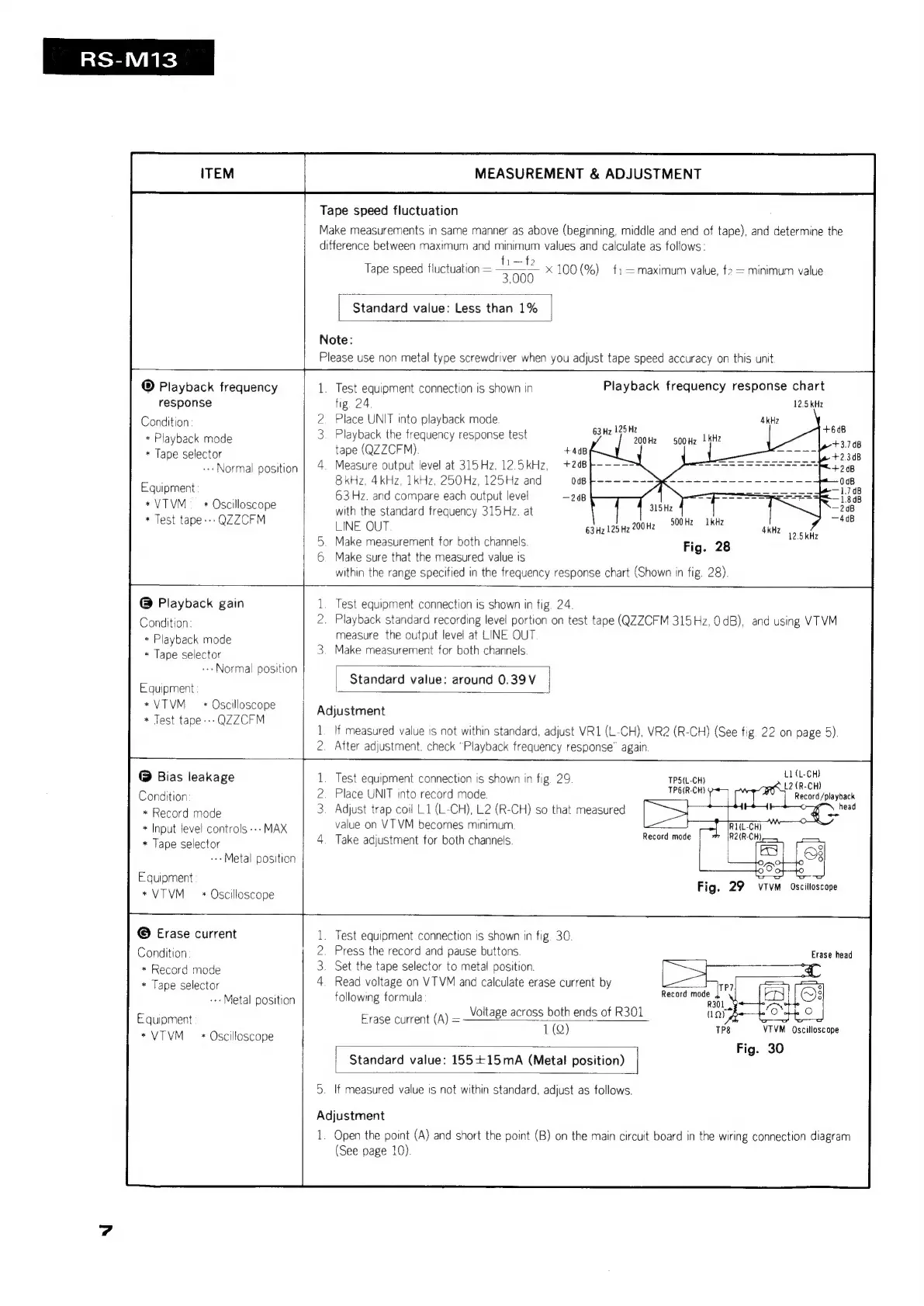
RS-M13
ITEM
MEASUREMENT
&
ADJUSTMENT
Tape
speed
fluctuation
Make
measurements
in
same
manner
as
above
(beginning,
middle
and end
of
tape),
and
determine
the
difference
between
maximum
and
minimum
values
and
calculate
as
follows:
Tape
speed
fluctuation
=
ee
x
100
(%)
f:—=maximum
value,
f2
=
minimum
value
Standard
value:
Less
than
1%
Note:
Please
use
non
metal
type
screwdriver
when
you
adjust
tape
speed
accuracy
on
this
unit.
®
Playback
frequency
response
Condition
*
Playback
mode
*
Tape
selector
---Normal
position
Equipment
*VTVM
*
Oscilloscope
*
Test
tape»
QZZCFM
@
Playback
gain
Condition:
*
Playback
mode
*
Tape
selector
--»
Normal
position
Equipment
*VTVM
*
Oscilloscope
*
Test
tape---
QZZCFM
@
Bias
leakage
Condition
*
Record
mode
*
Input
level
controls
---
MAX
*
Tape
selector
-+-Metal
position
Equipment
*VTVM
*
Oscilloscope
j——
Playback
frequency
response
chart
12.5
kHz
1.
Test
equipment
connection
is
shown
in
fig.
24
2.
Place
UNIT
into
playback
mode
3.
Playback
the
frequency
response
test
ape
(QZZCFM)
4kHz
63Hz
125
Hz
200Hz
S00Hz
|
kHz
+4dB
4.
Measure
output
level
at
315Hz,12.5kHz,
+248
i
a
oad
ae
aT
+248
8kHz,
4kHz,
1kHz,
250Hz,
125Hz
and
0dB
F}-~——~-~}€~---~-
------------
988
63
Hz.
and
compare
each
output
level
208
with
the
standard
frequency
315Hz.
at
LINE
OUT
ake
measurement
for
both
channels.
ake
sure
that
the
measured
value
is
within
the
range
specified
in
the
frequency
response
chart
(Shown
in
fig.
28).
500
Hz
Fig.
28
1kH
63Hz
125
Hz
200Hz
:
kHz
12.5kHz
oo
ran
Test
equipment
connection
is
shown
in
fig.
24
2.
Playback
standard
recording
level
portion
on
test
tape
(QZZCFM
315Hz,
OdB),
and
using
VTVM
measure
the
output
level
at
LINE
OUT
3.
Make
measurement
for
both
channels
Standard
value:
around
0.39V
|
Adjustment
1.
If
measured
value
is
not
within
standard,
adjust
VR1(L-CH),
VR2
(R-CH)
(See
fig.
22
on
page
5).
2.
After
adjustment.
check
“Playback
frequency
response”
again
L1(L-CH)
L2
(R-CH)
Record/playback
TPS(L-CH)
TP6(R-CH)
=
Record
mode
1.
Test
equipment
connection
is
shown
in
fig.
29
Place
UNIT
into
record
mode.
3.
Adjust
trap
coil
L.1
(L-CH),
L2
(R-CH)
so
that
measured
value
on
VT
VM
becomes minimum
4.
Take
adjustment
for
both
channels
©
Erase
current
Condition
*
Record
mode
*
Tape
selector
--»
Metal
position
Equipment
*
VTVM
*
Oscilloscope
Test
equipment
connection
is
shown
in
fig.
30.
Press
the
record
and
pause
buttons
Set
the
tape
selector
to
metal
position.
Read
voltage
on
VTVM
and
calculate
erase
current
by
following
formula
BWNHH
Record
mode
Use
Voltage
across
both
ends
of
R301
1
(Q)
Erase
current
(A)
=
ee
ee
VTVM
Oscilloscope
Fig.
30
Standard
value:
155+15mA
(Metal
position)
|
5.
If
measured
value
is
not
within
standard,
adjust
as
follows.
Adjustment
1.
Open
the
point
(A)
and
short
the
point
(B)
on
the
main
circuit
board
in
the
wiring
connection
diagram
(See
page
10).

Related product manuals