EasyManua.ls Logo

Technics RS-M13 - Page 6

Technics RS-M13
21 pages
Print Icon
To Next Page IconTo Next Page
To Previous Page IconTo Previous Page
Loading...
RS-M13
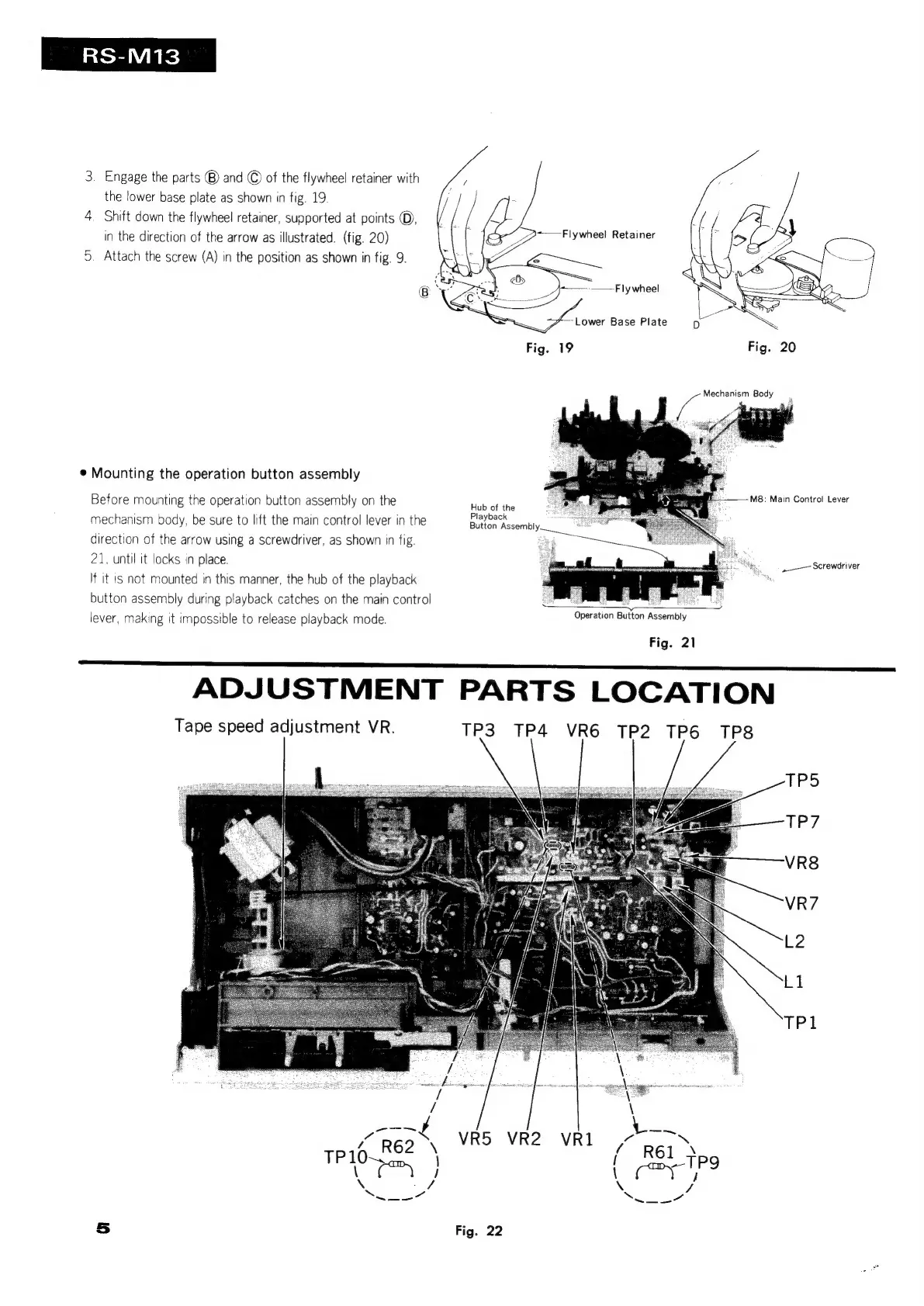
3.
Engage
the
parts
®)
and
©
of
the
flywheel
retainer
with
the
lower
base
plate
as
shown
in
fig.
19.
4.
Shift
down
the
flywheel
retainer,
supported
at
points
©,
in
the
direction
of
the
arrow
as
illustrated.
(fig.
20)
5.
Attach
the
screw
(A)
in
the
position
as
shown
in
fig.
9.
Mounting
the
operation
button
assembly
Before
mounting
the
operation
button
assembly
on
the
MpsiMaln
Control
revert
mechanism
body,
be
sure
to
lift
the
main
control
lever
in
the
direction
of
the
arrow
using
a
screwdriver,
as
shown
in
fig
21,
until
it
locks
in
place.
If
it
is
not
mounted
in
this
manner,
the
hub
of
the
playback
button
assembly
during
playback
catches
on
the
main
control
lever,
making
it
impossible
to
release
playback
mode.
Hub
of
the
Playback
Button
Assembly.
-——
Screwdriver
Fig.
21
a
ADJUSTMENT
PARTS
LOCATION
Tape
speed
adjustment
VR.
TP3
TP4
VR6
TP2
TP6
TP8
EPS
TP7
VR8
VR7
L2
Lt
TP1
fi
wee
ape
3
m
/
“TS
s
/
Se
Ri
é
/
/
a
7
ap
R62
\
VR5 VR2
VRI1
/
R61
Yoo
\
¢
,
|
oe
Gace
a
]
\
_f
\
7
Swe
Sel
es
5
Fig.
22

Related product manuals