RS-M215
CONTENTS
ITEM
PAGE
LOCATION
OF
CONTROLS
AND
COMPONENTS
cetcccccccesceceecesteceeceseesseeeseeeeasetcesetseessege
1
DISASSEMBLY
INSTRUCTIONS
-eececcecccceceteteceetee
set
eeeeseeeeseeseeeeeeeseeesseseeteseneenenteneesnenes
2
MEASUREMENT
AND
ADJUSTMENT
METHODS
cccccsccecceceececceeceseeseeeeesaeeeeeeeneceseeneees
3
ELECTRICAL
PARTS
LOCATION
ccccccscccecectecesceteceee
ese
setneneeeeesneneencesaeeneceeeeeeeseeeeseeereens
6
SCHEMATIC
DIAGRAM
ceccceccccecceccetec
cette
eee
t
etna
net
et
eee
ee
eee
e
senses
enone
nese
eneesnses
eet
eeeesentenenees
7
CIRCUIT
BOARDS
AND
WIRING
CONNECTION
DIAGRAM
eccccecceccecceceeceteeeeteeeeeeesensenes
8
MECHANICAL
PARTS
LOCATION
cccccccceceecesteceteecet
sees
test
eessese
cence
esecneeeseeaeneenseseeaeneaees
9
CABINET
PARTS
LOCATION
crcccececececetetecetetesetetececne
cece seen
snes
eee
eeeeeeneeeee
sees
en
eaeeseen
tees
9
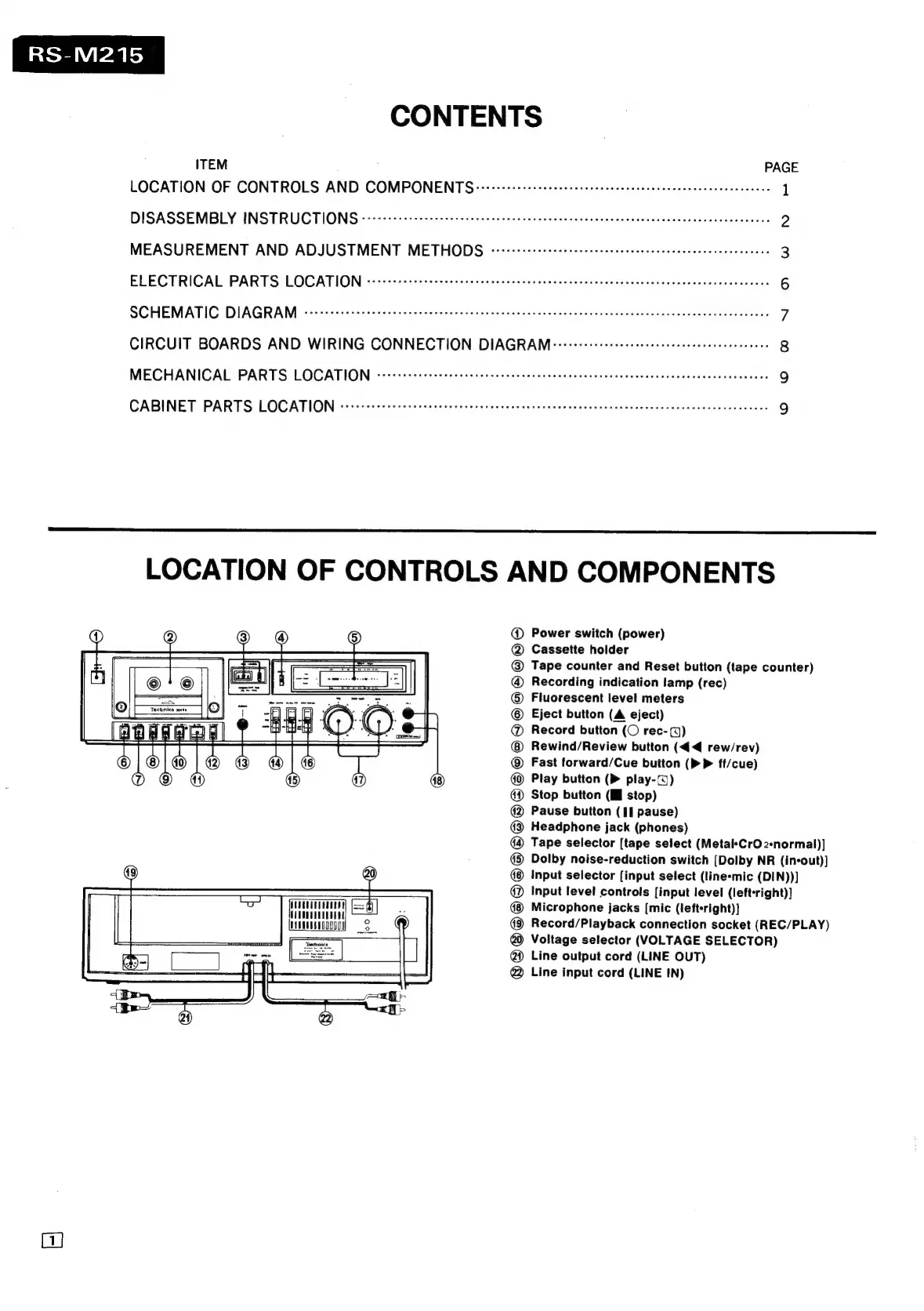
LOCATION
OF
CONTROLS
AND
COMPONENTS
@
Power
switch
(power)
@
Cassette
holder
@
Tape
counter
and
Reset
button
(tape
counter)
@
Recording
indication
lamp
(rec)
®
Fluorescent
level
meters
Eject
button
(A
eject)
@
Record
button
(O
rec-()
Rewind/Review
button
(4€<4
rew/rev)
Fast
forward/Cue
button
(>
P
ff/cue)
Play
button
(Pm
play-(@)
@
Stop
button
(I
stop)
@
Pause
button
(||
pause)
@3
Headphone
jack
(phones)
Tape
selector
[tape
select
(Metal*CrO
2-normal)]
@®
Dolby
noise-reduction
switch
[Dolby
NR
(in-out)]
Input
selector
[input
select
(line-mic
(DIN))]
@
Input
level
controls
[input
level
(leftright)]
TT
a
.
Microphone
jacks
[mic
(lefteright)]
HAN
nnEOgg009
Record/Playback
connection
socket
(REC/PLAY)
—
@
Voltage
selector
(VOLTAGE
SELECTOR)
@
Line
output
cord
(LINE
OUT)
@
Line
input
cord
(LINE
IN)



 To Next Page