EasyManua.ls Logo

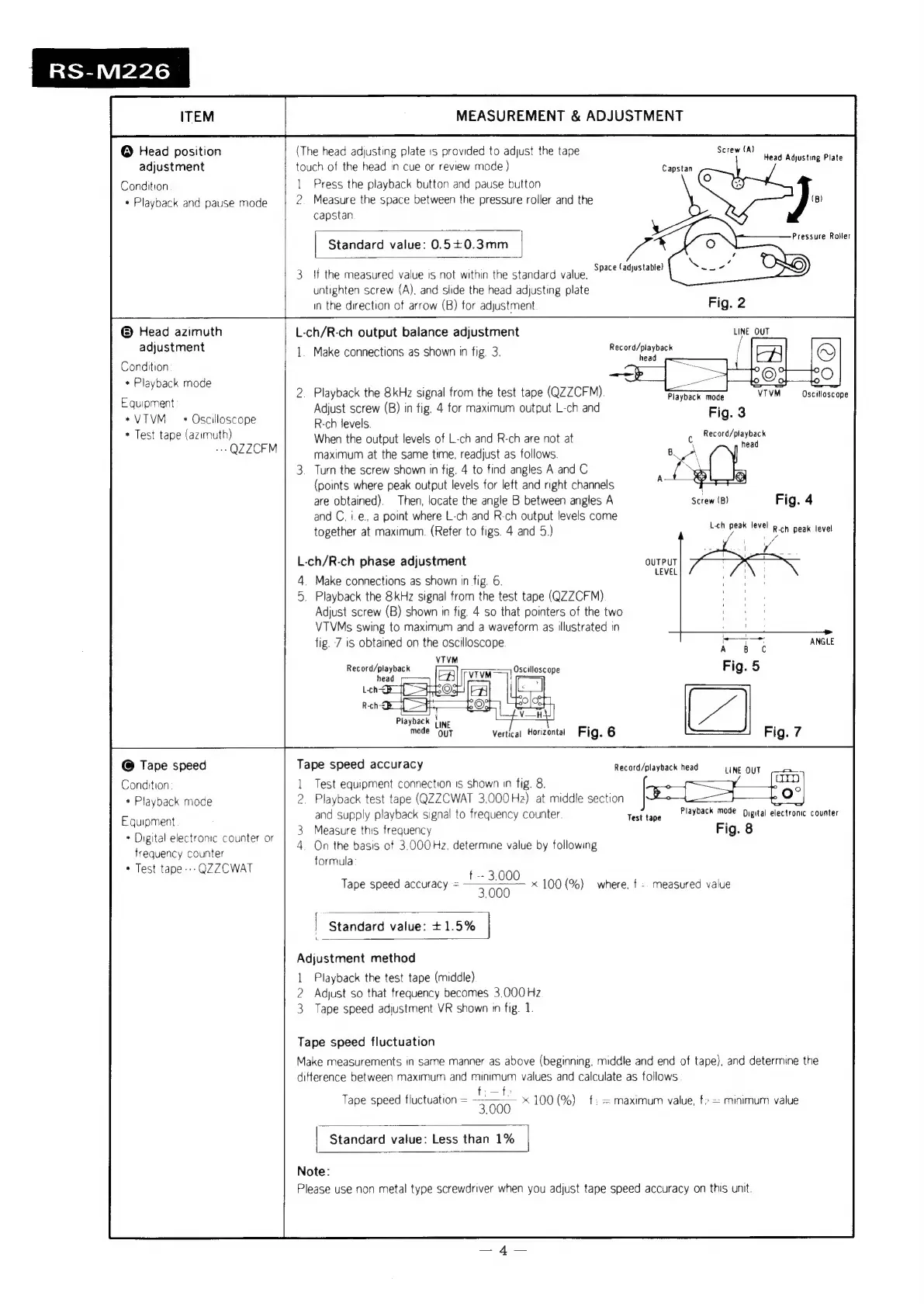
Technics RS-M226 - Head Position Adjustment

Technics RS-M226
19 pages
Print Icon
To Next Page IconTo Next Page
To Previous Page IconTo Previous Page
Loading...
RS-M226
ITEM
MEASUREMENT
&
ADJUSTMENT
@
Head
position
(The
head
adjusting
plate
is
provided
to
adjust
the
tape
Screw
(A)
adjustment
touch
of
the
head
in
cue
or
review
mode)
Capstan
Condition
1
Press
the
playback
button
and
pause
button
*
Playback
and
pause
mode
2.
Measure
the
space
between
the
pressure
roiler
and
the
(B)
capstan
Head
Adjusting
Plate
Pressure
Roller
Standard
value:
0.5+0.3mm
Space
(adjustabte)
If
the
measured
value
is
not
within
the
standard
value,
-”
}
untighten
screw
(A),
and
slide
the
head
adjusting
plate
;
in
the
direction
of
arrow
(B)
for
adjustment
Fig.
2
@
Head
azimuth
L-ch/R-ch
output
balance
adjustment
LINE
QUT
adjustment
1.
Make
connections
as
shown
in
fig.
3.
merpeu/
paynael
Condition
+
Playback
mode
:
_
os
sill
:
Playback
the
8kHz
signal
from
the
test
tape
(QZZCFM)
Playback
mode
VIVM
Oscilloscope
Equipment
:
abe
;
;
i
Ve
2
Oaslotone
ene
(B)
in
fig.
4
for
maximum
output
L-ch
and
Fig.
3
*
Test
tape
(azimuth)
When
the
output
levels
of
L-ch
and
R-ch
are
not
at
c
pees
Mint
~
Q2ZCFM
maximum
at
the
same
time,
readjust
as
follows
Turn
the
screw
shown
in
fig.
4
to
find
angles
A
and
C
(points
where
peak
output
levels
for
left
and
right
channels
are
obtained).
Then,
locate
the
angle
B
between
angles
A
Screw
(B)
Fig.
4
and
C,
i.e.,
a
point
where
L-ch
and
R-ch
output
levels
come
together
at
maximum.
(Refer
to
figs.
4
and
5.)
ee
Roh
peak
level
L-ch/R-ch
phase
adjustment
4
Make
connections
as
shown
in
fig.
6.
5.
Playback
the
8kHz
signal
from
the
test
tape
(QZZCFM)
Adjust
screw
(B)
shown
in
fig.
4
so
that
pointers
of
the
two
VTVMs
swing
to
maximum
and
a
waveform
as
illustrated
in
fig.
7
is
obtained
on
the
oscilloscope
Oscill
VIVM|
illoscope
Playback
{ine
:
mode
Qyt
Vertical
Horizontal
Fig.
6
@
Tape
speed
Tape
speed
accuracy
Record/playback
head
Condition
1
Test
equipment
connection
1s
shown
in
fig.
8.
eae
*
Playback
mode
2.
Playback
test
tape
(QZZCWAT
3,000Hz2)
at
middle
section
eo]
and
supply
playback
signal
to
frequency
counter.
Test
tape
Payback
mode
Digital
electronic
counter
3
Measure
this
frequency
Fig.
8
4.
On
the
basis
of
3.000Hz.
determine
value
by
following
formula
LINE
OUT
Equipment
*
Digital
electronic
counter
or
frequency
counter
*
Test
tape
---
QZZCWAT
t
--
3.000
Tape
speed
accuracy
=
3000
x
100(%)
where.
f
-.
measured
value
f
|
Standard
value:
+1.5%
Adjustment
method
1
Playback
the
test
tape
(middle)
2
Adjust
so
that
frequency
becomes
3.000
Hz
3
Tape
speed
adjustment
VR
shown
in
fig.
1.
Tape
speed
fluctuation
Make
measurements
in
same
manner
as
above
(beginning,
middle
and end
of
tape),
and
determine
the
difference
between
maximum
and
minimum
values
and
calculate
as
follows
:
f:—fe
Tape
speed
fluctuation
=
3
00.
100
(%)
f:
=
maximum
value,
=
minimum
value
Standard
value:
Less
than
1%
Note:
Please
use
non
metal
type
screwdriver
when
you
adjust
tape
speed
accuracy
on
this
unit.

Related product manuals