EasyManua.ls Logo

Technics RS-M226 - Page 5

Technics RS-M226
19 pages
Print Icon
To Next Page IconTo Next Page
To Previous Page IconTo Previous Page
Loading...
®
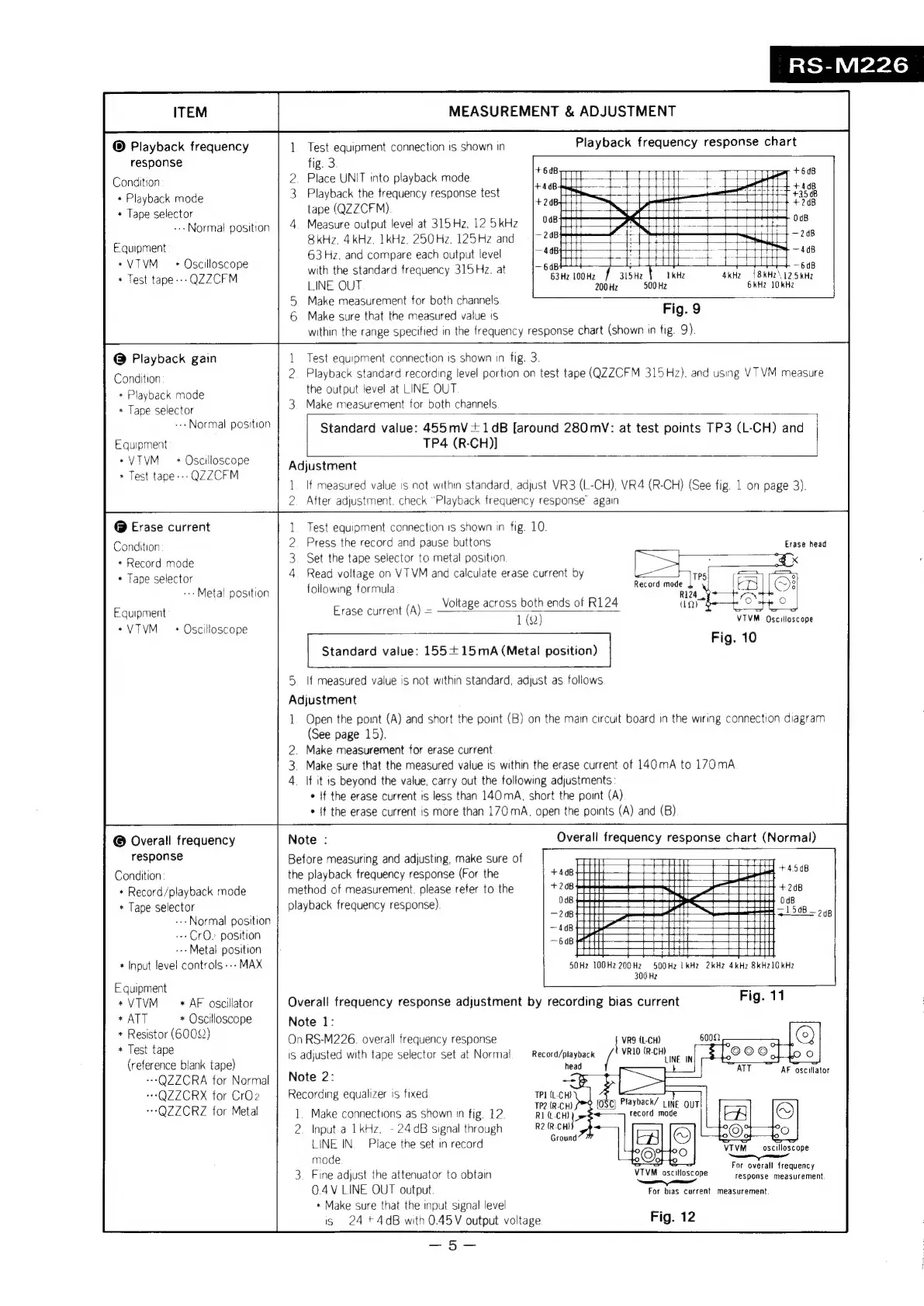
Playback
frequency
response
Condition
+
Playback
mode
*
Tape
selector
--
Normal
position
Equipment
*VTVM
+
Test
tape---
*
Oscilloscope
QZZCFM
ony
fig.
3.
Test
equipment
connection
is
shown
in
ITEM
MEASUREMENT
&
ADJUSTMENT
Playback
frequency
response
chart
RS-M226
@
Playback
gain
Condition
*
Playback
mode
*
Tape
selector
-»Normal
position
Equipment
*VTVM
*
Test
tape--:
*
Oscilloscope
QZZCFM
@
Erase
current
Condition
*
Record
mode
*
Tape
selector
--
Metal
position
Equipment
«VTVM
*
Oscilloscope
2.
Place
UNIT
into
playback
mode
aig
100
hee
7
+6d8
3.
Playback
the
frequency
response
test
rade
Se
-
ee
are
$hc8
tape
(QZZCFM)
sae
m@annuiaeal
4
Measure
output
level
at
315Hz,125kHz
|
#8
:
2H
haa
8kHz,
4kHz,
1kHz,
250Hz,
125Hz
and
=
|7
288
ial
248
63Hz.
and
compare
each
output
level
4
erie
q
foe
“To
408
with
the
standard
frequency
315
Hz.
at
eG
oon
|
eas
r
ai
This
*
rivets
LINE
OUT
200Hz
500
Hz
GkHz
10kHz
5.
Make
measurement
for
both
channels
,
6
Make
sure
that
the
measured
value
is
Fig.
9
within
the
range
specified
in
the
frequency
response
chart
(shown
in
fig.
9).
1
Test
equipment
connection
is
shown
in
fig.
3.
2.
Playback
standard
recording
level
portion
on
test
tape
(QZZCFM
315Hz),
and
using
VTVM
measure
the
output
level
at
LINE
OUT
3.
Make
measurement
for
both
channels
Standard
value:
455mV+1dB
[around
280
mV:
at
test
points
TP3
(L-CH)
and
TP4
(R-CH)]
Adjustment
RQ
tf
measured
value
is
not
within
standard,
adjust
VR3
(L-CH),
VR4
(R-CH)
(See
fig.
1
on
page
3).
After
adjustment.
check
“Playback
frequency
response’
again
Test
equipment
connection
1s
shown
in
fig.
10.
Press
the
record
and
pause
buttons
1
2
3.
Set
the
tape
selector
to
metal
position
4
Read
voltage
on
VT
VM
and
calculate
erase
current
by
following
formula
Erase
current
(A)
=
Voltage
across
both
ends
of
R124
1
(Q)
Standard
value:
155+15mA
(Metal
position)
5.
If
measured
value
is
not
within
standard,
adjust
as
follows
Adjustment
1.
Open
the
point
(A)
and
short
the
point
(B)
on
the
main
circuit
board
in
the
wiring
connection
diagram
(See
page
15).
2.
Make
measurement
for
erase
current
3.
Make
sure
that
the
measured
value
is
within
the
erase
current
of
140
mA
to
170mA
4.
If
it
is
beyond
the
value,
carry
out
the
following
adjustments
*
If
the
erase
current
is
less
than
140
mA,
short
the
point
(A)
*
{f
the
erase
current
is
more
than
170
mA,
open
the
points
(A)
and
(B)
©
Overall
frequency
response
Condition
*
Record/playback
mode
*
Tape
selector
--
Normal
position
--CrOQ.
position
--Metal
position
*
Input
level
controls
---
MAX
Equipment
*VTVM
*
AF
oscillator
*
ATT
*
Oscilloscope
*
Resistor
(60002)
*
Test
tape
(reference
blank
tape)
---QZZCRA
for
Normal
“+
QZZCRX
for
CrOz
*-QZZCRZ
for
Metal
Note
:
Before
measuring
and
adjusting,
make
sure
of
the
playback
frequency
response
(For
the
method
of
measurement.
please
refer
to
the
playback
frequency
response}
Overall
frequency
response
adjustment
by
recording
bias
current
Note
1:
On
RS-M226.
overall
frequency
response
1S
adjusted
with
tape
selector
set
at
Normal
Note
2:
Recording
equalizer
is
fixed
1.
Make
connections
as
shown
in
fig.
12.
-
24
dB
signal
through
LINE
IN.
Place
the
set
in
record
2.
Input
a
1
kHz.
mode
Erase
head
Record
mode
=!
vM
Oscilloscope
Fig.
10
Overall
frequency
response
chart
(Norma!)
50Hz
100Hz 200Hz
300
Hz
500Hz
LkHz
2kHz 4kHz
8kKHZ10kHz
Record/playback
!
head
TP]
(L-CH)
TP2
(R-CH)
R1
(t-CH)
R2(R-CH)
Ground
3.
Fine
adjust
the
attenuator
to
obtain
0.4V
LINE
OUT
output.
+
Make
sure
that
the
input
signal
level
is
24+4dB
with
0.45V
output
voltage
Fig.
11
VRQ
(L-CH)
VR10
(R-CH)
LINE
VIVM
——
For
overall
frequency
response
measurement
oscilloscope
VTVM
FVM
oscscoe
arse
ears
bias
current
measurement.
Fig.
12

Related product manuals