EasyManua.ls Logo

Technics RS-M226 - Page 6

Technics RS-M226
19 pages
Print Icon
To Next Page IconTo Next Page
To Previous Page IconTo Previous Page
Loading...
RS-M226
ITEM
MEASUREMENT
&
ADJUSTMENT
Set
the
tape
selector
to
Normal,
and
load
the
test
tape
(QZZCRA)
Adjust
the
attenuator
to
reduce
the
input
signal
level
by
20dB
Adjust
the
AF
oscillator
to
generate
50Hz,
100
Hz,
200Hz,
500Hz,
1
kHz,
4kHz,
8kHz
and
10
kHz
(ooo
signals,
and
record
these
signals
on
the
test
tape
Playback
the
signals
recorded
in
step
6,
and
check
if
the
frequency
response
curve
is
within
the
limits
shown
in
the
overall
frequency
response
chart
for
normal
tapes
(fig.
11).
(If
the
curve
is
within
the
charted
specifications,
proceed
to
steps
8,
9
and
10.)
If
the
curve
is
not
within
the
charted
specifications,
adjust
as
follows,
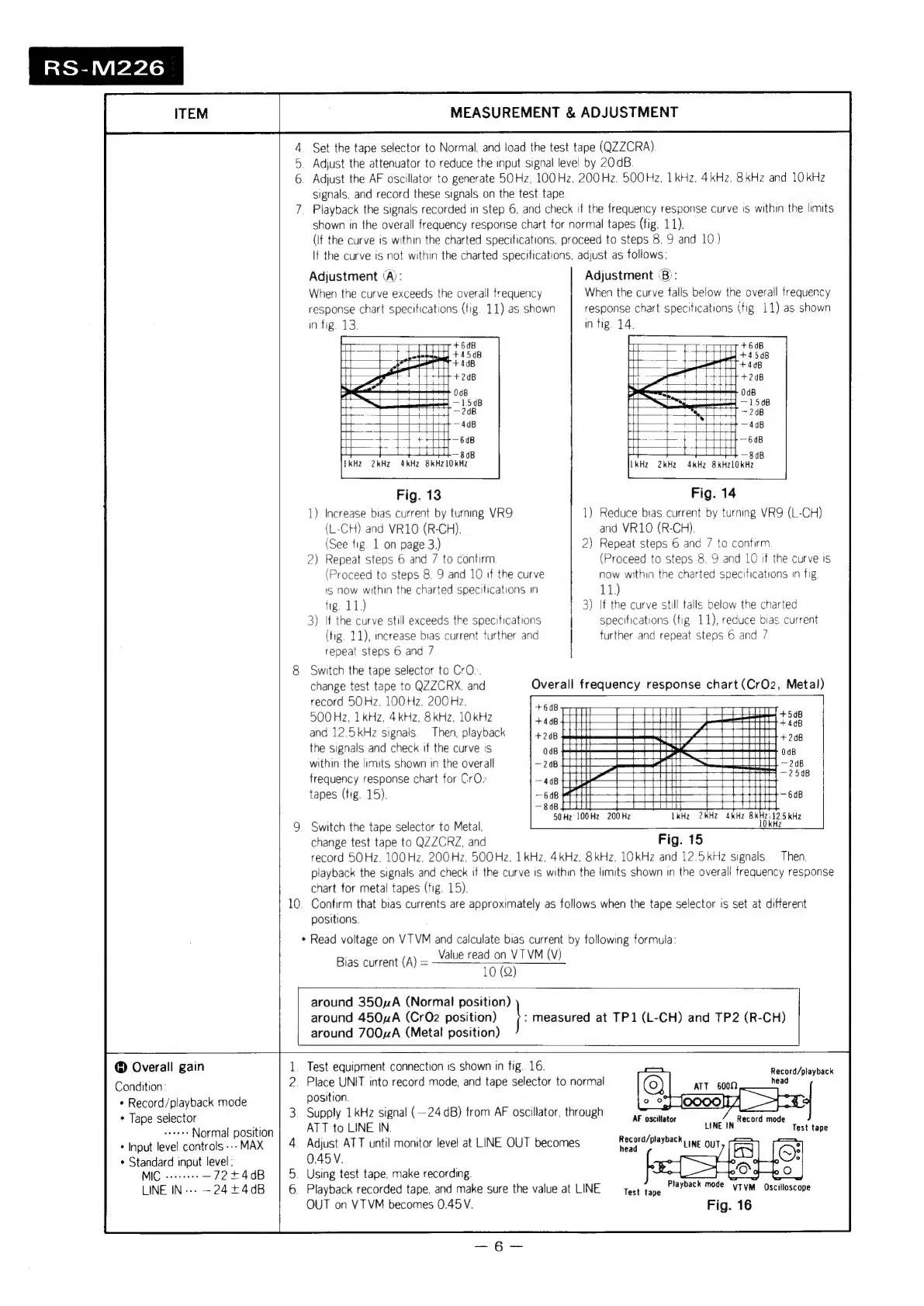
Adjustment
(A):
When
the
curve
exceeds
the
overall
frequency
response
chart
specifications
(fig.
11)
as
shown
in
fig
13.
fe
ee
+6dB
+
one
=
t
ct
—4dB
—t—4—f
ett
608
rae
1
gap
VkH2
2kHz 4kHz
8kHz1OkHz
Fig.
13
1)
Increase
bias
current
by
turning
VR9
(L-CH)
and
VR10
(R-CH).
(See
fig.
1
on
page
3.)
Repeat
steps
6
and
7
to
confirm
NO
(Proceed
to
steps
8.
9
and
10
if
the
curve
1S
now
within
the
charted
specifications
in
fig.
11.)
3)
If
the
curve
still
exceeds
the
specifications
(tig.
11),
increase
bias
current
further
and
repeat
steps
6
and
7
8.
Switch
the
tape
selector
to
CrO:.
change
test
tape
to
QZZCRX,
and
record
50Hz.
100Hz.
200
Hz,
500Hz,
1
kHz,
4kHz,
8kHz,
10kHz
and
12.5
kHz
signals
the
signals
and
check
if
the
curve
is
within
the
limits
shown
in
the
overall
frequency
response
chart
for
CrO»
tapes
(fig.
15).
9.
Switch
the
tape
selector
to
Metal.
change
test
tape
to
QZZCRZ,
and
Then,
playback
Adjustment
‘B):
When
the
curve
falls
below
the
overall
frequency
response
chart
specifications
(fig
11)
as
shown
in
fig.
14,
4
Ti+
408
re)
ttt
+
208
>
HOB
3
—150B
Toy
~
208
i
=
H
4dB
Pree
teed
+t
tt
eae
roy
|
8
dB
LkH2
2kHz
4kHz
8kHz10kHz
as,
|
oe
i
+4
54B
Fig.
14
1)
Reduce
bias
current
by
turning
VR9
(L-CH)
and
VR10
(R-CH).
2)
Repeat
steps
6
and
7
to
contirm
(Proceed
to
steps
8.
9
and
10
if
the
curve
is
now
within
the
charted
specifications
in
fig
11)
3)
If
the
curve
still
falls
below
the
charted
specifications
(tig.
11),
reduce
bias
current
further
and
repeat
steps
6
and
7
50Hz
100Hz
200Hz
Overall
frequency
response
chart
(CrO2,
Metal)
PTT
1kHz
2kHZ
4kHz
uly
\12.5
KHz
kHz
0
Fig.
15
record
50Hz.
100Hz,
200Hz,
500Hz.
1
kHz,
4kHz,
8kHz,
1OKHz
and
12.5
kHz
signals
playback
the
signals
and
check
if
the
curve
1s
within
the
limits
shown
in
the
overall
frequency
response
chart
for
metal
tapes
(tig.
15).
positions.
*
Read
voltage
on
VTVM
and
caiculate
bias
current
by
following
formula:
Bias
current
(A)
=
Value
read
on
VTVM
(V)
10
(Q)
Then,
10.
Confirm
that
bias
currents
are
approximately
as
follows
when
the
tape
selector
is
set
at
different
around
350A
(Normal
position)
around
450zA
(Cr02
position)
around
700A
(Metal
position)
\
measured
at
TP1
(L-CH)
and
TP2
(R-CH)
Overall
gain
Condition
:
+
Record/playback
mode
*
Tape
selector
seanee
Normal
position
*
Input
level
controls
---
MAX
*
Standard
input
level;
MIC
«+--+
—72+4dB
LINE
IN---
—-24+4dB
Vv
position.
ATT
to
LINE
IN.
A
0.45V.
Using
test
tape,
make
recording.
P
OUT
on
VTVM
becomes
0.45V.
Test
equipment
connection
is
shown
in
fig.
16.
ace
UNIT
into
record
mode,
and
tape
selector
to
normal
Supply
1
kHz
signal
(—24
dB)
from
AF
oscillator,
through
djust
ATT
until
monitor
level
at
LINE
OUT
becomes
layback
recorded
tape,
and
make
sure
the
value
at
LINE
AF
oscillator
LINE
IN
Record/playback
head
Test
tape
Fig.
16
Record
mode
Test
tape
Playback
mode
ytym
Oscilloscope