EasyManua.ls Logo

Technics RS-M226 - Dolby NR Circuit Check

Technics RS-M226
19 pages
Print Icon
To Next Page IconTo Next Page
To Previous Page IconTo Previous Page
Loading...
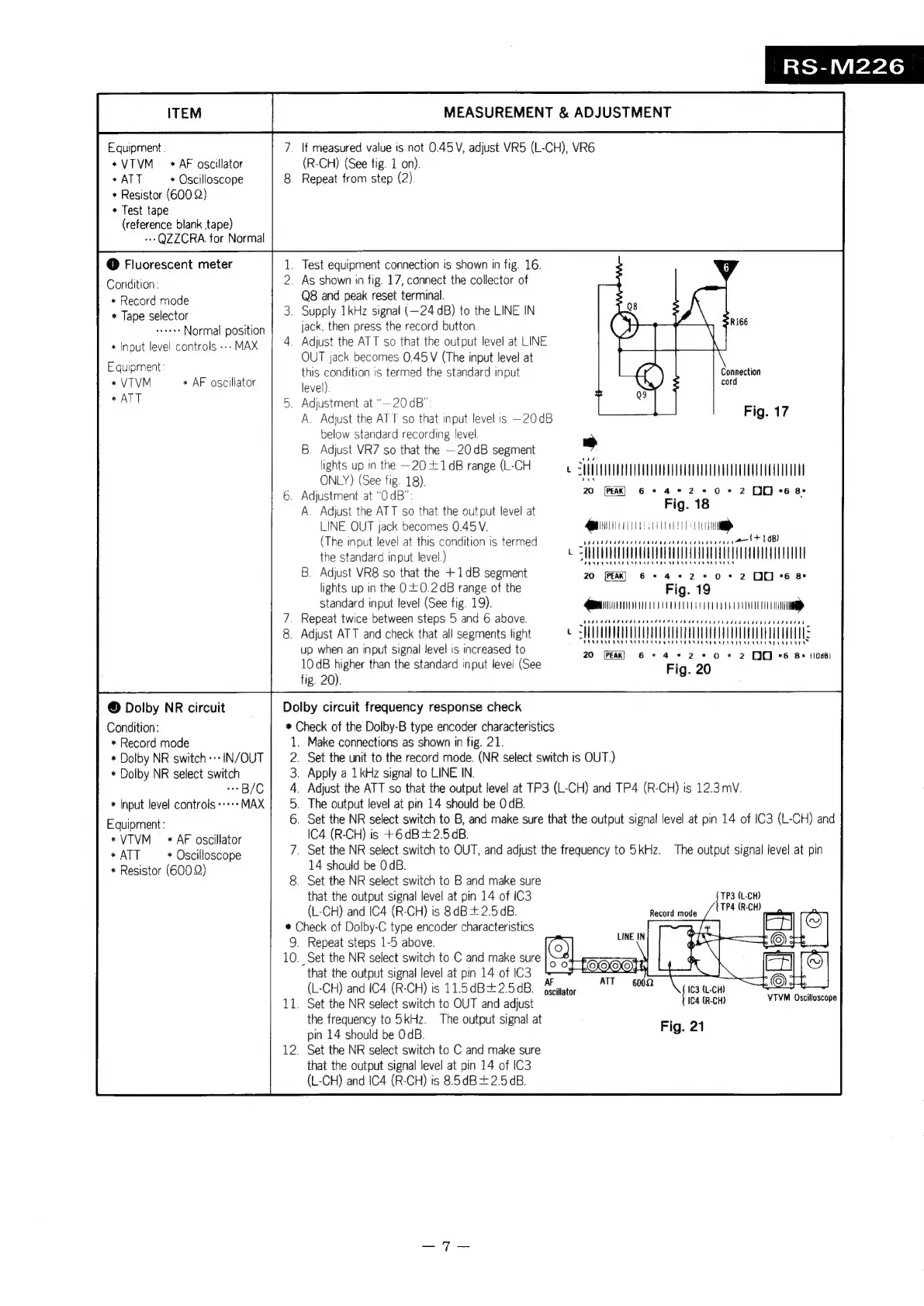
RS-M226
ITEM
MEASUREMENT
&
ADJUSTMENT
Equipment
:
7.
if
measured
value
is
not
0.45V,
adjust
VR5
(L-CH),
VR6
+*VTVM
_
+
AF
oscillator
(R-CH)
(See
fig.
1
on).
*ATT
*
Oscilloscope
8.
Repeat
from
step
(2)
+
Resistor
(600
2)
»
Test
tape
(reference
blank
tape)
-+-QZZCRA.
for
Normal
@
Fluorescent
meter
.
Test
equipment
connection
is
shown
in
fig.
16.
Condition:
.
As
shown
in
fig.
17,
connect
the
collector
of
Q8
and
peak
reset
terminal.
*
Tape
selector
.
Supply
1kHz
signal
(—24
dB)
to
the
LINE
IN
Normal
position
jack,
then
press
the
record
button.
+
Input
level
controls
--»
MAX
_
Adjust
the
ATT
so
that
the
output
level
at
LINE
OUT
jack
becomes
0.45
V
(The
input
level
at
Equipment:
;
this
condition
is
termed
the
standard
input
Connection
+
VTVM
*
AF
oscillator
level)
uN
cord
*
ATT
.
Adjustment
at
"—20dB"
A.
Adjust
the
ATT
so
that
input
level
is
—20dB
below
standard
recording
level
B.
Adjust
VR7
so
that
the
—20dB
segment
>
lights
up
in
the
—20
+
1dB
range
(L-CH
Ly
ONLY)
(See
fig.
18)
SUTETTTTTTETT
TTT
ET
HTT
5.
Adjustment
at
“OdB":
20
(Fak)
6
©
4+
20+
2
00-68:
A.
Adjust
the
ATT
so
that
the
output
level
at
Fig.
18
LINE
QUT
jack
becomes
0.45V.
MMS
(The
input
level
at
this
condition
is
termed
vesveseeaserisesisaasssersaseesecsese
FOB)
the
standard
input
level.)
t
SHMUOOUUQUAOUUATOL
AUT
A
UAV
ALT
AT
LAUUHT
TUT
.
Adjust
VR8
so
that
the
+1dB
segment
20
(ER)
pee
nae
-2+*0+2
00-628
lights
up
in
the
00.2
dB
range
of
the
Fig.
19
*
Record
mode
Fig.
17
standard
input
level
(See
fig.
19).
CC
Repeat
twice
between
steps
5
and
6
above.
i
.
Adjust
ATT
and
check
that
all
segments
light
SS
ITTULTUUEUUMTUUATUUUTOULCUUUU
TDCI
vt
Pus
vrs
PIVTINERYELULASEAS
EASE
SOEEEEY
ET
up
when
an
input
signal
level
is
increased
to
20
bah
airs
shee
eat
10
dB
higher
than
the
standard
input
level
(See
ee
Fig
20.
sc
a
fig.
20).
©
Dolby
NR
circuit
Dolby
circuit
frequency
response
check
Condition:
@
Check
of
the
Dolby-B
type
encoder
characteristics
*
Record
mode
.
Make
connections
as
shown
in
fig.
21.
*
Dolby
NR
switch
-+-
IN/OUT
.
Set
the
unit
to
the
record
mode.
(NR
select
switch
is
OUT.)
*
Dolby
NR
select
switch
.
Apply
a
1
kHz
signal
to
LINE
IN.
++B/C
.
Adjust
the
ATT
so
that
the
output
level
at
TP3
(L-CH)
and
TP4
(R-CH)
is
12.3
mV.
*
Input
level
controls
MAX
.
The
output
level
at
pin
14
should
be
0dB.
Equipment:
.
Set
the
NR
select
switch
to
B,
and
make
sure
that
the
output
signal
level
at
pin
14
of
IC3
(L-CH)
and
*VTVM
*
AF
oscillator
IC4
(R-CH)
is
+6dB+2.5dB.
*
ATT
*
Oscilloscope
.
Set
the
NR
select
switch
to
OUT,
and
adjust
the
frequency
to
5kHz.
The
output
signal
level
at
pin
*
Resistor
(600
Q)
14
should
be
OdB.
;
.
Set
the
NR
select
switch
to
B
and
make
sure
that
the
output
signal
level
at
pin
14
of
IC3
TP3
(L-CH)
(L-CH)
and
IC4
(R-CH)
is
8dB+2.5¢B.
re
©
Check
of
Dolby-C
type
encoder
characteristics
9.
Repeat
steps
1-5
above.
10.
Set
the
NR
select
switch
to
C
and
make
sure
that
the
output
signal
level
at
pin
14
of
IC3
;
(L-CH)
and
IC4
(R-CH)
is
11.5dB+2.5dB.
fate
{ite
(L-CH)
2
11.
Set
the
NR
select
switch
to
OUT
and
adjust
Ica
(R-CH)
EN
ere
the
frequency
to
5kHz.
The
output
signal
at
Fig.
21
pin
14
should
be
OdB.
9-
.
Set
the
NR
select
switch
to
C
and
make
sure
that
the
output
signal
level
at
pin
14
of
IC3
(L-CH)
and
IC4
(R-CH)
is
8.5dB+2.5dB.

Related product manuals