EasyManua.ls Logo

Technics RS-M228X - Page 5

Technics RS-M228X
40 pages
Print Icon
To Next Page IconTo Next Page
To Previous Page IconTo Previous Page
Loading...
RS-M228X
ITEM
MEASUREMENT
&
ADJUSTMENT
5.
Make
measurement
for
both
channels.
6.
Make
sure
that
the
measured
value
is
within
the
range
specified
in
the
frequency
response
chart
(fig.
9).
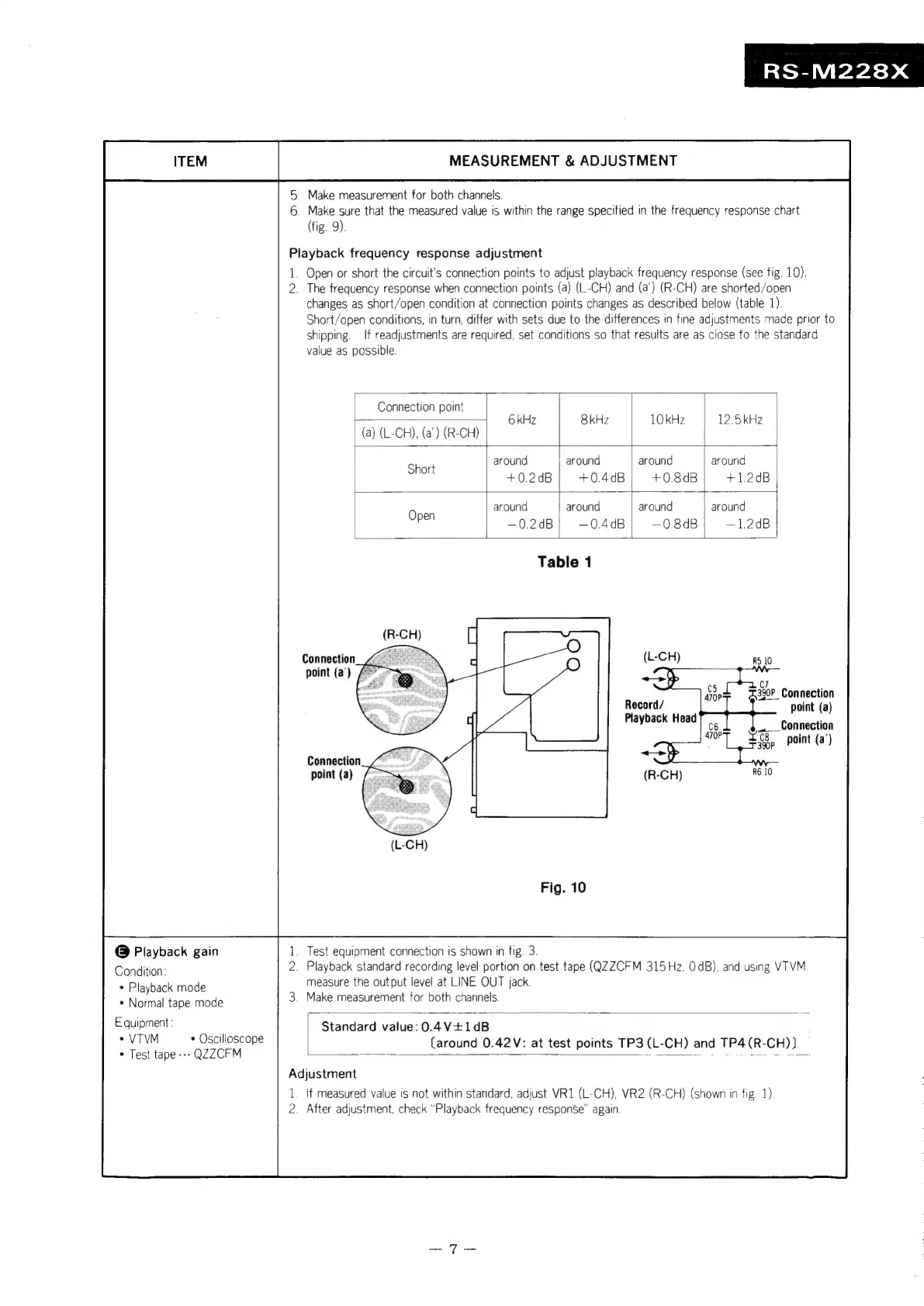
Playback
frequency
response
adjustment
1.
Open
or
short
the
circuit's
connection
points
to
adjust
playback
frequency
response
(see
fig.
10).
2.
The
frequency
response
when
connection
points
(a)
(L-CH)
and
(a’)
(R-CH)
are
shorted/open
changes
as
short/open
condition
at
connection
points
changes
as
described
below
(table
1).
Short/open
conditions,
in
turn,
differ
with
sets
due
to
the
differences
in
fine
adjustments
made
prior
to
shipping.
If
readjustments
are
required,
set
conditions
so
that
results
are
as
close
to
the
standard
value
as
possible.
Connection
point
(a)
(L-CH),
(a')
(R-CH)
6
kHz
8kHz
10
kHz
12.5kHz
around
around
around around
Short
+0.2dB}
+04dB)
+08dB)
+12dB
around
around around
around
ope
-~0.2dB]
-04dB|
—08dB)
—1.2dB
Table
1
Connection.“
point
(a')
/
C7
%390P_
Connection
Record/
point
(a)
Playback
Head
Connection
point
(a)
L-GH)
@
Playback
gain
_
Test
equipment
connection
is
shown
in
fig.
3.
Condition:
.
Playback
standard
recording
level
portion
on
test
tape
(QZZCFM
315
Hz,
OdB),
and
using
VTVM
measure
the
output
level
at
LINE
OUT
jack.
*
Playback
mode
Ge,
.
Make
measurement
for
both
channels
*
Normal
tape
mode
Equipment:
Standard
value:
0.4V+1¢dB
SVM.
««
Oselloseope
(around
0.42V:
at
test
points
TP3
(L-CH)
and
TP4(R-CH
*
Test
tape
---
QZZCFM
a
:
P
3
ane
a(R
E
i
Adjustment
1.
If
measured
value
is
not
within
standard,
adjust
VR1
(L-CH),
VR2
(R-CH)
(shown
in
fig.
1)
2.
After
adjustment.
check
“Playback
frequency
response”
again

Related product manuals