EasyManua.ls Logo

Technics RS-M228X - Page 7

Technics RS-M228X
40 pages
Print Icon
To Next Page IconTo Next Page
To Previous Page IconTo Previous Page
Loading...
RS-M228X
RS-M228X
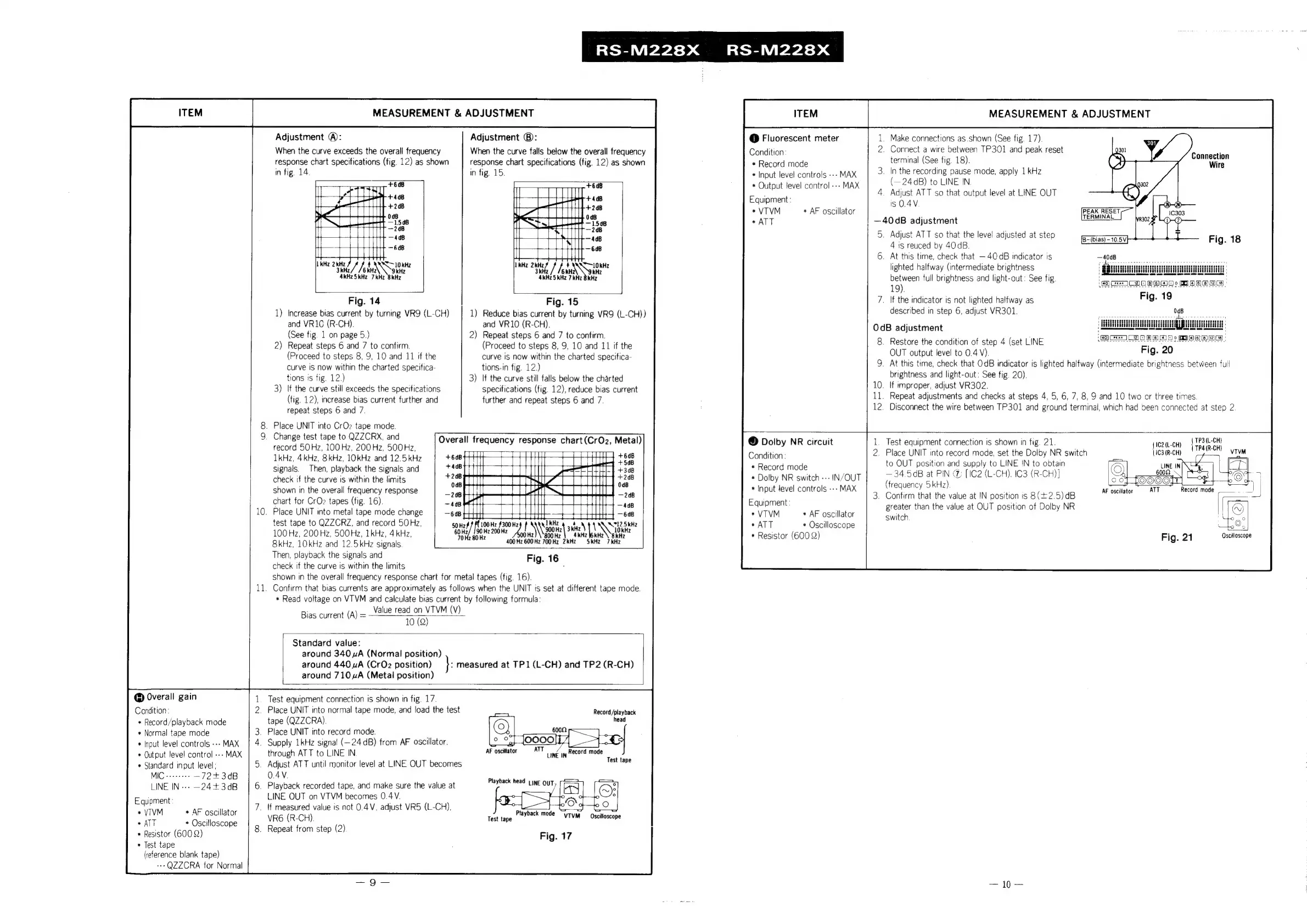
Adjustment
@:
Adjustment
®:
@
Fluorescent
meter
.
Make
connections
as.shown
(See
fig.
17).
When
the
curve
exceeds
the
overall
frequency
When
the
curve
falls
below
the
overall
frequency
Condition:
2.
Connect
a
wire
between
TP301
and
peak
reset
response
chart
specifications
(fig.
12)
as
shown
response
chart
specitications
(fig.
12)
as
shown
*
Record
mode
terminal
(See
fig.
18).
in
fig.
14.
in
fig.
15.
*
Input
level
controls
--»
MAX
.
In
the
recording
pause
mode,
apply
1
kHz
+
Output
level
control
--»
MAX
(—24dB)
to
LINE
IN.
eat
_
Adjust
ATT
so
that
output
level
at
LINE
OUT
Equipment:
is
O.4V
*
VTVM
*
AF
oscillator
«ATT
—40dB
adjustment
5.
Adjust
ATT
so
that
the
level
adjusted
at
step
4
is
reuced
by
40dB.
6.
At
this
time,
check
that
40 dB
indicator
is
kHz
2kHz
Wars
SSE
10
kHz
ax
So
10kHZ
lighted
halfway
(intermediate
brightness
3kHz/
/6kH
aki
SikHz
71
‘AC
Hi
/
feu
kare
between
full
brightness
and
light-out:
See
fig.
19).
Fig.
14
Fig.
15
7.
\f
the
indicator
is
not
lighted
halfway
as
1)
Increase
bias
current
by
turning
VR9
(L-CH)
1)
Reduce
bias
current
by
turning
VR9
(L-CH))
described
in
step
6,
adjust
VR301.
and
VR1G
(R-CH).
and
VR10
(R-CH).
OdB
adjustment
See
fig.
1
on
page
5.)
2)
Repeat
steps
6
and
7
to
confirm.
i
:
2)
Repeat
steps
6
and
7
to
confirm.
(Proceed
to
steps
8,
9,
10
and
11
if
the
8
ete
ae
4
(set
LINE
Proceed
to
steps
8, 9,
10
and
11
if
the
curve
iS
now
within
the
charted
specifica-
Rion
a
EN ot
lots
. .
:
;
curve
is
now
within
the
charted
specifica-
tions.in
fig.
12)
.
time,
ee
oe
le
is
lighted
halfway
(intermediate
brightness
between
full
tions
is
fig.
12.)
3)
If
the
curve
still
falls
below
the
charted
i
iaprone:
edie
yeaa
ig.
20).
if
th
till
h
ificati ificati
i
i
:
;
3)
e
curve
still
exceeds
the
specifications
specifications
(fig.
12),
reduce
bias
current
Repent
adyistmien|e:
and
chiaciealestene
4
G26:
78)
S
anal
0
tae
Ge
tarde
tines
fig.
12),
i
bi
t
further
and
furth
t
re
; ; ,
ee
7
on
aey
aie
Dive
aee
Letras
iene
Disconnect
the
wire
between
TP301
and
ground
terminal,
which
had
been
connected
at
step
2
.
Place
UNIT
into
CrO2
tape
mode.
ee,
Been
Borne
A
Overall
frequency
response
chart
(CrO2,
Metal)
©
Dolby
NR
circuit
1.
Test
equipment
connection
is
shown
in
fig.
21.
jezdcny
|
Tralee
es
4kH
e
kH
ions
a
1D
a
TO
Condition
2.
Place
UNIT
into
record
mode,
set
the
Dolby
NR
switch
|1C3(R-CH)
2,
2
OINEIES
2
ANG)
9
Bitz
HT
|
Pe
a
scardaned
to
OUT
position
and
supply
to
LINE
IN
to
obtain
a
signals.
Then,
playback
the
signals
and
Foner
adie
oa
—34.5¢B
at
PIN
@
[IC2
(L-CH).
C3
(R-CH)]
check
if
the
curve
is
within
the
limits
asi
Z|
aerate
Sie
ie
ae
(frequency
5
kHz}
-
.
shown
in
the
overall
frequency
response
*
Input
level
controls
---
f
Bak The
val
IN
:
: :
t
+2.5)dB
chart
for
CrO2
tapes
(fig.
16).
it
Yt
TU
Equipment:
COON!
Weel
eee
IN
Dostonse
|
ial
Hi
aunt
greater
than
the
value
at
OUT
position
of
Dolby
NR
e
.
Place
UNIT
into
metal
tape
mode
change
HH
or
ee
ad
Ht
*
VTVM
*
AF
oscillator
awiten
test
tape
to
QZZCRZ,
and
record
50Hz,
fligots
$300
Hz
hy
xu
ate
Tt
N72
Sie
*
ATT
*
Oscilloscope
:
100Hz,
200Hz,
500Hz,
1kHz,
4
kHz,
uy
fa
ae
\\\g20H|
4kHz
NE
Rte
*
Resistor
(600
2)
Fig.
21
Genin
8kHz,
10kHz
and
12.5kHz
signals
400
Hz
600
Hz
700
Hz
\
§kHz
7kHz
Then,
playback
the
signals
and
-
Fig.
16
check
if
the
curve
is
within
the
limits
:
shown
in
the
overall
frequency
response
chart
for
metal
tapes
(fig.
16).
.
Confirm
that
bias
currents
are
approximately
as
follows
when
the
UNIT
is
set
at
different
tape
mode.
*
Read
voltage
on
VTVM
and
calculate
bias
current
by
following
formula:
Value
read
on
VTVM
(V)
10
(Q)
Connection
AF
oscillator
ATT
Record
ii
Bias
current
(A)
Standard
value:
around
340
uA
(Normal
position)
around
440
ZA
(CrO2
position)
:
measured
at
TP1(L-CH)
and
TP2
(R-CH)
around
710A
(Metal
position)
@
Overall
gain
Test
equipment
connection
is
shown
in
fig.
17.
Condition:
2.
Place
UNIT
into
normal
tape
mode,
and
load
the
test
Record
/playback
*
Record/playback
mode
tape
(QZZCRA).
+
Normal
tape
mode
_
Place
UNIT
into
record
mode.
*
Input
level
controls
--»
MAX
.
Supply
1kHz
signa!
(—24
dB)
from
AF
oscillator.
2
as
*
Output
level
control
---
MAX
through
ATT
to
LINE
IN.
AF
oscillator
A
Lune
in
Record
mode
*
Standard
input
level;
.
Adjust
ATT
until
monitor
level
at
LINE
OUT
becomes
MIC
«+++
—72+3¢dB
OAV.
LINE
IN--»
—24+3dB
_
Playback
recorded
tape,
and
make
sure
the
value
at
LINE
OUT
on
VTVM
becomes
0.4
V.
_
(f
measured
value
is
not
0.4V,
adjust
VR5
(L-CH),
VR6
(R-CH).
Test
tape
.
Repeat
from
step
(2)
Test
tape
Playback
head
LINE
OUT
Equipment:
*
VTVM
*
AF
oscillator
*
ATT
*
Oscilloscope
*
Resistor
(600
2)
+
Test
tape
(reference
blank
tape)
--QZZCRA
for
Normal
Playback
mode
“yrym
Oscilloscope
Fig.
17

Related product manuals