EasyManua.ls Logo

Technics SU-V620 - Page 8

Technics SU-V620
16 pages
Print Icon
To Next Page IconTo Next Page
To Previous Page IconTo Previous Page
Loading...
gs
Tae
mune
©
©
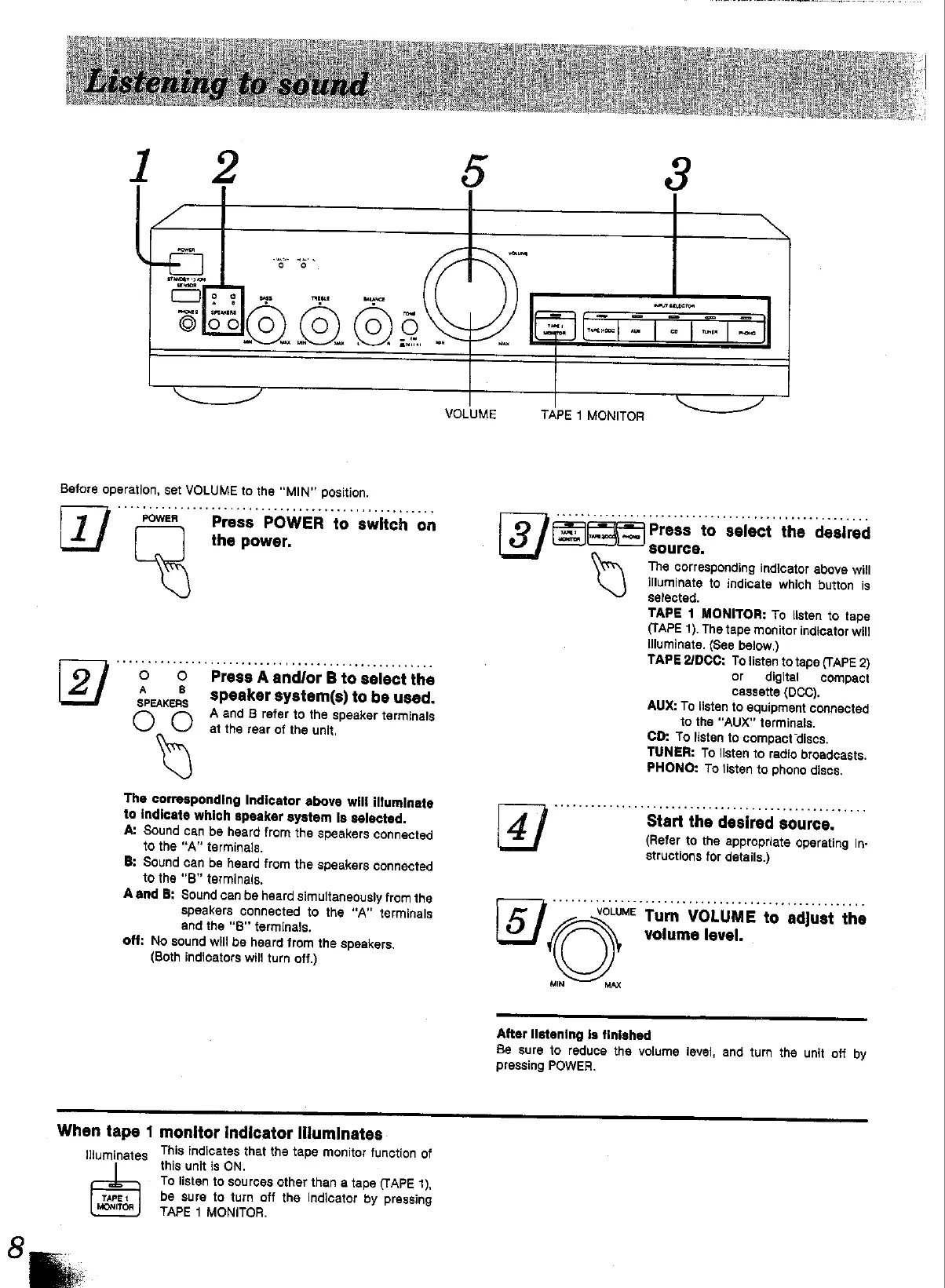
Before
operation,
set
VOLUME
to
the
“MIN”
position.
o
0
A
8
SPEAKERS
Press
POWER
to
switch
on
the
power.
Press
A
and/or
B
to
select
the
speaker
system(s)
to
be
used.
A
and
B
refer
to
the
speaker
terminals
at
the
rear
of
the
unit.
The
corresponding
Indicator
above
will
illuminate
to
indicate
which
speaker
system
Is
selected.
A:
Sound
can
be
heard
from
the
speakers
connected
to
the
“A”
terminals.
B:
Sound
can
be
heard
from
the
speakers
connected
to
the
“B”
terminais,
Aand
B:
Sound
can
be
heard
simultaneously
from
the
speakers
connected
to
the
“A”
terminals
and
the
“B"
terminals.
off:
No
sound
will
be heard
from
the
speakers.
(Both
indicators
will
turn
off.)
|
TAPE
1
MONITOR
a
Press
to
select
the
desired
MIN
MAX
source.
The
corresponding
indicator
above
will
illuminate
to
indicate
which
button
is
selected.
TAPE
1
MONITOR:
To
listen
to
tape
(TAPE
1).
The
tape
monitor
indicator
will
illuminate.
(See
below.)
TAPE
2/DCC:
To
listen
to
tape
(TAPE
2)
or
digital
compact
cassette
(DCC),
AUX:
To
listen
to
equipment
connected
to
the
“AUX”
terminals.
CD:
To
listen
to
compact
discs.
TUNER:
To
listen
to
radio
broadcasts.
PHONO:
To
listen
to
phono
discs.
Start
the
desired
source.
(Refer
to
the
appropriate
operating
in-
structions
for
details.)
Turn
VOLUME
to
adjust
the
volume
level.
After
Ilstening
Is
finished
Be
sure
to
reduce
the
volume
level,
and
turn
the
unit
off
by
pressing
POWER.
When
tape
1
monitor
indicator
illuminates
illuminates
This
indicates
that
the
tape
monitor
function
of
this
unit
is
ON.
To
listen
to
sources
other
than
a
tape
(TAPE
1),
be
sure
to
turn
off
the
Indicator
by
pressing
TAPE
1
MONITOR.

Other manuals for Technics SU-V620

Related product manuals