EasyManua.ls Logo

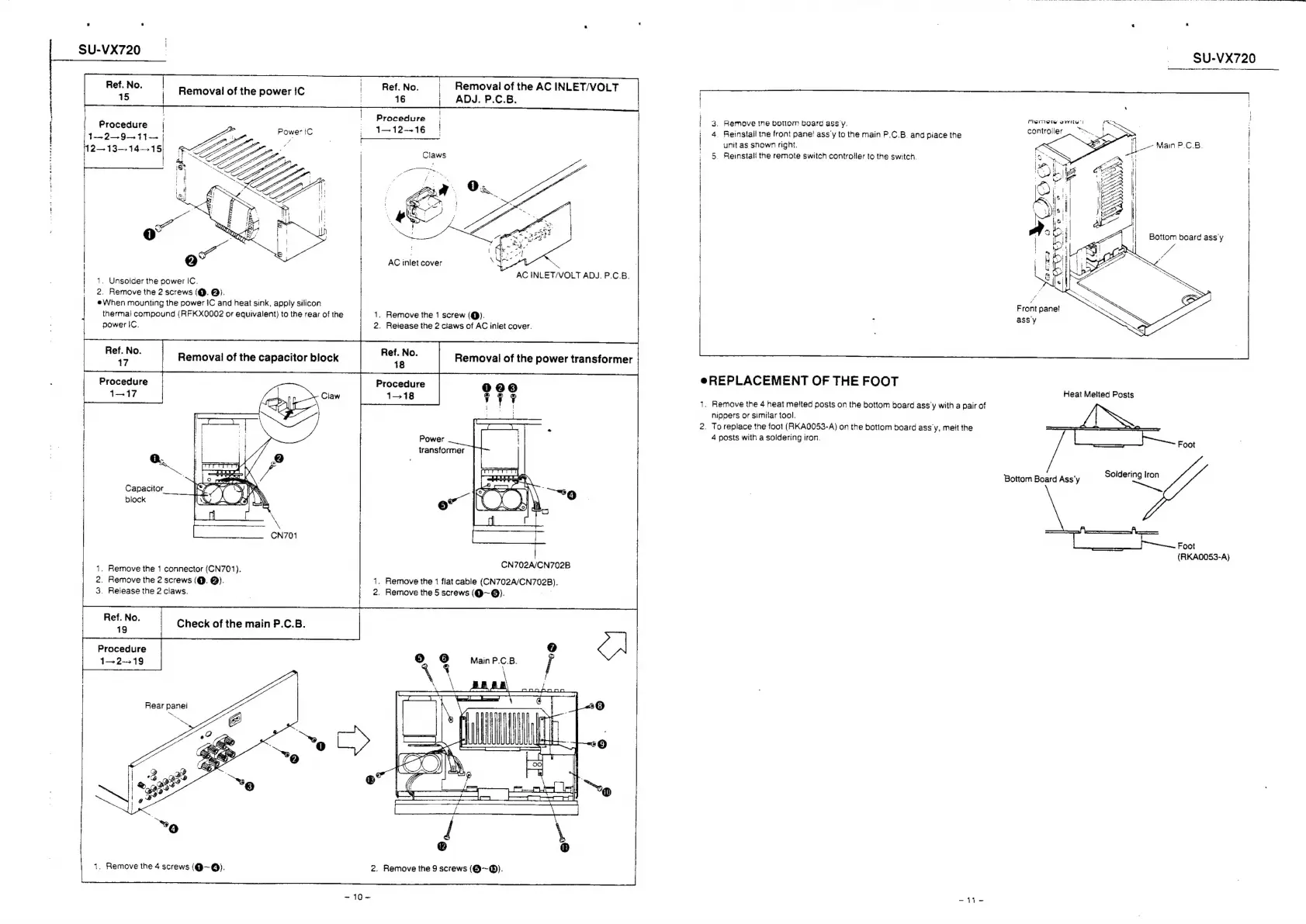
Technics SU-VX720 - Component Removal and Replacement; Power IC, AC Inlet, and Capacitor Block Removal; Power Transformer Removal and Main PCB Check

Technics SU-VX720
19 pages
Print Icon
To Next Page IconTo Next Page
To Previous Page IconTo Previous Page
Loading...
SU-VX720
SU-VX720
Ref.
No.
Ref.
No.
Removal
of
the
AC
INLET/VOLT
:
|
|
15
|
Removal
of
the
power
{tC
:
16
|
ADJ.
PCB.
|
.
|
|
tt
the,
ween
Claws
;
5.
Reinstall
the
remote
switch
controller
to
the
switch.
}
;
|
Procedure
|
;
Wain
eaus
oe
}
|
3.
Remove
tne
botlom
board
assy.
Siete
IT
gS
|
|
1
peels
!
1-12-16
|
:
4.
Reinstail
tne
front
pane!
ass’y
to
the
main
P.C.B.
and
piace
the
continues
>
|
96
447-4
(ee
|
unit
as
snown
right.
[Le
Man
PCB.
|
12—13—14-15
'
|
Li
:
oO
|
AC
inlet
cover
YA
AA
AC
INLET/VOLT
ADJ.
P.C.B.
GD
Gk?
|
|
|
1.
Unsoider
the
power
IC.
|
{
2,
Remove
the
2
screws
(@.
@).
|
eWhen
mounting
the
power
IC
and
heat
sink,
apply
silicon
Procedure
0008
1—>18
Front
pane!
thermal
compound
(RFKX0002
or
equivalent)
to
the
rear
of
the
1,
Remove
the
1
screw
(@).
:
ass'y
power
IC.
2.
Release
the
2
claws
of
AC
iniet
cover.
.
No.
:
.
No.
es
.
Removal
of
the
capacitor
block
ii
oe
Removal
of
the
power
transformer
|
Procedure
eREPLACEMENT
OF
THE
FOOT
1—17
Heat
Melted
Posts
1.
Remove
the
4
heat
melted
posts
on
the
bottom
board
ass’y
with
a
pair
of
nippers
or
similar
tool.
2.
To
replace
the
foot
(RKAQ053-A)
on
the
bottom
board
ass’y,
melt
the
4
posts
with
a
soldering
iron.
Foot
Bottom
Board
Ass'y
Soldering
iron
Capacitor
block
Foot
(RKA0053-A)
CN702A4/CN702B
1.
Remove
the
1
flat
cable
(CN702A/CN702B).
2.
Remove
the
5
screws
(Q~@).
a
1.
Remove
the
1
connector
(CN701).
2.
Remove
the
2
screws
(@.
@).
3.
Release
the
2
claws.
peas
Check
of
the
main
P.C.B.
Procedure
1—
2-319
Rear
panel
|
1.
Remove
the
4
screws
(@~@).
2.
Remove
the
9
screws
(Q@~@®).
10
aa

Related product manuals