C
Copyright Technolog Ltd. 2017. All rights reserved.
Information contained in this document subject to
change without prior notice.
Sheet 38 of 43
Technolog Limited,
Ravenstor Road,
Wirksworth,
DE4 4FY,
United Kingdom
T: +44 (0) 1629 823611
E: techsupport@technolog.com
www.technolog.com
DMR No.: 7504
2099PM9000 Rev. B
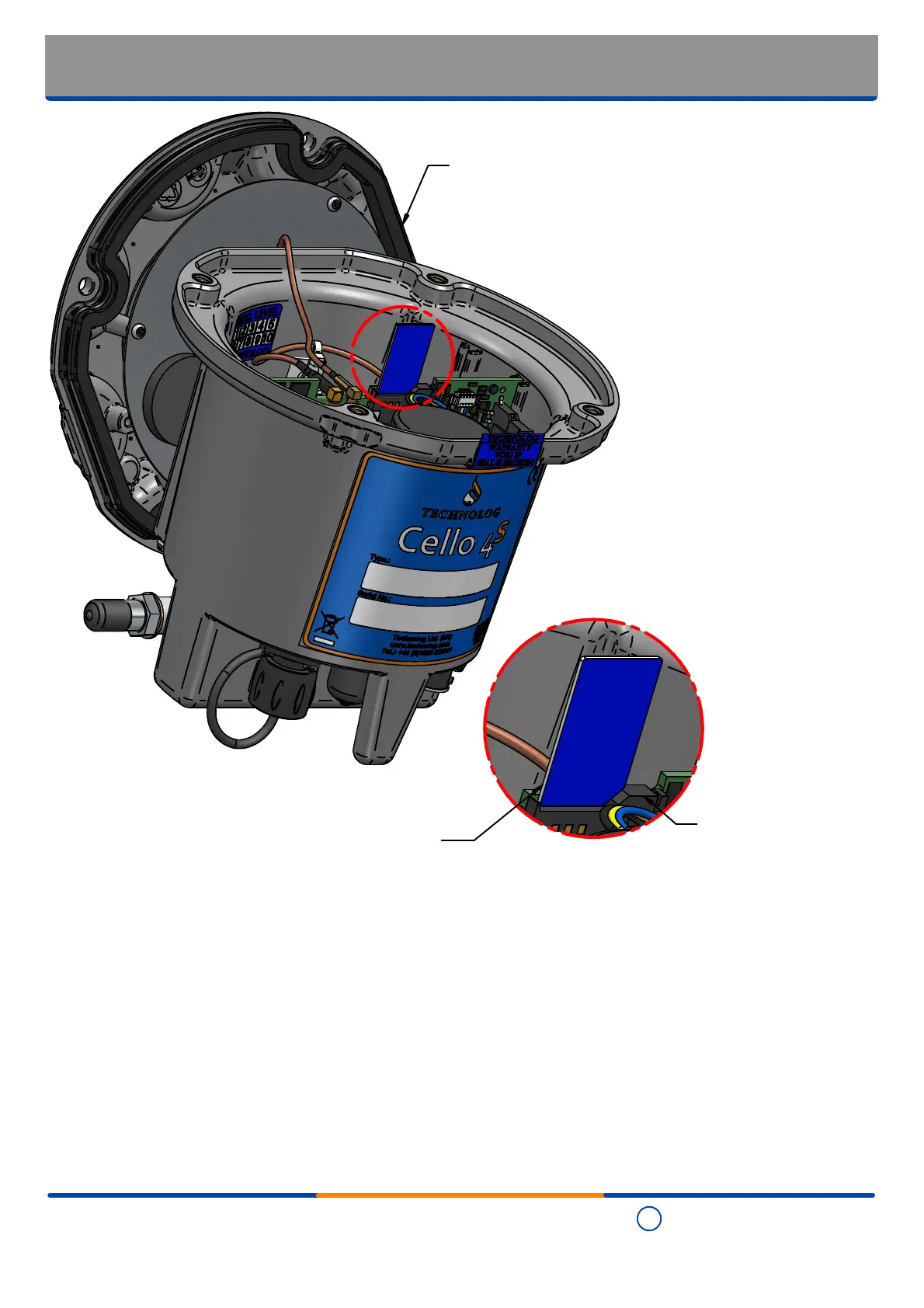
SIM card replacement
A
Detail A
Step 4
When re-fitting the SIM ensure that it is clean and that there are no finger prints or other marks on its contacts - use a
clean and dry lint-free cloth to remove.
Step 5
Noting orientation refit the SIM into the holder by carefully pushing it down until the latch 'clicks' to secure it in place.
Step 6
Refit the lid as indicated in the "Refitting the enclosure lid" section of this document.
Step 2
Slide the latch on the
PCB mounted SIM
card holder to the side
allowing the SIM to
'pop' up
Step 3
Noting orientation for replacement
/ re-fitting, carefully remove the
SIM card
Step 1
Open the enclosure as indicated
in the "Entering the enclosure"
section of this document


 To Next Page