USER MANUAL
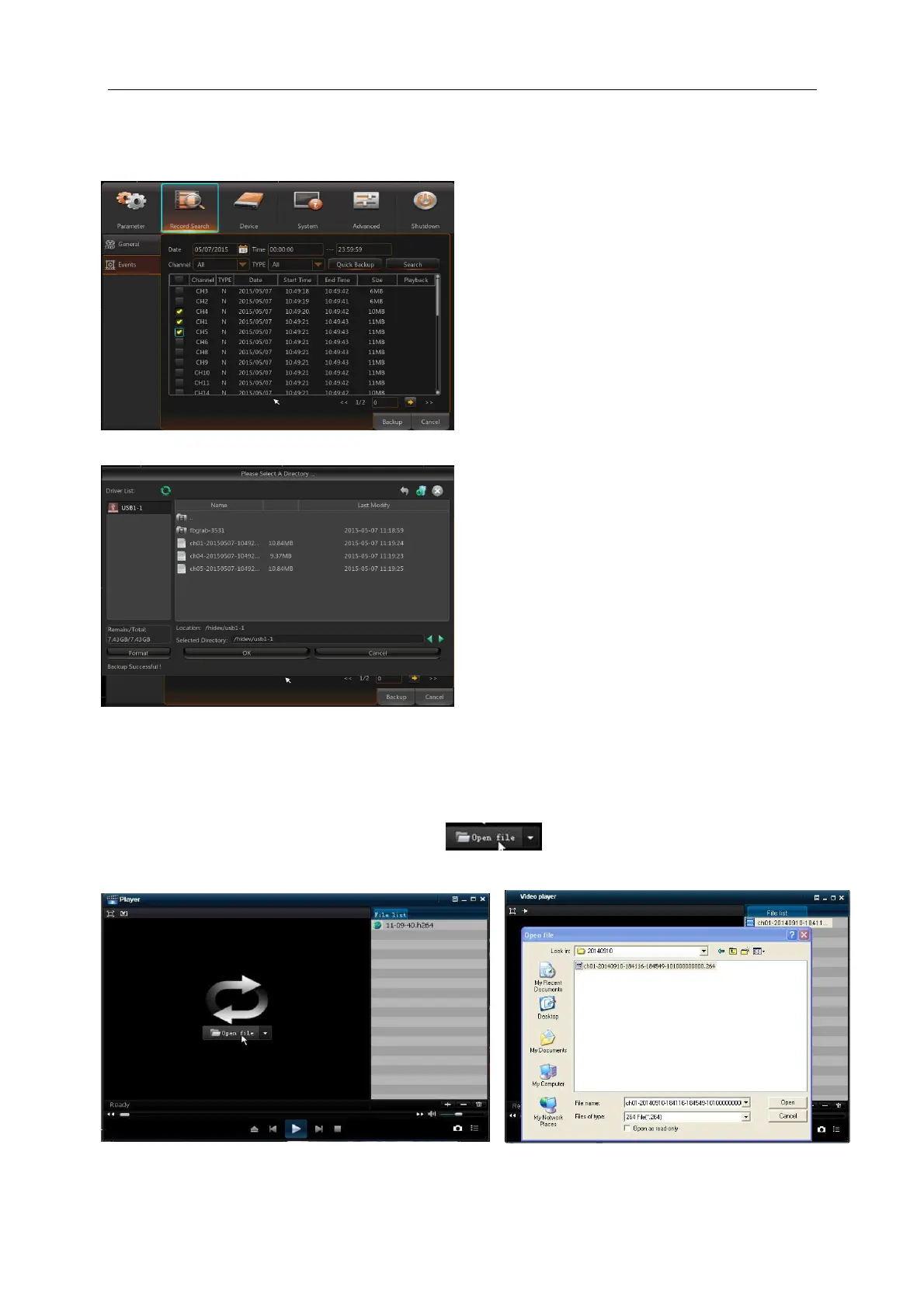
If you want to back up a record in the detailed file list, you may tick the checkbox at the left of the
record (“√”means it has been selected) and click “Backup” to enter into “Select backup type”
(Make sure U disk or other portable storage device are connected), as shown in Picture 5-30.
Picture 5-30
Picture 5-31
3. Play Backup Files
1.Copy backup files to the computer.
2. Open playback player and click “+” or “ ”. For example, if you want to choose
*.264, add backup file and select a file to play, as shown in Picture 5-32 and 5-33.
Picture 5-32 Picture 5-33
If you want to back up with USB/ESATA,
select USB/ESATA and click OK to start
processing and you may see the backup
progress shown as Picture 5-30.
After backup finishes, message Backup
Finishes will appear at down-right corner, as
shown in Picture 5-31.
Note: Before backup, connect devices for
backup (U flash disk or other mobile storage
devices with USB interface)



 To Next Page