8
Electronic Timer
❑ The timer knob is designed for one-
hand operation. To use this function, the
required cooking time must be set by
turning the timer knob within 4 seconds
of pressing the appropriate function
button.
❑ Setting the time of day:
Follow the steps described in the
preceding section “Before Using Your
Appliance for the First Time ...”.
Alarm function:
Press the
8
button and set the lenght of
time required for the alarm. (The example in
the illustration shows a time of 5 minutes.)
After setting, the time of day is displayed
again.
❑ Press the
8
button to display the time
remaining.
❑ After the time has elapsed, an alarm
signal sounds. To switch off the alarm,
briefly press the
8
button.
❑ The settings can be corrected at any
time.
❑ To cancel a setting before the time has
elapsed:
Press the
8
button and set the time in
the display to 0.00.
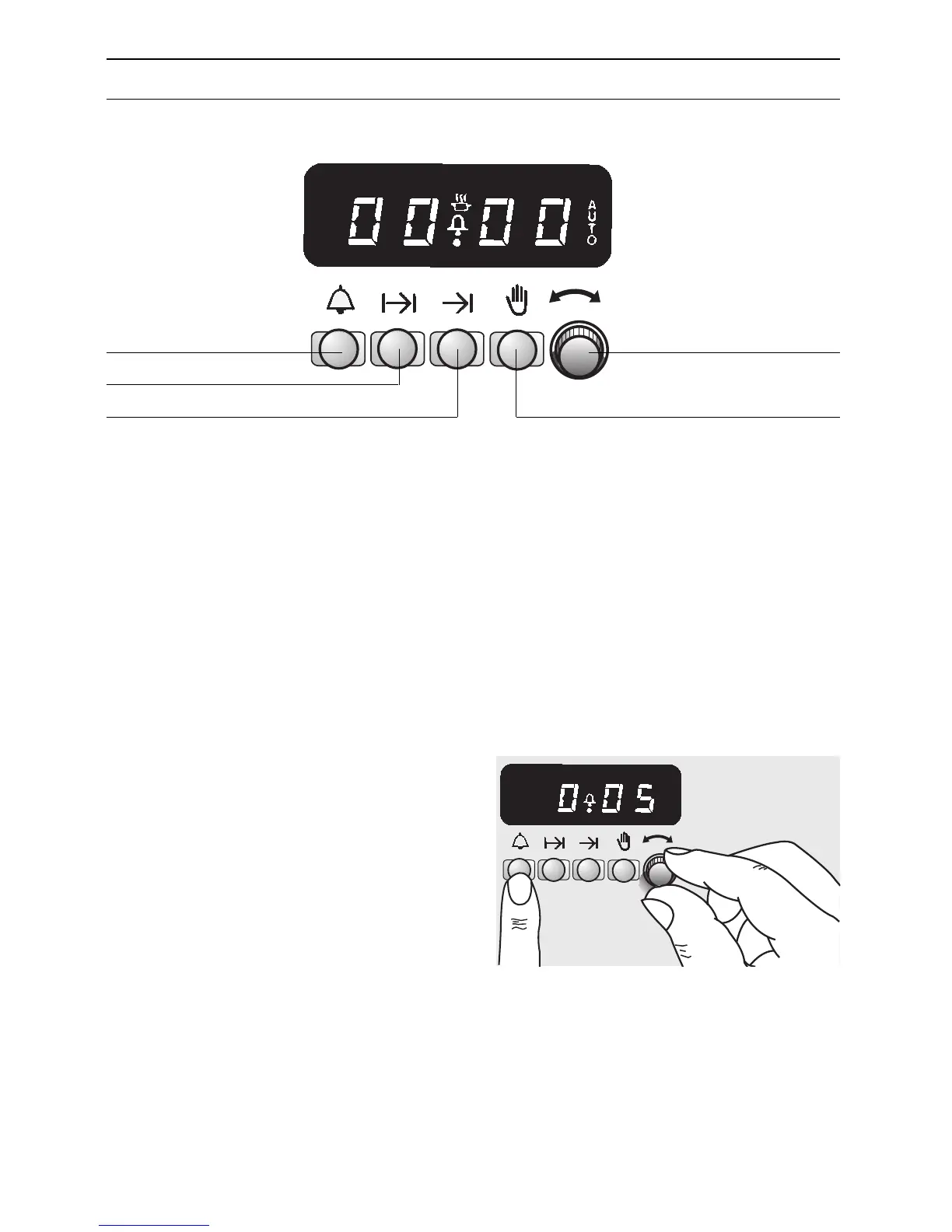
Alarm function
Length of cooking time
Cooking finish time Automatic timer OFF
Timer knob
Setting the timer:
Operating the timer


 To Next Page