9
Automatic timer
for the main oven
❑ You can use the automatic timer
functions to switch the oven ON or OFF.
Automatic OFF:
❑ If you want cooking to start immediately,
simply use the timer knob to set the
required total cooking time.
1.
Set the oven to the required temperature.
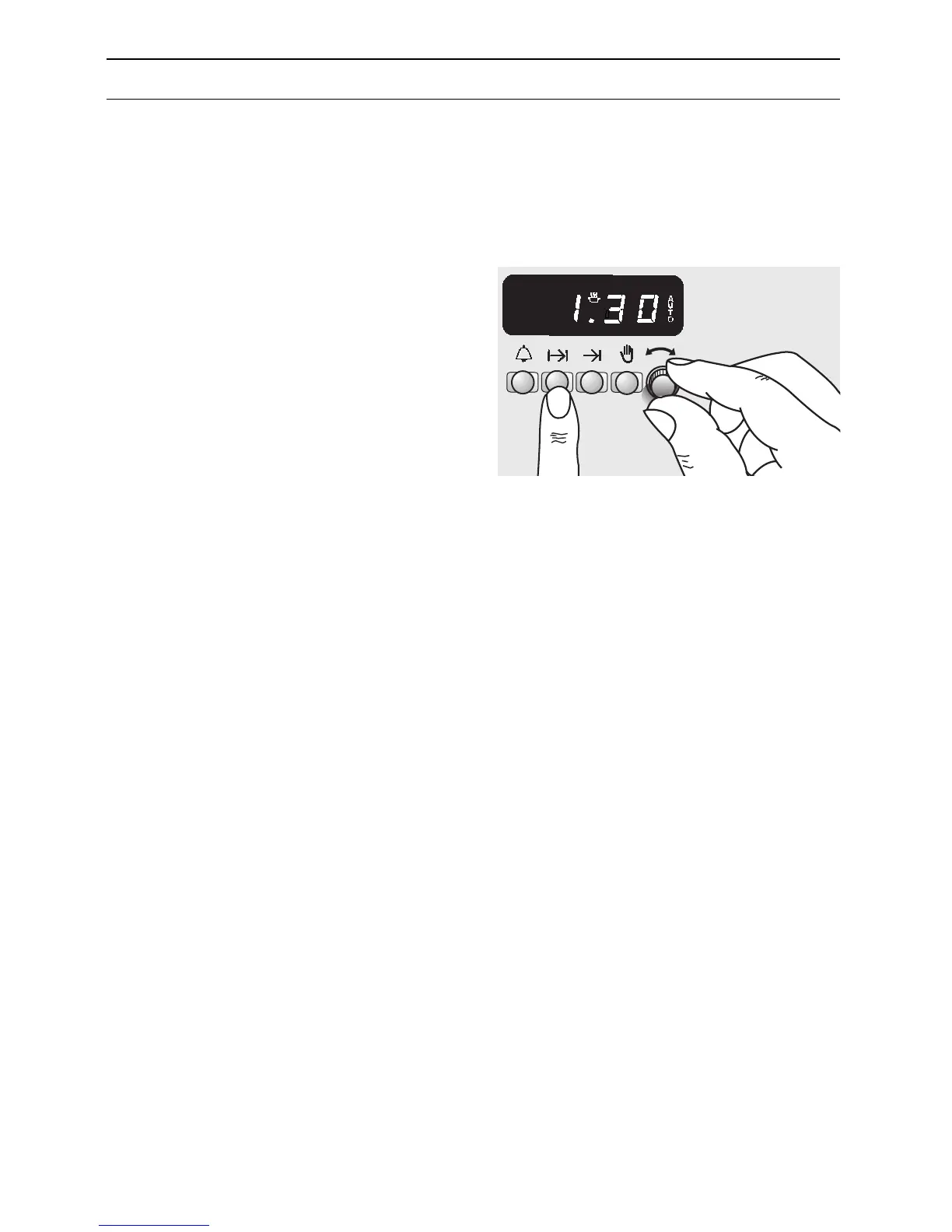
2. Press the ? button and set the total
cooking time (see the example in the
illustration to the right, showing 1 hour
and 30 minutes).
After setting the display shows the time
of day and indicates »AUTO«.
❑ The oven is now operating.
❑ After the set cooking time, a signal
sounds and the oven is automatically
switched OFF.
To turn the signal off, briefly press the
? button.
3. Turn the oven selector switch to the
0 position.
4. The »AUTO« symbol blinks.
Important: It must be switched OFF by
pressing the
9
button.
Setting the length of cooking time
Electronic Timer


 To Next Page