EV 10-50
12
19.6°C
20.2°C
9:35
4 5
1 2
66 7 83
9.6°C
2
.2°
:
5
15/06/22
B
A
C
Default Alert
20.2°C
19.6° C
Wireless hybrid arm sy em
Wireless hybrid arm sy em
Tecnoalarm Logo
Key reading area
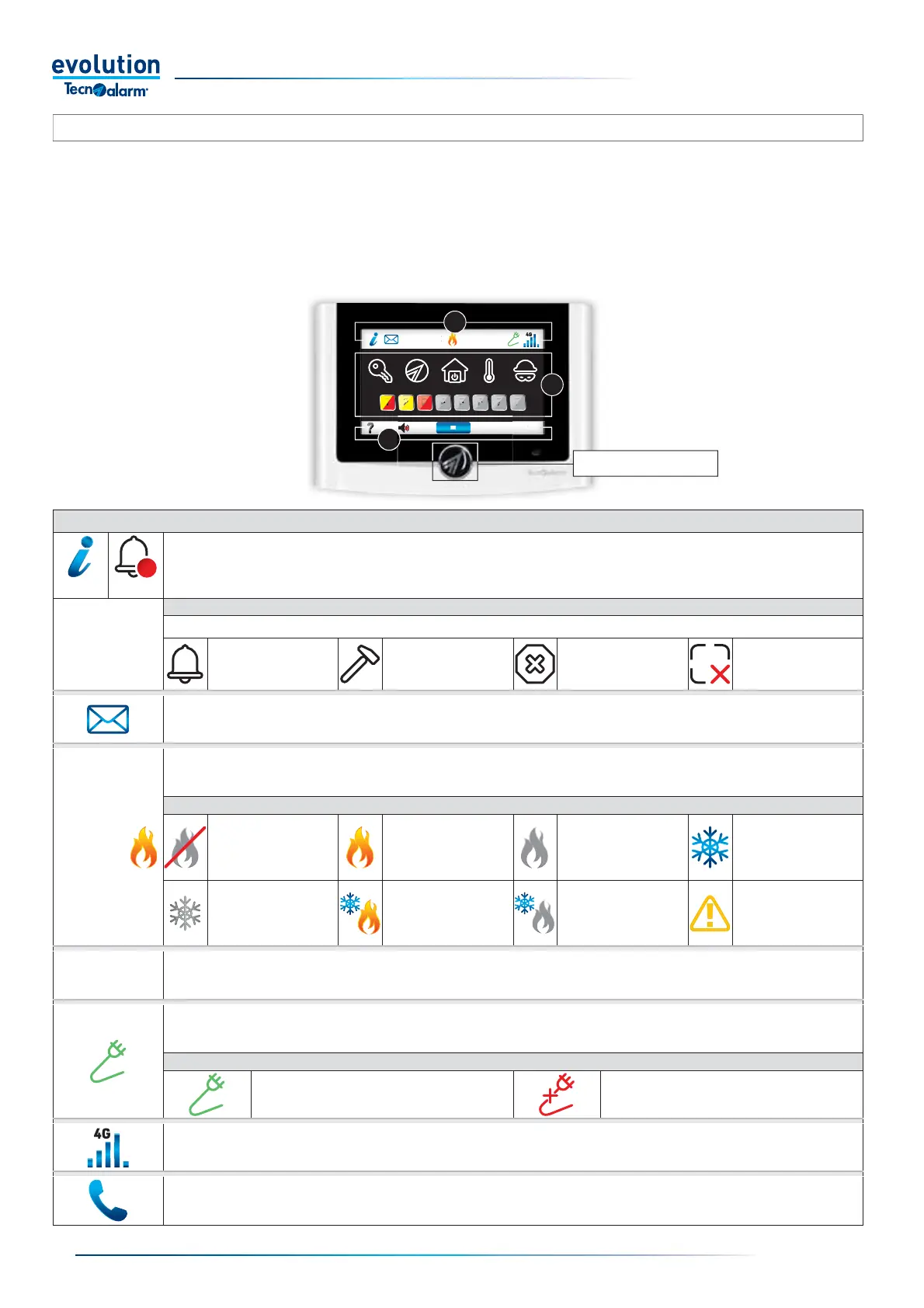
The EV 430 PROX console lets you manage the operating programs of the System, interact with the home automation functions
and thermostats, and access the consultation and programming menus of the System reserved for the user. In standby the console
displays the time, date and temperatures in a low light, touch the display to access console information and functions.
System information and functions are displayed with icons in three areas, which can be seen in boxes A, B, C.
The console comes with an integrated RFID key reader; keys allow you to insert, disconnect and make partial System programs.
BOX A
Information on System status.
Tap to enter the page that displays System information.
• The page displays the detail icons and, if programmed by the installer, the splash info message.
• When there is new information, the Alert icon replaces the Default icon.
DETAIL ICONS
Notifi cations can be fi ltered by selecting and deselecting detail icons.
Zone alarm status Tampering status
Anomalies / Faults
Status
Isolated zones and/or
devices
Information messages.
The icon shows there is a message (if programmed by the installer).
Tap the icon to view the message.
Primary thermostat associated with the console.
The icon indicates the temperature detected by the climate sensor associated with the console and the status of the thermostat
THERMOSTAT STATUS ICONS
Gray fl ame
Thermostat: off (operation
deactivated)
Orange fl ame
Thermostat: on
Mode: Winter
Control Output: ON
Gray fl ame
Thermostat: on
Mode: Winter
Control Output: OFF
Blue nowfl ake
Thermostat: on
Mode: summer
Control output: ON
Gray nowfl ake
Thermostat: on
Mode: summer
Control output: OFF
Orange fl ame
Blue nowfl ake
Thermostat: on
Mode: Anti-freeze
Control output: ON
Gray fl ame
Nowfl ake Blue
Thermostat: on
Mode: Anti-freeze
Control output: OFF
Yellow icon
Thermostat in block
Secondary thermostat not associated with the console.
The icon displays the temperature detected by the climate sensor not associated with the console.
Mains power.
The icon indicates the status of the mains power
MAINS POWER STATUS ICONS
Presence of mains power 230V AC No mains power 230V AC.
GSM Phone module information
The icon indicates the mobile signal strength and network used.
Tap the icon to display details on the phone module.
Current call
The icon indicates a call in progress by the control panel.
Tap the icon to stop the call cycle. (Operation allowed only under particular operating conditions)
2-5.1 - EV 430 PROX Console


 To Next Page
 Loading...





