EV 10-50
18
11:02
B
A
Wireless hybrid arm sy em
Wireless hybrid arm sy em
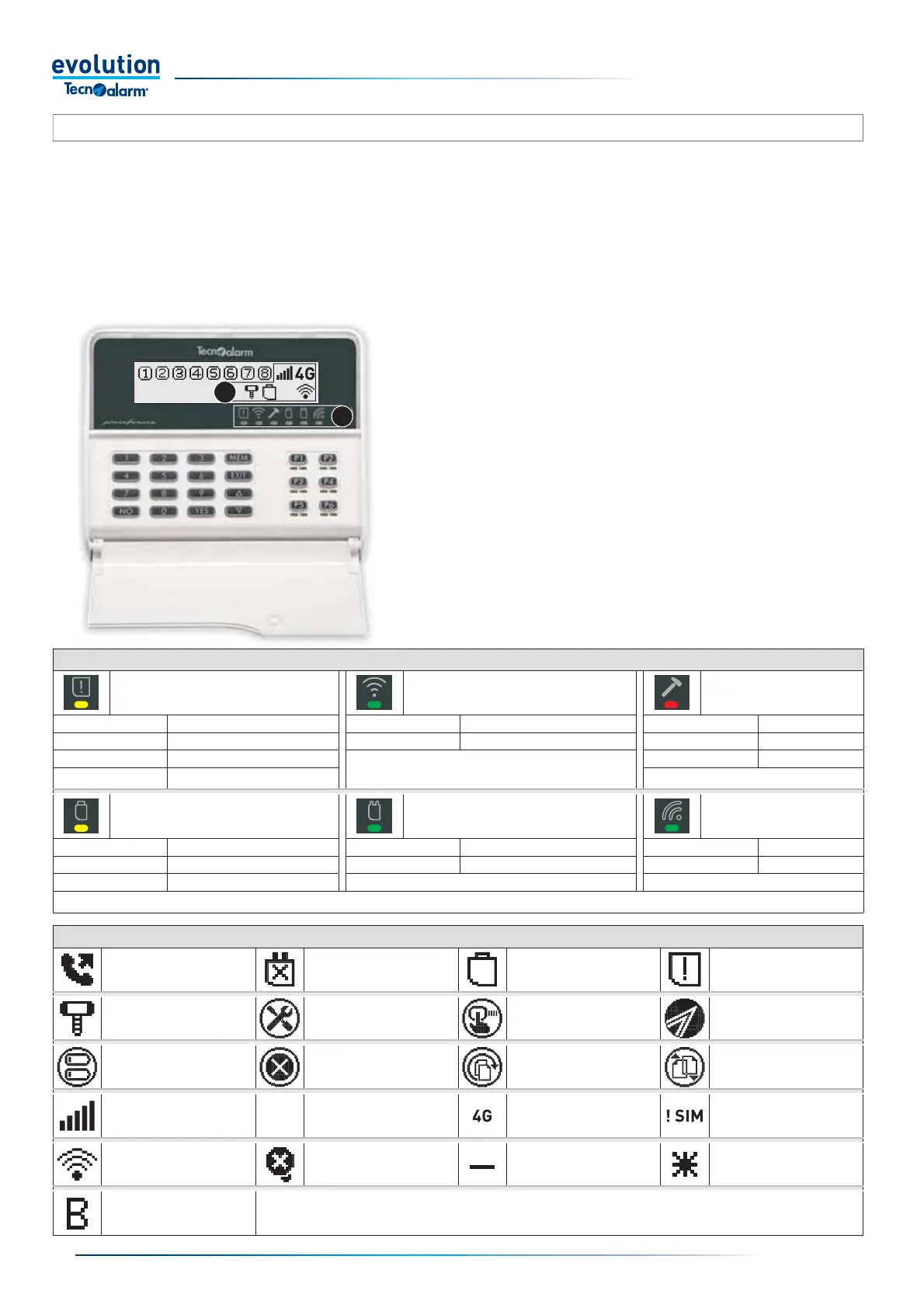
2-5.3 - EV LCD BWL and EV LCD-AL BWL consoles
Box A
Operating statuses shown on the display by dynamic icons, which
constantly show the mobile signal strength and the radio frequency signal
strength, other signalling icons are shown on the display only when the
event occurs.
Box B
Operating statuses displayed by graphic icons with LEDs, the icons are
located horizontally on the right below the display, they provide use and
fault signals.
ICON/LED INDICATORS
General fault status
(yellow LED)
Reception/Transmission status
(green LED)
Tamper alarm status
(red LED)
Off Status OK Off Waiting Off Status OK
On Fault memory On Reception/Transmission in progress On Alarm memory*
Fast fl ashing Active fault Flashing Active alarm
Slow fl ashing Telecommunication fault
Operating status of the system batteries
(yellow LED)
Control panel electrical
power supply status
(green LED)
Key code reading
(green LED)
Off Status OK Off Power failure Off Waiting
On Low battery memory On Status OK Flashing Key read
Flashing Battery faulty or out of power
*Warning: the tamper memory can only be cleared by the installer
DYNAMIC ICONS SHOWN ON THE DISPLAY
Telecommunication
in progress
No 230V AC power supply General low battery signalling General fault signalling
Tamper signalling Active console fault
Icon displayed when entering
the access code
Validation of the code or
technical interval
Console batteries out of power
(operation interrupted)
No wireless communication
Reception/transmission
attempts in progress
Authentication procedure
in progress
GSM mobile signal strength
dynamic indication
Insuffi cient mobile signal
strength
Mobile network used dynamic
indication
SIM Card not detected
Radio frequency signal
strength dynamic indication
0% radio frequency signal fault
Thermostat in operation
Control output OFF
Thermostat in operation
Control output ON
Thermostat blocked
The EV LCD BWL console is a battery-powered radio device. In order to reduce consumption, the console is always off, to access
consultation operations turn on the console by pressing any key as long as it is not a numeric key, for example use the YES key
or one of the program command keys P1... P6. For all program arming and disarming operations, enter the code directly, pressing
the fi rst numeric key turns on the console.
The EV LCD-AL BWL console is a radio device with dual power supply: mains and battery In the case of mains power supply the
operation is identical to the EV LC
D keyboard. With LCD BWL and EV LCD-AL BWL consoles, it is possible to manage the system's
operating programs, interact with the remote controls, and access the system's consultation and programming menus reserved for
the
user. The console displays the operating statuses of the system using two groups of icons, visible in boxes A and B.


 To Next Page
 Loading...





