EV 10-50
27
Wireless hybrid arm sy em
Wireless hybrid arm sy em
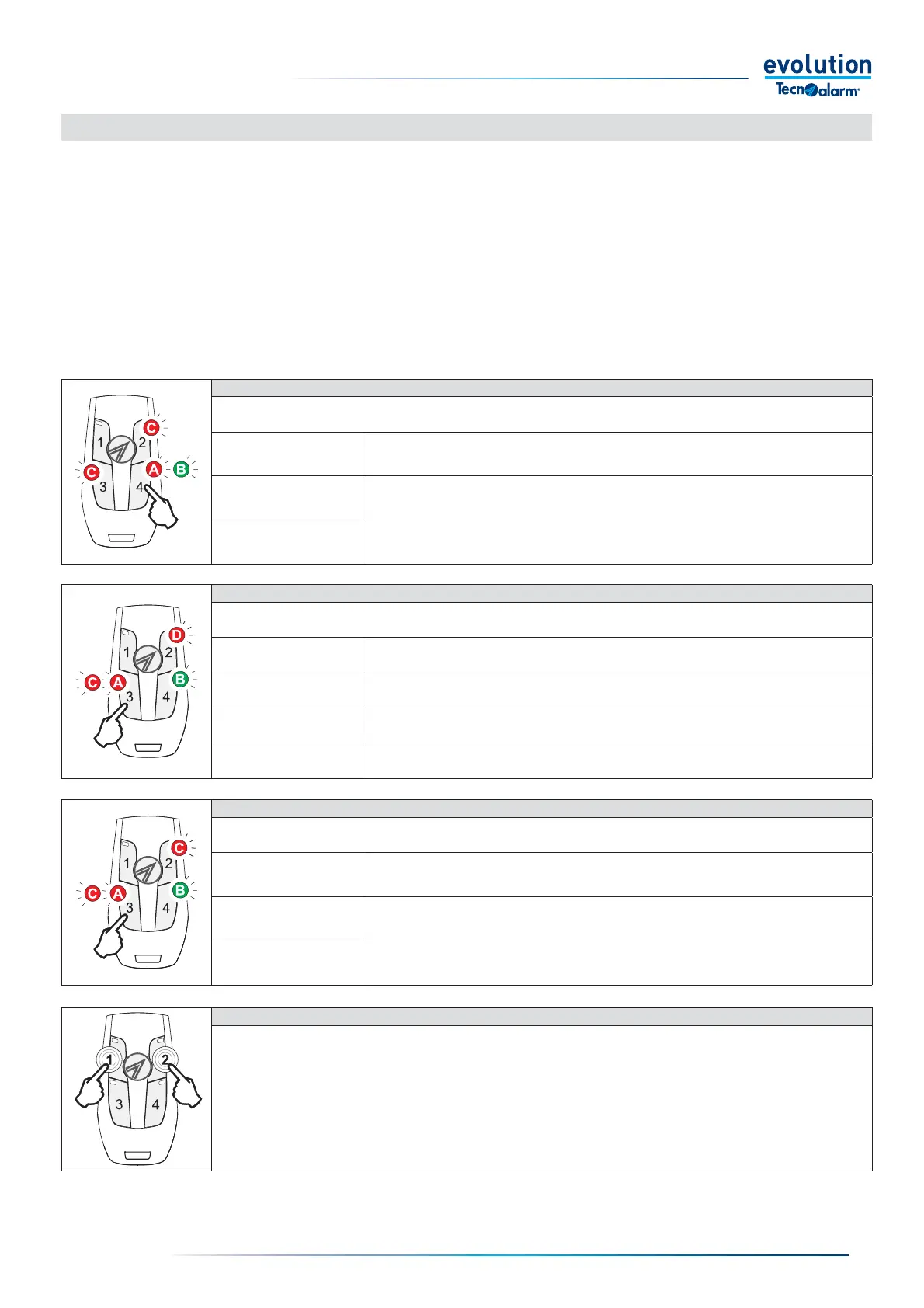
The EV CMD BWL two-way wireless key is equipped with three activation buttons with which it is possible to control the operating
programs of the system and/or the remote controls and a query button, with which it is possible to request the operating status of
the commands managed.
The three activation buttons of the wireless key are equipped with a red LED indicator, the query button is equipped with a two-
colour red and green LED indicator.The LEDs provide information on the status of the activation during the command and query
operations.
Instructions for use
Warning: to prevent premature battery depletion, do not press the buttons of the wireless key when you are outside the coverage
area of the System. In these conditions, the wireless key, not receiving a response from the system, makes repeated and useless
transmission attempts, with consequent unnecessary energy consumption.
PANIC ALARM ACTIVATION
Pressing keys 1 and 2 simultaneously for at least one second triggers the panic alarm signal.
Warning: the function is only active if programmed by the installer.
The alarm mode is defi ned by the programming given to the system.
STATUS QUERY
The status of the commands can be queried by pressing key 4.
The query process is divided into three phases in rapid sequence marked by the lighting up of the LEDs.
A
Send query
The key LED emits a fast red fl ash.
B
Receive response
The key LED emits a fast green fl ash.
C
View statuses
The LEDs of the keys relating to the commands which appear to be in the active status
light up simultaneously for one second.
ACTIVATING THE COMMAND
The activation command is given by pressing the keys: 1, 2, 3.
The activation process is divided into four phases in rapid sequence marked by the lighting up of the LEDs.
A
Send command
The LED of the pressed key emits a series of fast red fl ashes.
B
Receive response
The key 4 LED emits a fast green fl ash.
C
View activation
The LED of the pressed key emits a series of fast red fl ashes.
D
View statuses
The LEDs of the keys relating to the commands which appear to be in active status light
up simultaneously for one second.
DISABLING THE COMMAND
The disabling command is given by pressing the keys: 1, 2, 3.
The disabling process is divided into three phases in rapid sequence marked by the lighting up of the LEDs.
A
Send command
The LED of the pressed key emits a series of fast red fl ashes.
B
Receive response
The key 4 LED emits a fast green fl ash.
C
View statuses
The LEDs of the keys relating to the commands which appear to be
in active status light up simultaneously for one second.
3-3 - Management by Wireless Key


 To Next Page
 Loading...





