QUICK SET UP AND CALIBRATION USING LOAD CELL mV/V (Continued)
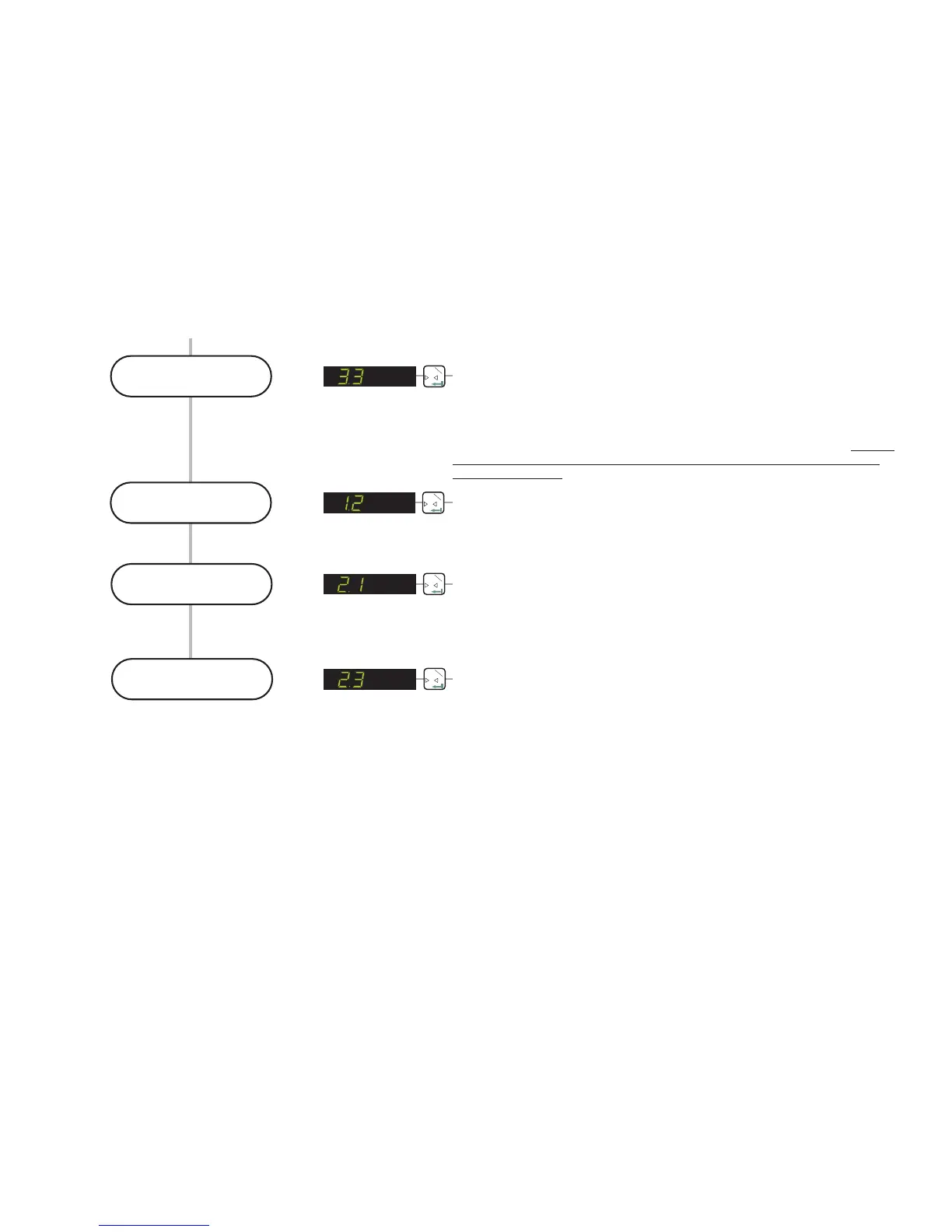
SELECT THE DECIMAL POINT POSITION ON THE DISPLAY (0, 0.0, 0.00,
0.000 or 0.0000)
Use the UP or DOWN key to set the required decimal point position on the
display. The factory default is no decimal place [0]. The maximum number of
places after the decimal point is four [0.0000]. Please note that this parameter
should be set before the span calibration value [menu 2.1] is entered. Setting
or moving the decimal point position after calibration will not alter the
display resolution
0
T
1
Set the Decimal
Point position
0
T
1
Calibrate the
Zero point
CALIBRATE OR ADJUST THE ZERO POINT.(CONVENTIONAL WEIGHING
SYSTEM)
Use this menu point to store a new calibration zero. The display will show the
actual input signal in mV/V. Ensure that the weighing system is at zero or has
no load on it. Pressing the Enter key will store the new zero.
0
T
1
Enter the weighing
system capacity
DEFINE THE SPAN CALIBRATION VALUE.
This menu point defines the span calibration value. If you intend to calibrate the
span using the mV/V readings from the load cell certificates, you should enter
the total load cell capacity here. So for example if you have a weighing system
consisting of 3 off 2000 kg load cells you should enter 6000 (3 x 2000) here.
Use the UP/DOWN & MOVE RIGHT keys to enter the total load cell capacity.
0
T
1
Enter the weighing
system mV/V value
CALIBRATE THE SPAN FROM THE LOAD CELL mV/V READING
If you are calibrating the weighing system without weights, use this menu point
to enter the mV/V value for the weighing system. The weighing system mV/V
value can be derived from the load cell test data. Normally a test data
certificate is provided with each load cell stating amongst other things, the
Output at Rated Load (ORL) in mV/V. In single load cell applications the
weighing system mV/V value will be the load cell ORL value. In applications
using more than one load cell, the weighing system mV/V value will be the
average of the individual load cells ORLs. Normally load cells used in multi-cell
applications have matched or rationalized ORLs typically 2 or 3 mV/V for
example. So if you have 4 load cells in your system, each 1000 kg capacity
with ORLs of 2 mV/V then the weighing system capacity will be 4000 kg at 2
mV/V. Use the UP/DOWN & MOVE RIGHT keys to enter the weighing system
ORL reading in mV/V. The reading should be in the format x.xxxx e.g 2.0000 if
the ORL is 2 mV/V exactly. The corresponding weighing system capacity should
be entered in menu point 2.1
Page 7


 To Next Page