7
Washer
11 5
Phillips Head Screw
118
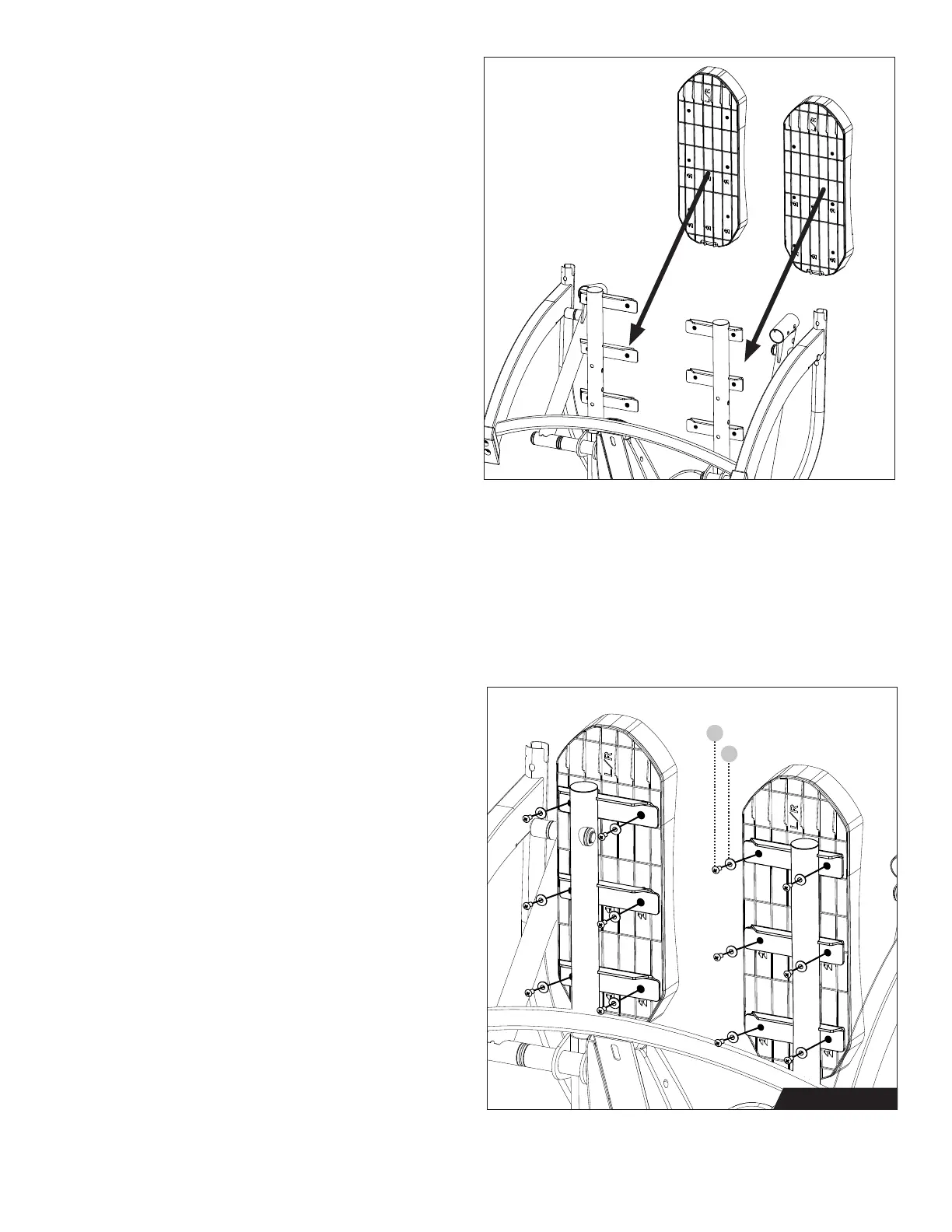
Figure 7: Locate the Pedals, noting that
both pedals are marked with both Left and
Right markings. This means it does not
matter which side the Pedals are installed
on. When installing the Pedals, be sure
that the L/R markings are pointing toward
the Front of the FreeStep. Align each Pedal
to the corresponding Base Pedal Arm.
Figure 8: Use the Step 2 Hardware Kit
to attach the Pedals. Hand tighten 12 × Phillips
Head Screws with 12 × Washers as shown.
Proceed to fully tighten all the Phillips Head
Screws with the Phillips Head Screwdriver.
Once the Pedals are installed, return the
FreeStep to the upright position by lowering
the Front Crossbar and rotating on the
Rear Stabilizer.
Figure 7
Figure 8
Step 2 Hardware



 To Next Page