Home
Teison
Automobile Battery Charger
TS-EVC07-003(S)
Page 24 (RFID Card Management and Limits)
Teison TS-EVC07-003(S) - RFID Card Management and Limits
47 pages
Manual
Save Page as PDF
To Next Page
To Next Page
To Previous Page
To Previous Page
Loading...
Copyright © Teison Energy Technology Co.,Ltd. All Rights Reserved
.
23
|
P
a
g
e
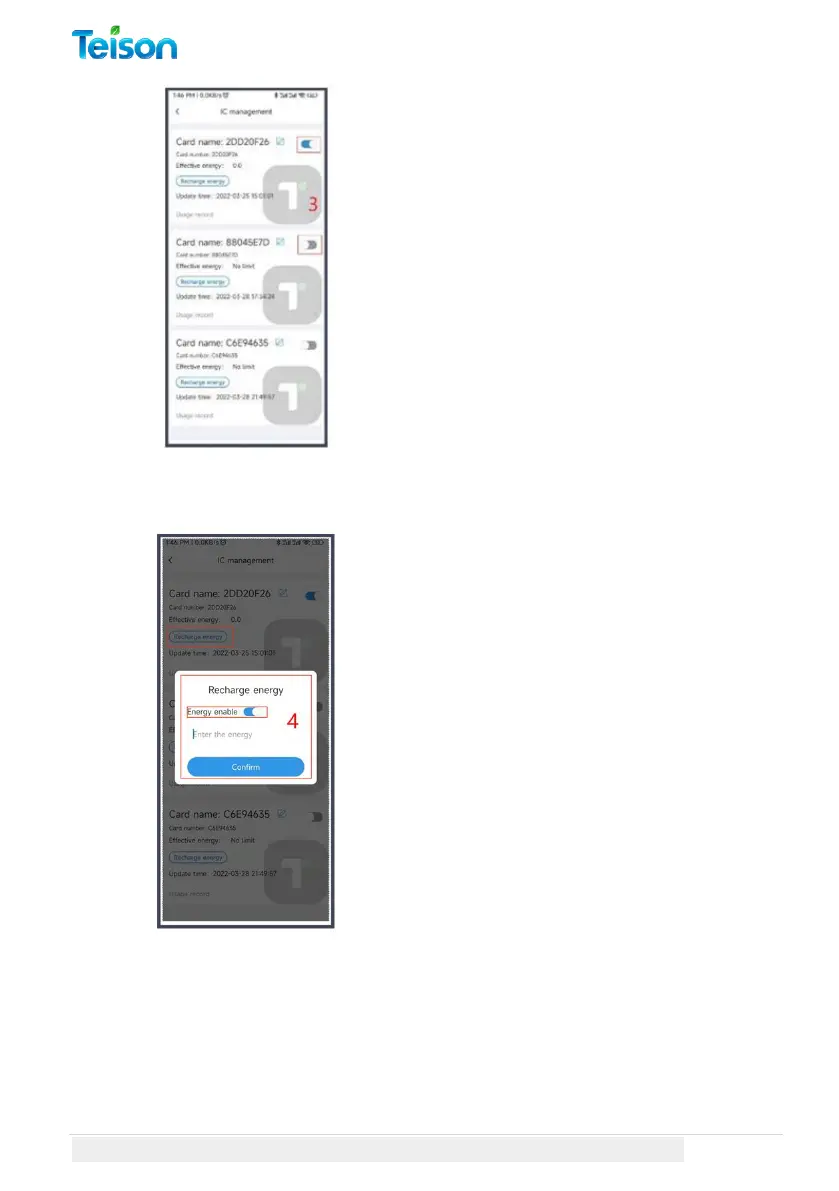
3. Activate this card b
y switching
the button on the right.
The first
activation is unlimited.
Manage and Monitor the RFID Cards:
In order to set a limit on the
amount
that can be charged to this
card,
please click on the "Re
charge
Energy" option and s
witch to "Energy
Enable". You will need t
o input the
charging power, ensuring
you
specify it to two decim
al numbers
.
23
25
Table of Contents
Main Page
Table of Contents
2
About TEISON Charger Box
4
Usage
4
Warning
4
Safety Instructions
4
Product Specification
6
Transportation and Storage
7
Installation Instruction
7
Safety Tip
7
Installation Steps
8
Installing Tips
9
Wiring Diagram
9
Configure Your TEISON Charger
10
LED Lights Indicators
10
Getting Your APP Ready
11
Setup Myteison App
12
Manage Myteison APP
14
Connect Your EV Charger to Wi-Fi
17
Configure Your Local Device
20
Pin Query
20
Unbinding
21
Configure Your Online Device
22
Charging Record
22
IC Management
23
Online Device Settings
26
Working Current
28
Household Current
29
Time Zone
30
Off-Peak Charging
31
Solar Mode
32
Plug and Play
33
How to Use Your TEISON Charger
34
Start Charging Your EV
34
Using Your Myteison APP
34
Using RFID Card
37
Stop Charging Your EV
38
Using Myteison APP
38
Using RFID Card
39
Suspended EV
40
Reserve Charging Session
41
Red Light Troubleshooting
45
Restore Factory Settings
46



 To Next Page