© 2016 680_D - 05/16 36 of 48
Melt – EconoMelt
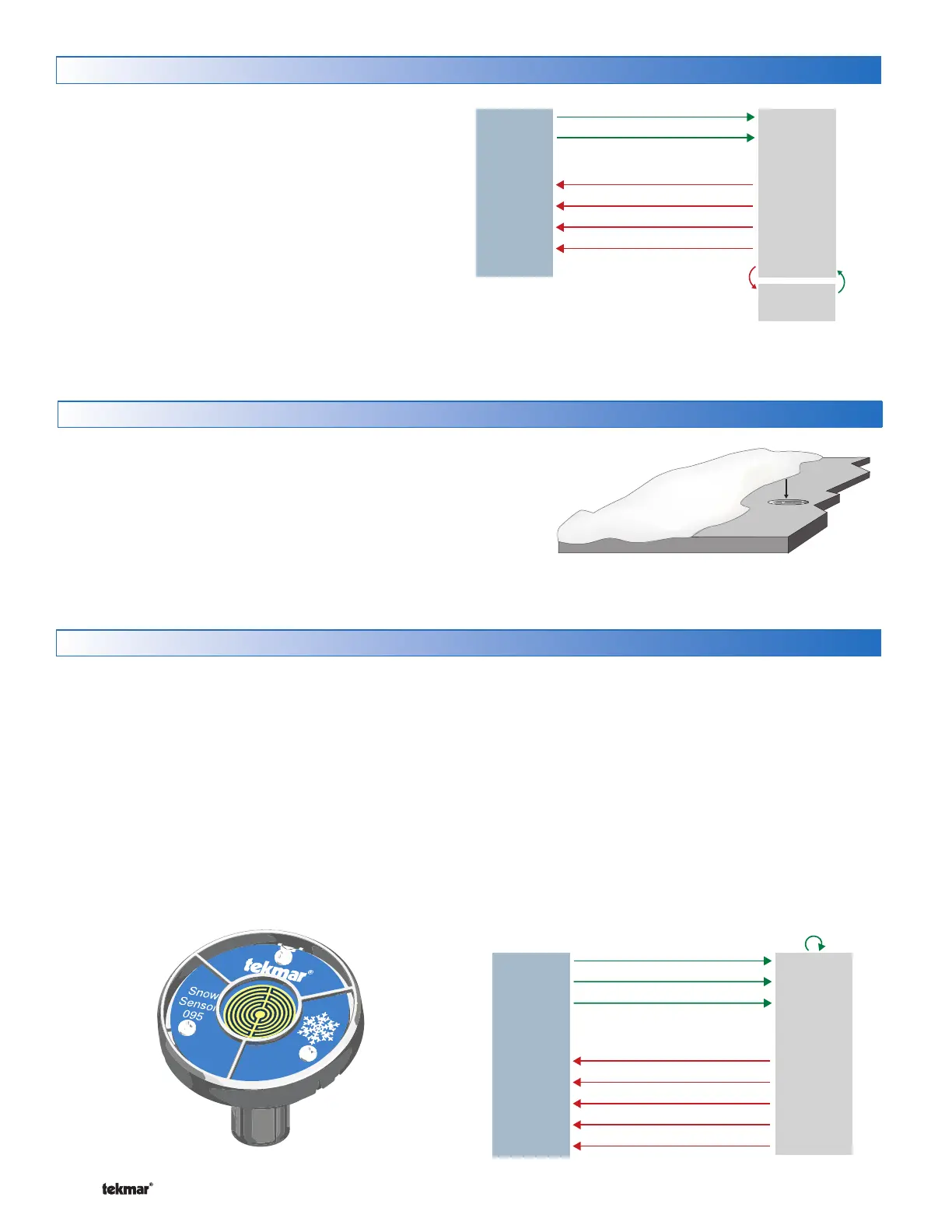
When a Snow/Ice Sensor 090 or 094 is installed, the installer
can choose to select to either automatically or manually start
the snow melting system. Selecting EconoMelt to On allows
snow removal using a snow plow or shovel. The remaining thin
layer of snow or ice that mechanical snow removal methods
are unable to remove can be melted using the manual start
operation. The snow melting system stops when the sensor
is dry. The factory default for EconoMelt is Off.
BACnet or Modbus Melt Request
090 and slab dry and
Add Melt time elapses
WWSD
Press Stop button
BACnet or Modbus Stop Request
Melt
Off
Exits
CW
Melt
Suspended
Enters
CWCO
Melt – Automatic Start and Timed Stop
Automatic start with a timed stop operation requires the instal-
lation of a Snow Sensor 095. The sensor is aerial mounted
on a pole near the melting surface. It is highly recommended
to also install a Slab Sensor 072 (20’ or 6 m cable) or 073
(40’ or 12 m cable) in order to regulate the slab temperature
and operate the snow melting system at the highest possible
efficiency. The control continually monitors the snow sensor
for the presence of moisture and slab temperature condi-
tions in which snow or ice may be present. When moisture
is detected, the control will show “Sensor Water Status Wet”
in the Slab Status menu. When the sensor is dry the control
will show “Sensor Water Status Dry”. The control includes
a Sensitivity setting in the Setpoints menu that allows the
installer to adjust the amount of moisture required to start and
stop the melting operation. In areas with low amounts of dust
and/or air pollution, the sensitivity may need to be increased.
The default sensitivity setting is Auto. This setting allows the
control to automatically determine the best suitable sensitivity
setting for the installation.
When moisture is detected and both the slab and outdoor
temperatures are below the Melting setting, the control auto-
matically starts the snow melting system. The snow melting
system operates to heat the slab to the slab target temperature
and continues to operate until the time set by the Manual Melt
Run Time in the Setpoints menu elapses.
Snow
Sensor 095
Push Melt button
095 detects water
BACnet or Modbus Melt Request
Manual Melt Run Time elapses
WWSD
Push Stop button
BACnet or Modbus Stop Request
CWCO
Timed
Melt
or
Idle
Off
Additional Melting Time
Dry
Snow Ice Sensor
A Snow/Ice Sensor 090 or 094 automatically shuts off the
snow melting system when the water sensor is dry. Due to
the construction of the slab and the layout of the heating
pipe or electrical cable, there may be areas that do not melt
completely. The Additional Melt Time setting in the Setpoints
menu allows the installer to set addition melting time after the
sensor is dry.


 To Next Page