© 2012 557_D - 08/12
9 of 48
A Watts Water Technologies Company
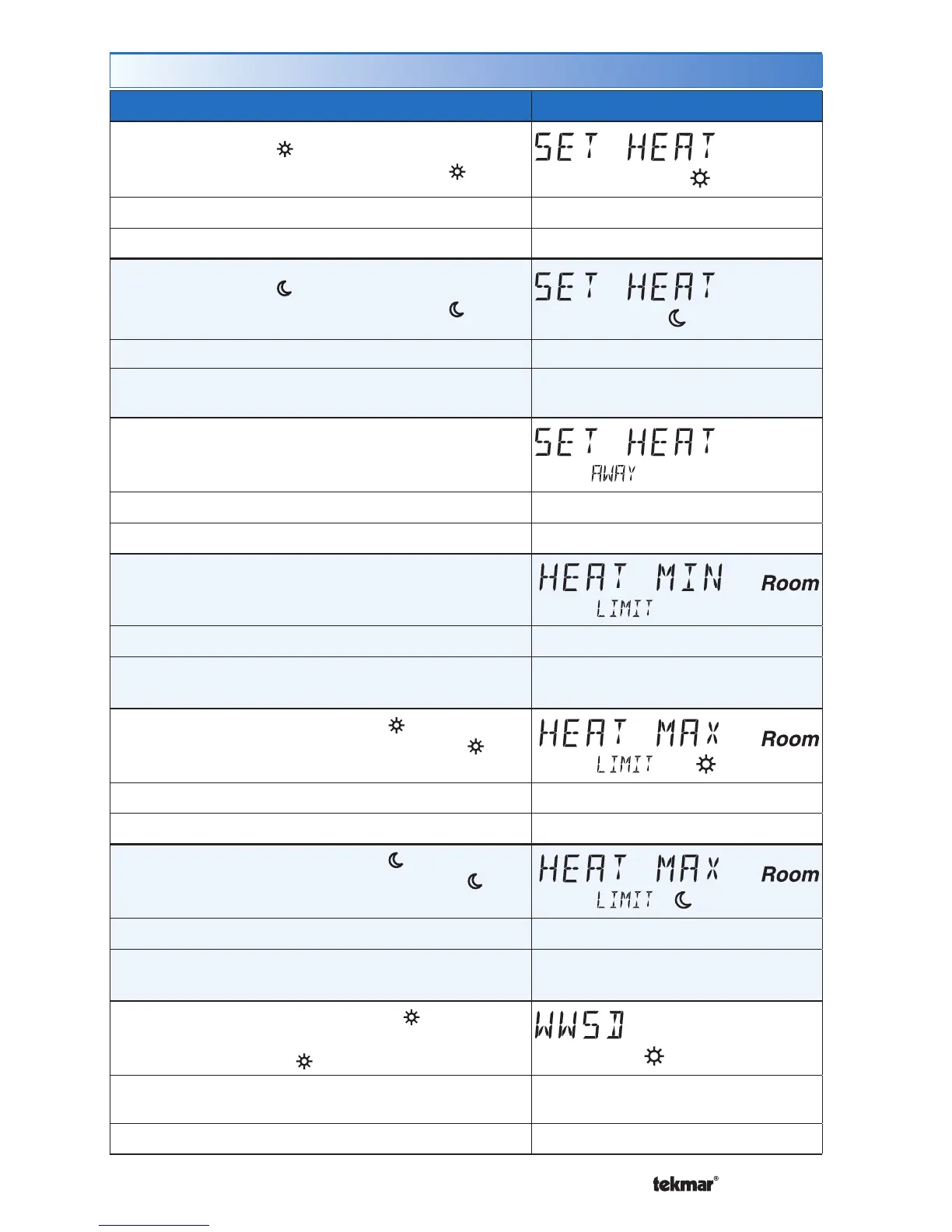
Set Temp Menu (1 of 4)
Setting Display
SET HEAT ROOM
Set the room heating temperature for the event.
Room
Access Level: Installer, User Range: 40 to 95°F (4.5 to 35.0°C)
Conditions: Always available Default: 70°F (21.0°C)
SET HEAT ROOM
Set the room heating temperature for the event.
Room
Access Level: Installer, User Range: 40 to 95°F (4.5 to 35.0°C)
Conditions: Schedules are in use or Scenes are
set to All or Guest.
Default: 65°F (18.5°C)
SET HEAT ROOM AWAY
Set the room heating temperature for the Away
scene.
Room
Access Level: Installer, User Range: 40 to 95°F (4.5 to 35.0°C)
Conditions: Scenes is set to Away, All or Guest. Default: 62°F (16.5°C)
HEAT MINIMUM ROOM LIMIT
Set the minimum room heating limit.
Access Level: Installer Range: 40 to 95°F (4.5 to 35.0°C)
Conditions: Schedules are in use or Scenes are
set to All or Guest.
Default: 40°F (4.5°C)
HEAT MAXIMUM ROOM LIMIT
Set the maximum room heating limit for the
event.
Access Level: Installer Range: 40 to 95°F (4.5 to 35.0°C)
Conditions: Always available Default: 85°F (29.5°C)
HEAT MAXIMUM ROOM LIMIT
Set the maximum room heating limit for the
event.
Access Level: Installer
Range: 40 to 95°F (4.5 to 35.0°C)
Conditions: Schedules are in use or Scenes are
set to All or Guest.
Default: 85°F (29.5°C)
WARM WEATHER SHUT DOWN
Set the outdoor air temperature at which heating is
suspended during the event.
Access Level: Installer
Range: CTRL (control), 40 to
100°F (4.5 to 38.0°C), OFF
Conditions: An outdoor sensor must be available. Default: CTRL


 To Next Page