TELE System
4
2.3 Remote Control Unit
Get well acquainted with your remote control and you will find it much easier to navigate through the various
menu options.
2.3.1 Batteries
Information and warnings
Battery type: 2 x AAA, 1.5V.
Insert/replace the batteries at the first installation or when the remote control doesn’t work well.
It’s recommended to remove batteries from the remote control if it is not used for long time, in order to avoid
any possible damage.
Do not use different types of battery or flat and new batteries at the same time.
Insertion and removal
Open the battery cover on the bottom of remote control and insert the two batteries (AAA format) respecting
the right polarity direction as indicated on their place. Then, close the cover.
Remove the flat batteries, that must be disposed separately from common garbage and they must be taken
to the shop or waste collection point, repeating similar operations done during the insertion.
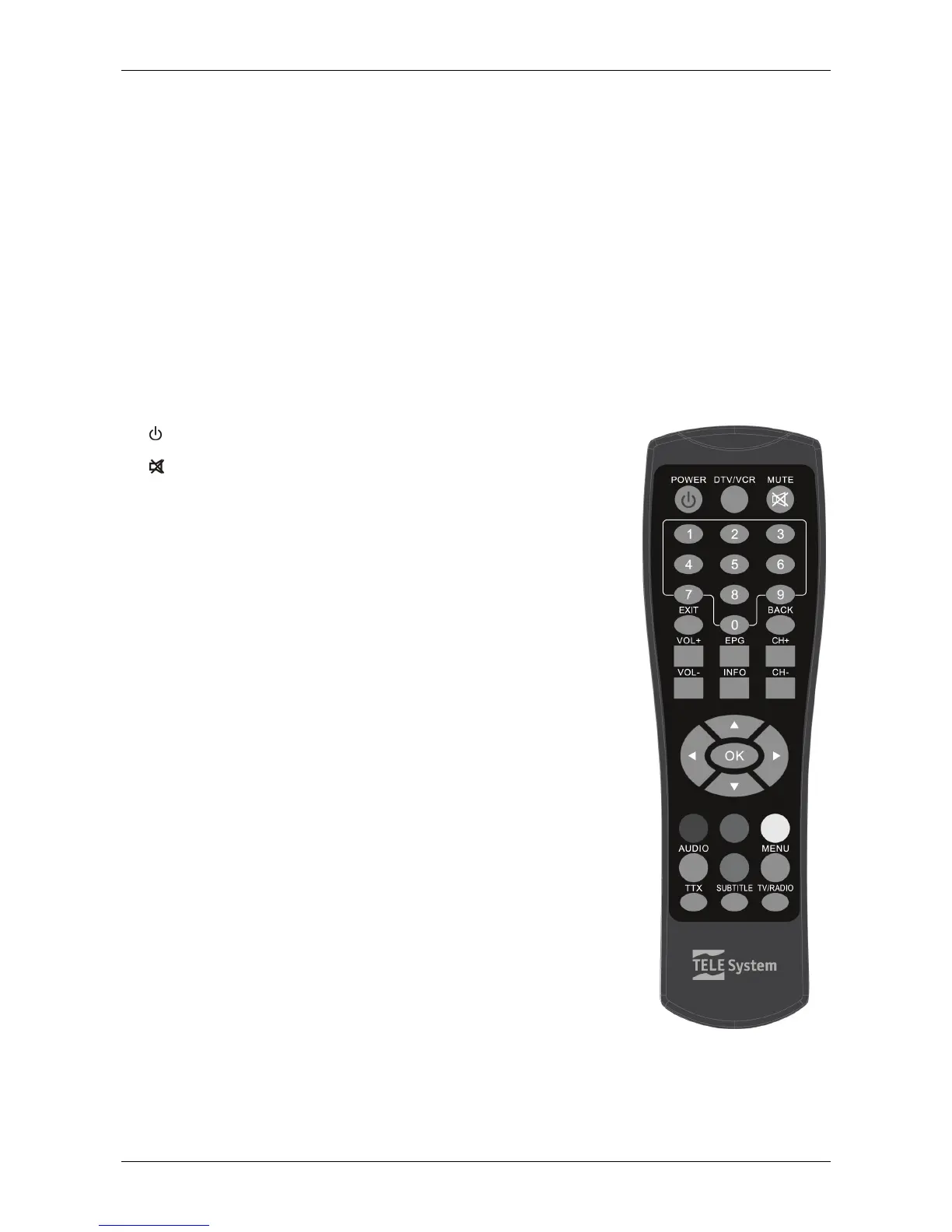
2.3.2 Buttons and related functions
1. ON/ST.BY ON / Stand-by.
2. DTV/VCR TV SCART switching.
3.
MUTE Mute.
4. 0÷9 Change channel/enter number in menu input boxes.
5. EXIT Quit function or menu.
6. BACK Go back to previous menu.
7. VOL+ / VOL- Audio volume up/down.
8. EPG Electronic Program Guide.
9. INFO Display channel information.
10. CH+ / CH- Next/Previous channel.
11. ▲/▼ Navigate menu items/options.
12. ◄/► Modify menu parameters/options.
13. OK Go to channel list menu or confirm action/changes in the menu.
14. Coloured Buttons Contextual menu functions.
15. AUDIO Set audio mode or select audio track.
16. MENU Main menu.
17. TTX Teletext.
18. SUBTITLE Subtitles, either Standard (DVB) or Teletext (TTX).
19. TV/RADIO Swaps between TV and radio programs of the receiver.



 To Next Page