English
TS6213
9
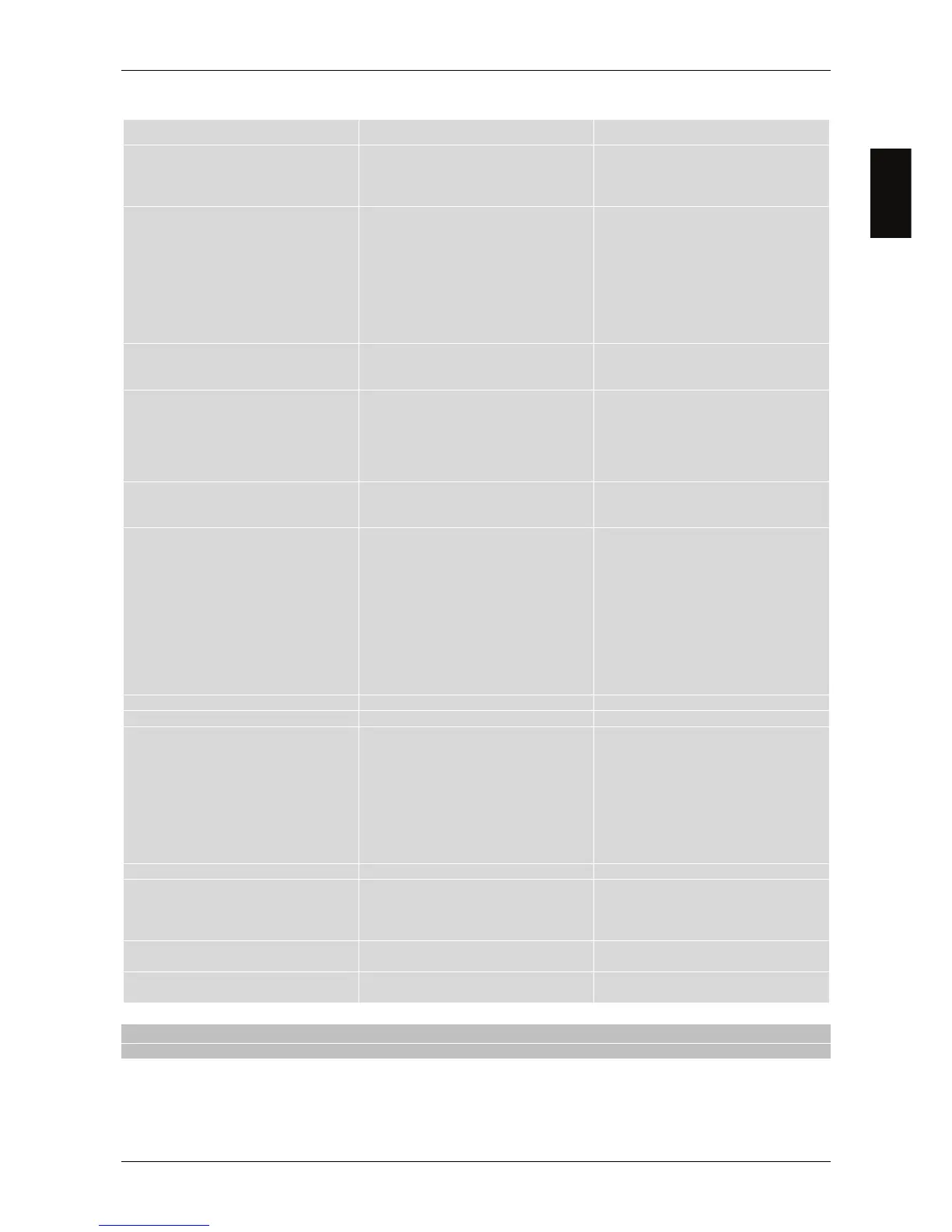
6 Problem solver
PROBLEM POSSIBLE CAUSE REMEDY
1. The receiver does not start (the
status LED on front panel is not
lighted up).
-The power lead is not plugged in.
-The power lead is plugged in but the
receiver still does not work.
-Plug in the power lead.
-Disable the electric power and check
it for damage (RISK of electric
shock!).
2. No Video or Audio signal.
-No signal or a poor signal.
-SCART cable or antenna cable not
connected properly.
-Audio volume low or zero.
-AV channel not selected on TV.
-Verify the antenna installation and
signal quality.
-Check the SCART connection.
-Make sure the TV and receiver
volumes are not set to zero.
-Make sure the AV channel is selected
on the TV (consult the TV user
manual).
3. Video on screen with green colour
shade.
-Problematic SCART cable.
-RGB not supported by the TV set.
-Replace the SCART cable.
-Change the Video Output in CVBS
from Setup - TV System menu.
4. The channel scan gives no results.
-No antenna signal.
-Your antenna system is not fully
compliant with the digital terrestrial
signal.
-Check for a signal using the receiver
menu.
-Ask for an antenna technician help.
-Manually scan for channels.
5. The settings are not saved.
-Setting changes are not confirmed
before quitting.
-Before quitting a menu, press the
confirm button to save the changes (if
any).
6. The remote control does not work.
-The receiver is in Stand-by.
-The remote control is not being
directed towards the receiver.
-The remote control batteries are flat.
-The batteries have been inserted in
the wrong direction.
-The remote control has been dropped
and its internal components have
been damaged.
-Press the STAND-BY button on the
front panel to check if the receiver is
working properly.
-Make sure nothing is obstructing the
front panel.
-Change batteries.
-Check the battery polarities.
-Contact the local dealer and buy a
new remote control.
7. You have forgotten the Password.
-Consult this manual at section 4.1.
8. Accessing the menu denied.
-Hotel Mode enabled. -See section 4.3.
9. The receiver does not interact with
the remote control buttons.
-The receiver is temporarily blocked.
-A broadcaster transmits wrong data.
-There is a problem with the remote
control.
-Unplug the mains lead of the receiver
for at least one minute and then plug it
back in.
-Reboot the box without the antenna
connection, delete the problematic
channel, then connect again the
antenna.
-Go to point 5 of this table.
10. Cannot exit the Easy Install menu.
-The password is not defined. -See chapter 3.
11. The scheduled event timer doesn’t
work properly.
-The receiver time has not been set
correctly.
-The specific program transmits a
wrong time information.
-Set the time from the menu (see
section 4.5).
12. The receiver goes down into
standby mode automatically.
-The Auto Standby function is active -Disable the automatic power-down
function (see section 4.7.1).
13. The antenna loop-through is not
working
-ANT OUT is disabled. -See section 2.2 and 4.7.2.
CAUTION
Generally, in case of dysfunctional behaviours of the receiver, a factory reset (par. 4.8) could solve the problem.



 To Next Page