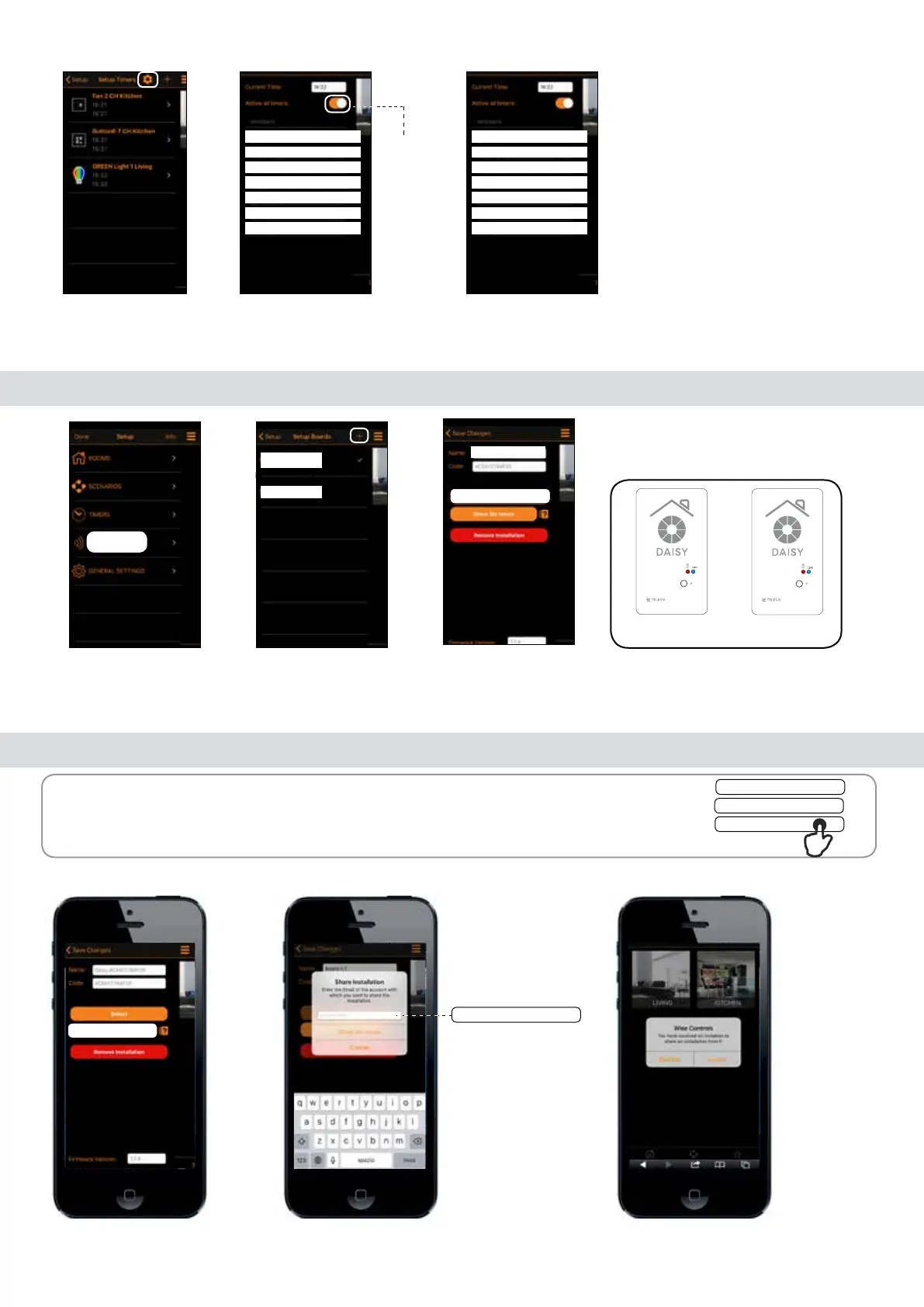
Enable timers
2. Tap (Active all
timers) to enable
the timers.
3. It’s possible to set weekdays-weekend group. Tap
on the day names to add in weekdays groups.
Note: To operate the timers must be enabled following the procedure described below:
1. Tap gear icon.
9.0 Select Boards
1. Tap (Boards) to
enter in the next
menu.
2. Tap the chosen
board. To add new
board tap (+).
3. To pair the
board tap (Select).
Board n. 2
Board n. 1
11.0 Share installation (SIX HOURS)
Note: Before starting, it is necessary to carry out the Registration procedure on the new
smartphone described in the paragraph 3.0
1.Tap(Share installation).
Congurated smartphone
2. Fill the eld with the email of the new
smartphone. Tap (Share ...) installation.
Congurated smartphone
3. Accept the invite to share
the installation.
New smartphone
David.fogar@gmail.com
Share Six Hours
Share Six Hours
Cancel
Monday
Tuesday
Wednesay
Thursday
Friday
Saturday
Sunday
Via dell'Artigianato, 5 - 31014 Colle Umberto (TV) ITALY
Tel. +39.0438.388511 Fax +39.0438.388536
Web site: www.telecoautomation.com
DATE: 01/06/18
REV: 2.0
G304BK-CO-SER1
colore come G304BK-CO-SER
Via dell'Artigianato, 5 - 31014 Colle Umberto (TV) ITALY
Tel. +39.0438.388511 Fax +39.0438.388536
Web site: www.telecoautomation.com
DATE: 01/06/18
REV: 2.0
G304BK-CO-SER1
colore come G304BK-CO-SER
Log In
********
David.fogar@gmail.com
Monday
Tuesday
Wednesay
Thursday
Friday
Saturday
Sunday
BOARDS
Board n. 1
Board n. 2
Board n. 2
Select
Share six hours


 To Next Page