EasyManua.ls Logo

Teleco Daisy - General Device Settings; Information Page Overview; Home Page Navigation

Teleco Daisy
12 pages
Print Icon
To Next Page IconTo Next Page
To Previous Page IconTo Previous Page
Loading...
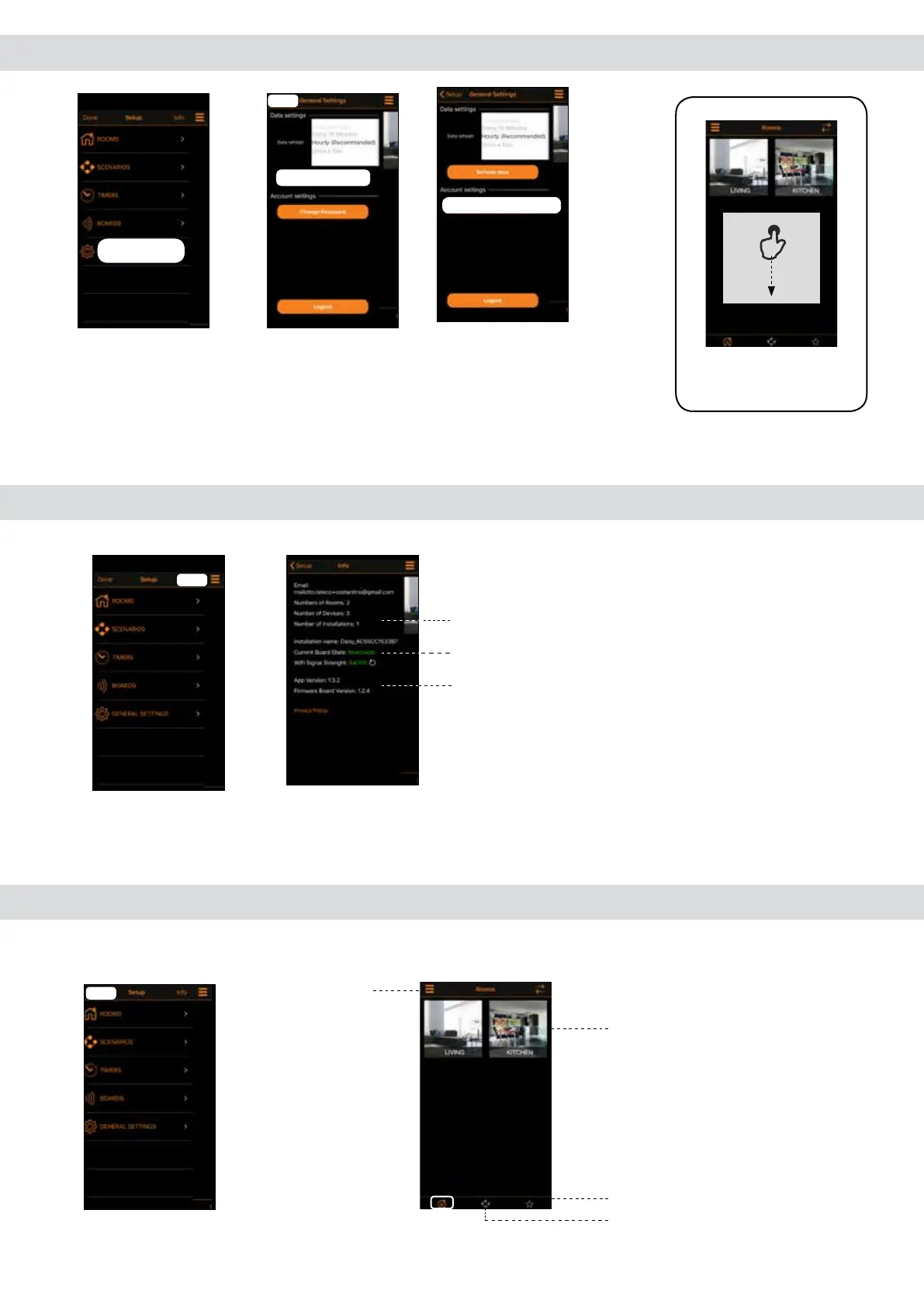
14.0 Home Page
Once congurated the rooms with the transmitters tap (done) to enter in the (Home) page.
12.0 General Setting
2. Choose the
Refresh time and tap
(Setup).In alternative
tap (Refresh Now).
3. In order to set a new
password tap (Change
Password).
Scenario set
Favourites transmitters set
Rooms set
Setup Menu
Hourly
Refresh Now
Setup
Swipe down
to Update the
conguration.
TIPS
13.0 Info page
1. Tap (Info) to
enter in the next
menu.
General conguration information
Status information of Daisy board
Software and rmware information
1. Tap (General
Setting) to enter in
the next menu.
GENERAL SETTING
Refresh Now
Setup
Change Password
Info
Done

Related product manuals