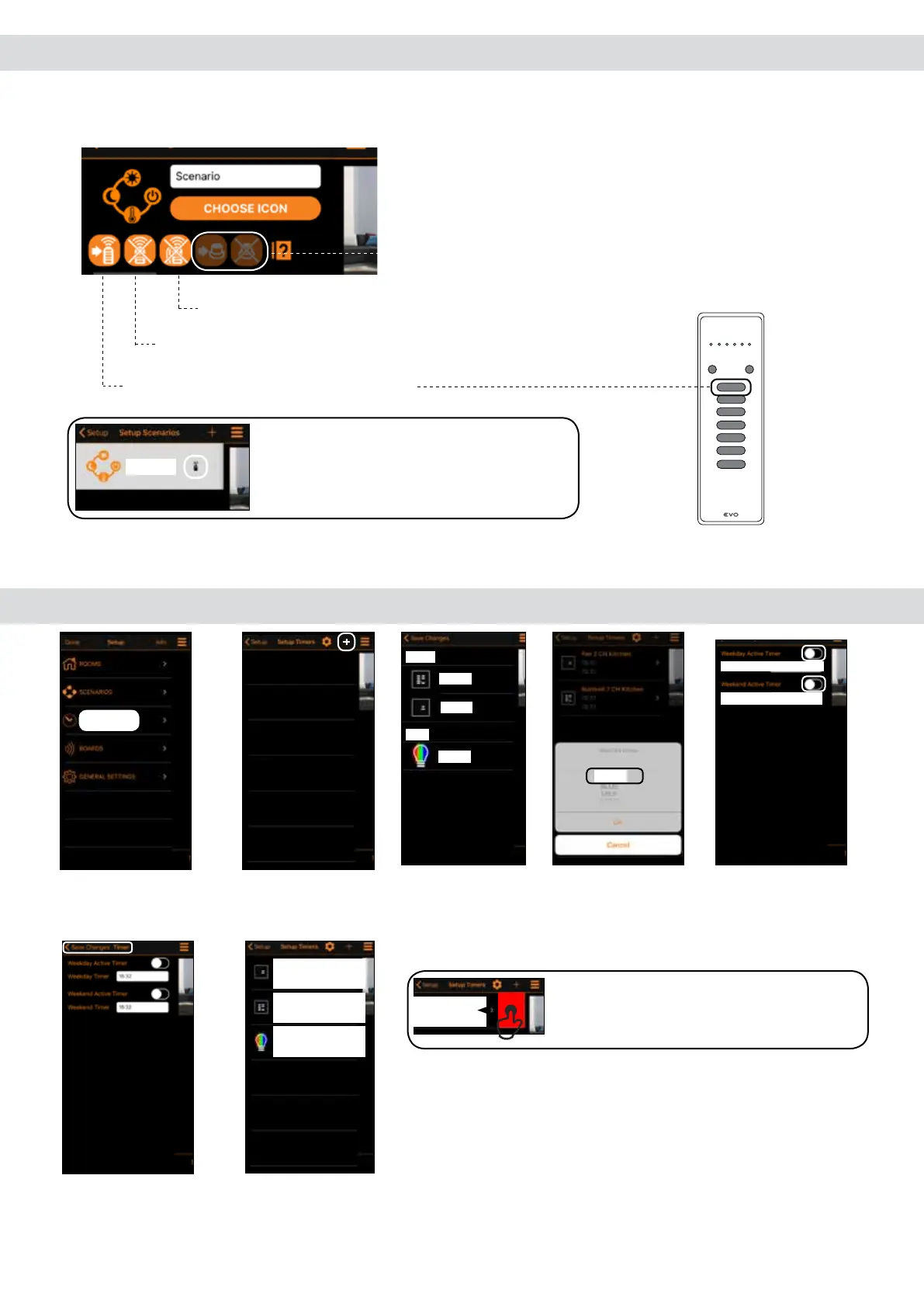
7.1 Advanced scenario programming
Once the scenario has been completed, it’s possible to assign it to a transmitter button or to a wired N.O. button
connected to the input 4-5.
Tap and press the transmitter button to assign.
Tap and press the transmitter button to delete.
Tap to delete all the associated transmitter buttons.
Note: When transmitters or the wired input
are programmed, this icon is ON
8.0 Timers
1. Create new timer
accessing the menu
“Timers” in Setup.
2. Tap “+” to add
a timer.
4. Tap (GREEN) to
chose the command
5. Enable the
timers. Set the hour
for the timers.
7. Repeat steps 2 and
3 to add timers to the
other devices.
Note: swipe a listed timer left to delete it.
3. Tap “Light 1” to
add a timer.
6.Tap “Save Changes”.
Not used
Scenario
TIMERS
GREEN
Weekday Timer: 17:17
Weekend Timer: 21:17
Living
Light 1
Kitchen
7 CH
2 CH
Green Light1 Living
15:32
15:32
FAN 2 CH Kitchen
13:17
17:17
Buttons6 7CH Kitchen
10:08
11:00
Delete
Green Light1 Living
15:32
15:32


 To Next Page