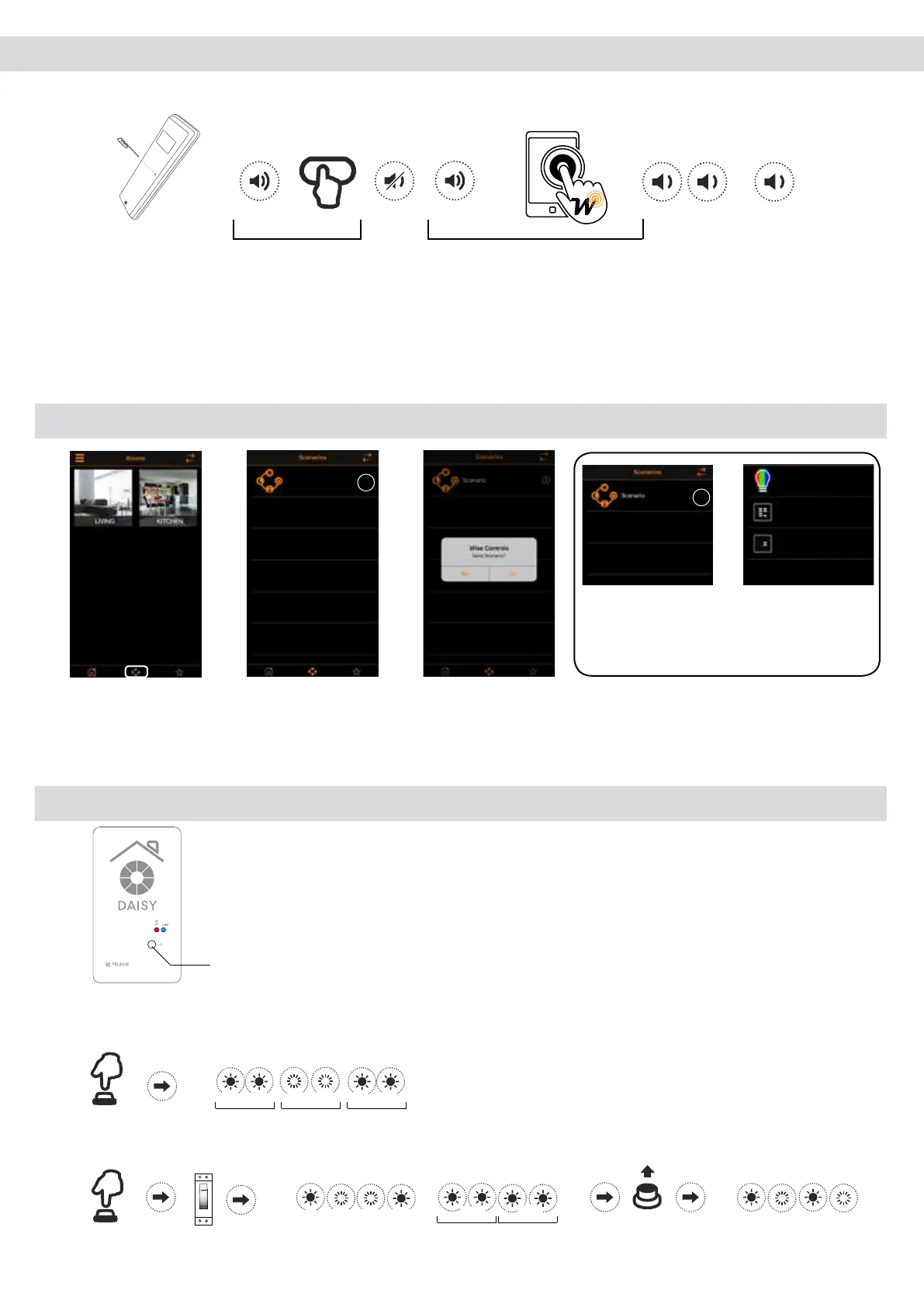
14.3 Remote memorization of other radio codes from standard transmitter
Note: The button P3 is located inside the standard transmitter. The added radio code will have the same functions as the code used for memorization.
This procedure is compatible with any type of transmitter.
1 s
P3
New
< 5 s
continuous
sound
Memorized
< 5 s
continuous
sound
Standard transmitter
Wise transmitter
Press button P3 of the memorized standard transmitter and hold. The buzzer emits a continuous sound. Press
a button relative to an already memorized code. The buzzer stops for 1 second and then starts the continuous
sound again. Press the virtual button on the Wise transmitter relative to the new code to be memorized. Successful
memorization is indicated by the intermittent sound of the buzzer.
15.0 Sending Scenario
1. Tap (Scenario
icon) to enter in the
next menu.
2. Tap (Scenario
icon) to send
scenario.
3. Tap (Yes) to
send scenario.
Note: Tap (i) icon to get information
about the scenario set.
16.0 Reset Wi-Fi Network configuration
Button: Reset Wi-Fi
Network conguration (*)
Press (P) once and hold for 5s:
* The memorized transmitters are not deleted.
Daisy
Send Scenario
YesNo
Blue Red
Blue Red
Blue Red
(5 s)
Alternatively hold the button (P) down and at the same time turn on the power:
Blue Red
Blue Red
ON
Blue Red Blue Red
Blue Blue
0.5 s 0.5 s
Memorized
...
Scenario
i
Scenario
i
2CH(CH2)
7CH(CH5)
Light1(Blue)
Via dell'Artigianato, 5 - 31014 Colle Umberto (TV) ITALY
Tel. +39.0438.388511 Fax +39.0438.388536
Web site: www.telecoautomation.com
DATE: 01/06/18
REV: 2.0
G304BK-CO-SER1
colore come G304BK-CO-SER
...
...
1 s 1 s 1 s 1 s
1 s 1 s
...
...
... ... ...
0.5 s
0.5 s
0.5 s
0.5 s 0.5 s 0.5 s


 To Next Page