12 Installation
B.2 Installing TMS-MA in Equipment Rack
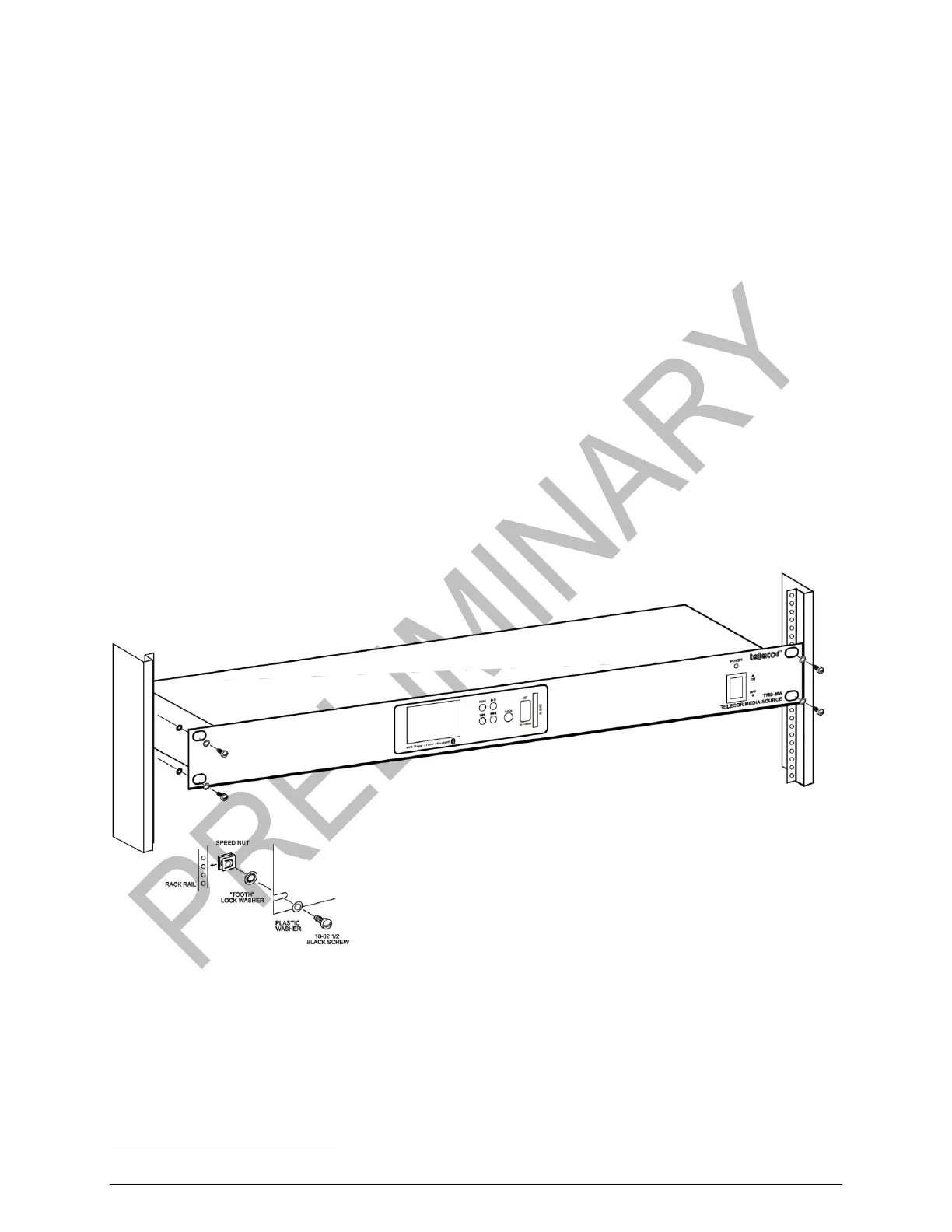
The TMS-MA installs into a standard 19” equipment rack.
Materials Required TMS-MA
4 10-32 ½” black screws (Part number: MS-1032)
(purchased separately)
4 “tooth” lock washers (included with MS-1032 screws)
4 plastic washers (Part number: MW-10BK)
1
(purchased separately)
4 speed nuts (Part number: MN-1032)
1
(purchased separately)
The TM-MA must be installed in a location with an operating temperature range of 10 to 40ºC (50
to 104ºF), 0-90% relatively humidity, non-condensing.
To install the TMS-MA into the equipment rack, complete the following steps:
1. Mount the TMS-MA in a 19" equipment rack.
2. Ensure that the equipment rack is properly grounded. Use “tooth” lock washers between
the TMS-MA and the mounting rails of the equipment rack. The washers ensure that a
chassis ground is maintained. Use the four plastic washers to protect the finish of the
front panel.
Installing TMS-MA into the Equipment Rack


 To Next Page