TMS-MA Telecor Media Source Model A Installation Manual 13
B.3 Connecting the TMS-MA Cables
Once you have mounted the TMS-MA unit into the rack, you can then connect the power, audio
cable harness, and optional (provided by customer) antenna.
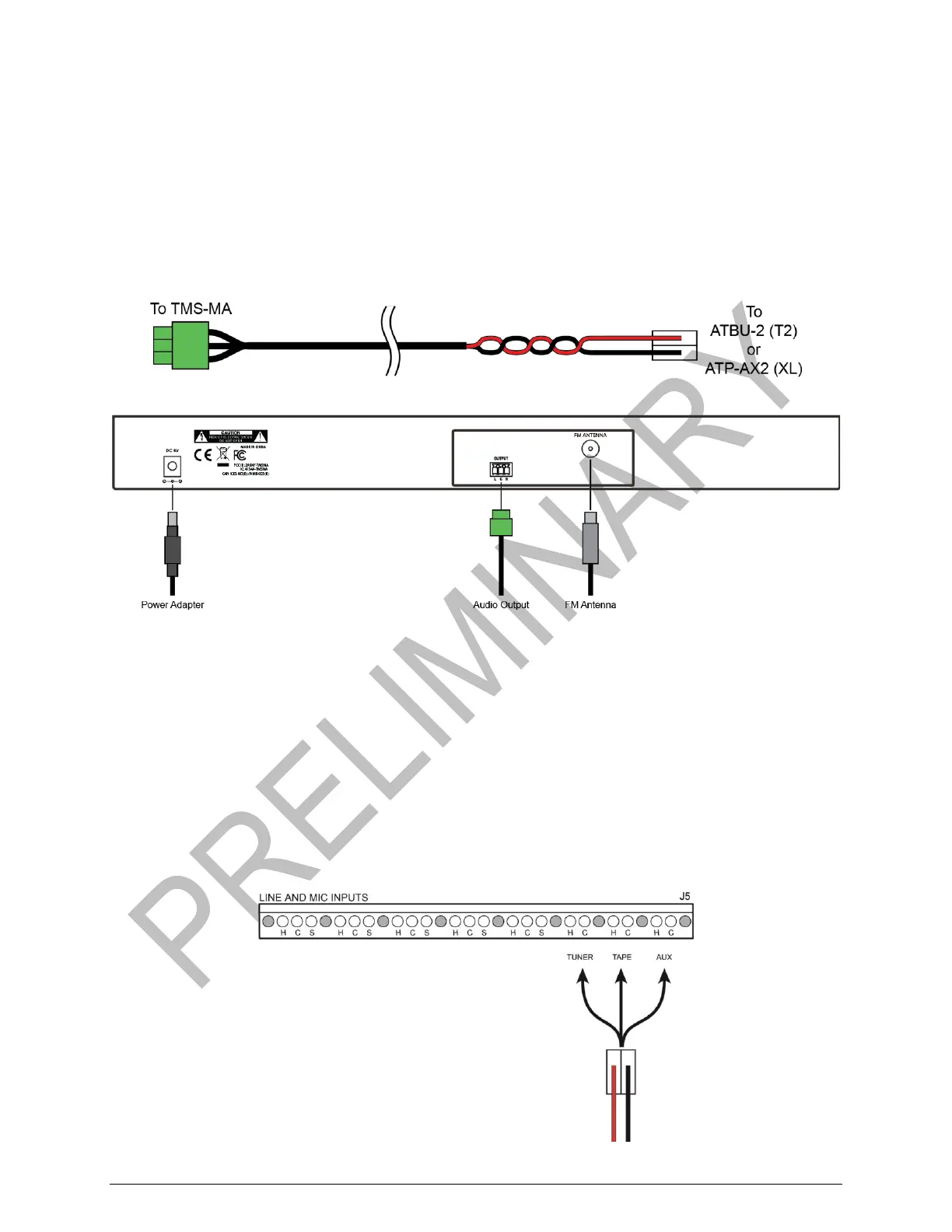
The CHAP-TMS-MA audio cable harness connects the TMS-MA to the Telecor II’s ATBU-2 or
Telecor XL’s ATP-AX2. It has a 3-pin insulation displacement connector (IDC) at the TMS-MA
end and a 2-pin IDC at the T2/XL end.
CHAP-TMS-MA Audio Cable Harness
Connections to the TMS-MA
1. Connect the power adapter cord to the TMS-MA and plug it into the mains.
2. Optional: plug an FM antenna into the 75Ω antenna port and run the antenna wire along
the outside of the rack.
3. On the rear of the TMS-MA, plug the 3-pin IDC of the CHAP-TMS-MA cable harness
into the audio output port as in the above diagram.
4. Plug the 2-pin IDC end of the CHAP-TMS-MA audio cable harness into the TUNER,
TAPE or AUX input of the T2/XL’s Audio Input board (ATP-AX2 on an XL System or
ATBU-2 on a T2 system).
Audio Connection to the T2/XL System


 To Next Page