TMS-MA Telecor Media Source Model A Installation Manual 19
To change repeat mode:
1. Press RPT on the remote. The available repeat modes are: 1 (repeat current audio file, R
(randomized), A (all audio files), and D (only audio files in the current folder).
To change equalizer mode:
1. Press EQ on the remote. The available equalizer modes are: Nor (Normal), Pop, Rock,
Jazz, Clas (Classical), Soft, and DBB (Dynamic Bass Boost).
D.1.3 Playing Bluetooth Audio
To play audio from a Bluetooth device:
1. Press and hold MENU on the front of the TMS-MA or Mode on the remote until the
main menu appears.
2. Press MENU on the front of the TMS-MA or Mode on the remote until “Bluetooth” is
selected.
3. Press Play/Pause on the front of the TMS-MA or the remote.
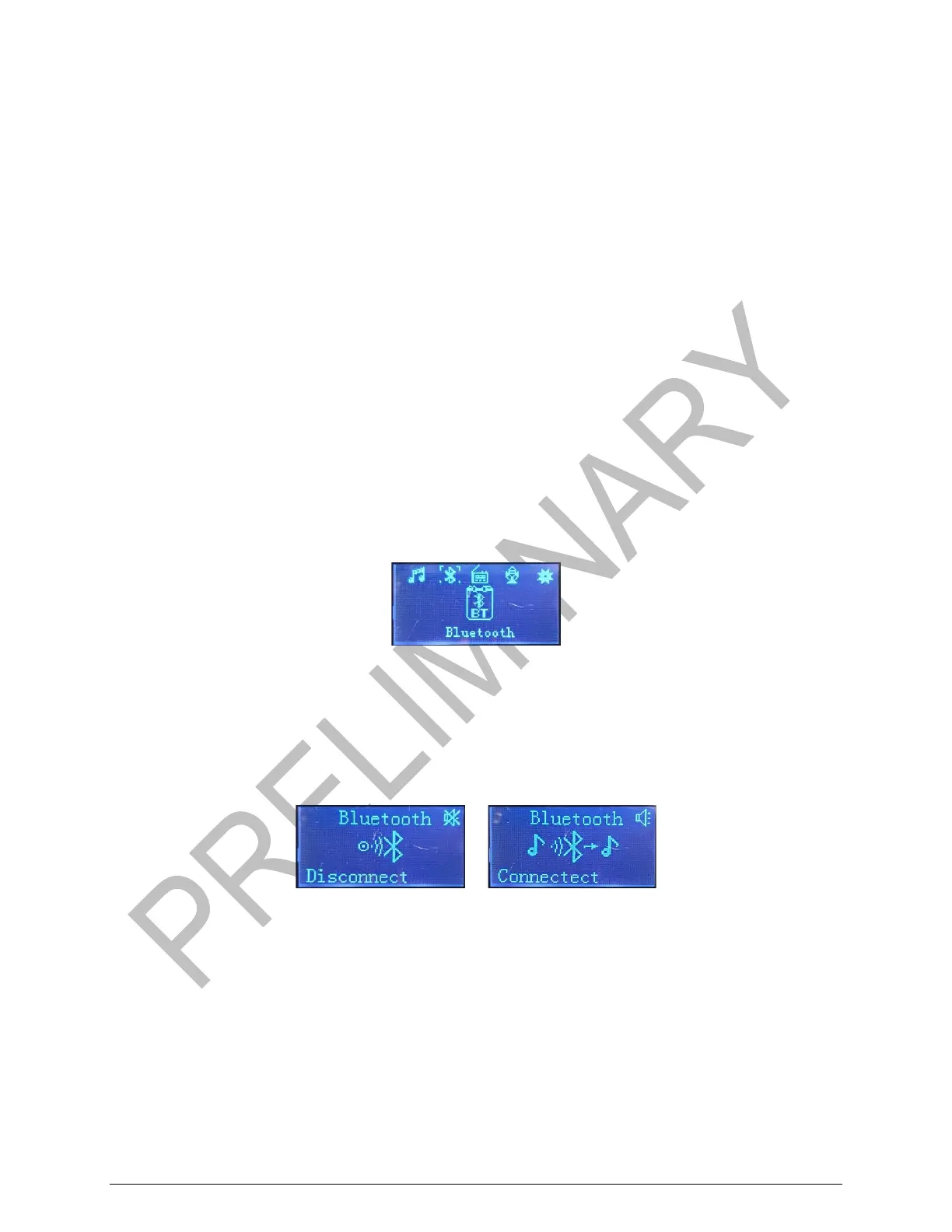
Selecting Bluetooth
4. On your Bluetooth device, search for other Bluetooth devices. Select MPLAYER C
when it is detected.
When the TMS-MA is set to play audio from a Bluetooth, the LCD display on the front of the
TMS-MA will display the following:
Bluetooth Device Not Connected (Left) or Connected (Right) Display
To mute the audio:
1. Press Mute on the remote.
To adjust the volume:
1. Press Vol- or Vol+ on the remote.


 To Next Page