Installation and Setup
System Overview
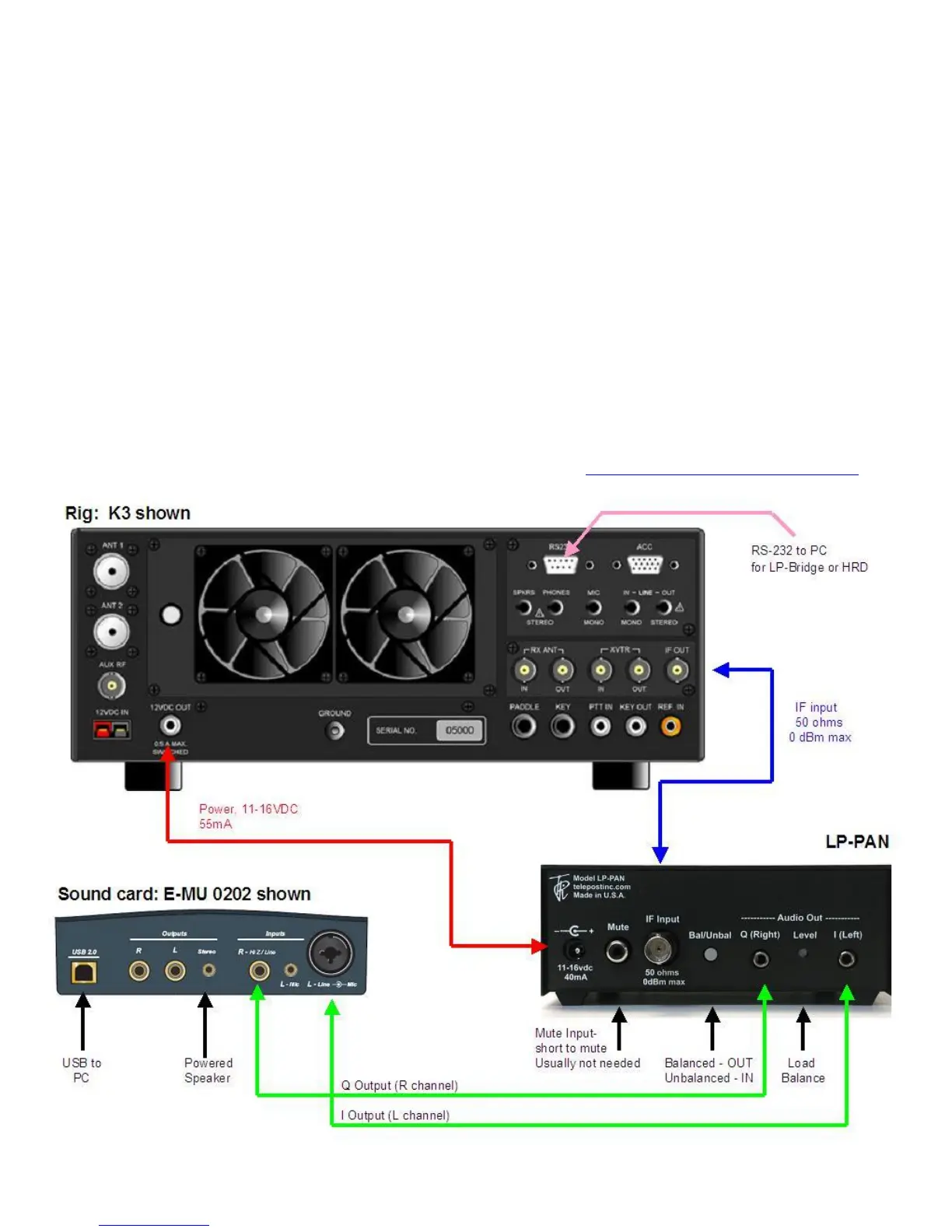
Before starting, it helps to read this section in order to understand the basics of how the K3, LP-PAN, PowerSDR, Sound Card and LP-
Bridge (or HRD) work together. In general, the duties of each part of the system are as follows:
LP-PAN – Provides audio baseband IQ signals for application to a high quality sound card, which becomes the interface to PowerSDR.
The signals are derived from the broadband IF output of the K3.
PowerSDR – Provides decoding and processing of the audio signals. In addition to providing a panadapter or waterfall display,
PowerSDR is actually a high quality receiver AND sub-receiver. It rivals the K3 in many ways, and adds some features not available on
the K3.
LP-Bridge - Provides a serial interface to the K3, and computer links to PowerSDR. This allows linking of the K3 to PowerSDR for
Frequency, Mode, Preamp setting, Mute, IF Offset and other functions. A serial cable is required between the K3 and the PC to enable
the communication link. Without this link, PowerSDR will act as a panadapter with “relative” frequency display, for instance, +/- 96 kHz
from a center “zero” frequency which represents the center of the IF.
Sound Card – The link between LP-PAN and PowerSDR. A high quality sound card is preferred. These are available for about $80-
$140. See the sound card page on the TelePost website for latest recommendations. http://www.telepostinc.com/soundcards.html



 To Next Page