ECLIPSE 8/16/32/99 Series – User Operation Manual
24
4.5 Adding Own Proxy Card
Every user without manager rights in the system can add or remove only his/her own
proxy card for controlling the system. The adding and removing is done in a one and
same menu “5. User Card” (address 5).
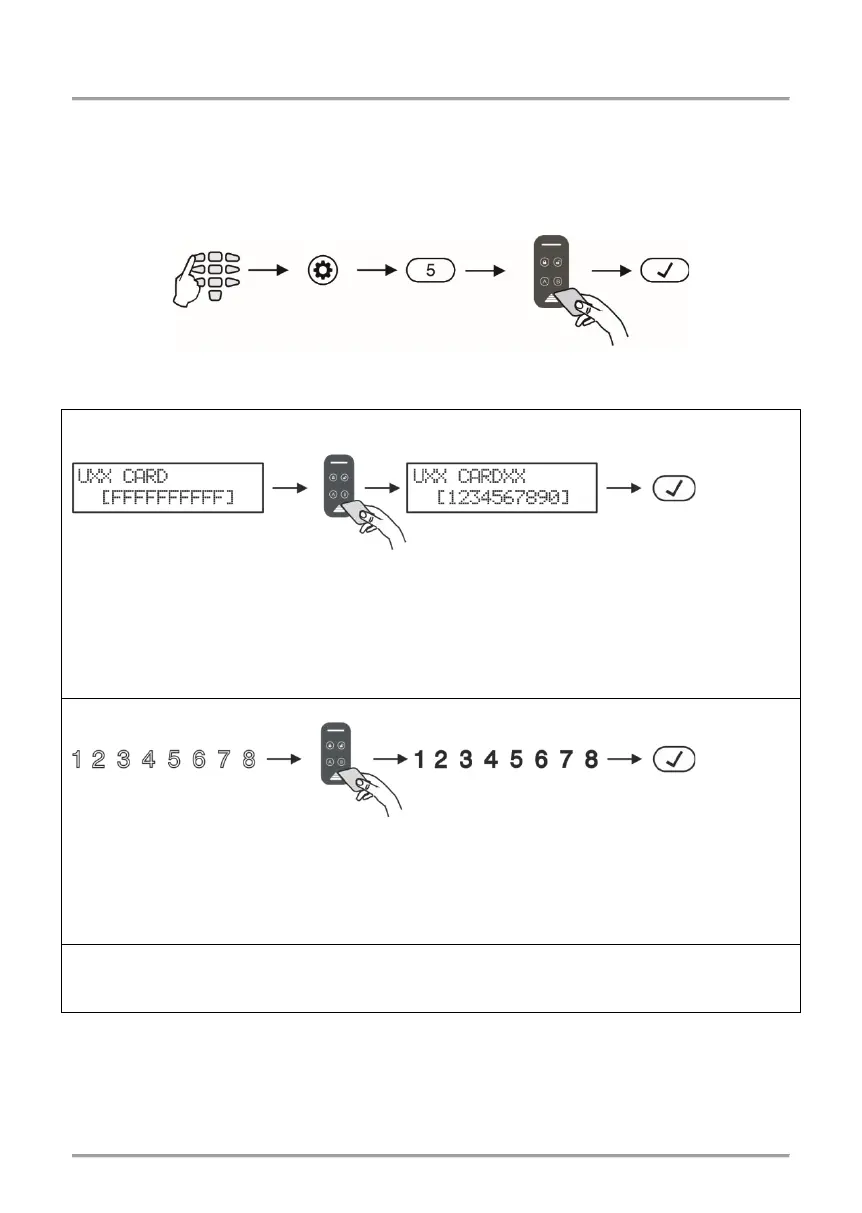
To add a card, the user needs to do in sequence:
Depending on the keyboard used, the visualization on screen is as follows:
LCD 32 and LCD 32 Sensitive
The card is recognized on the LCD display and its 10-digit unique code is shown on
screen. If the registration of a card to a user code is successful, after pushing the ENTER
button, a confirmation beep is heard. If the card is associated to a different user, an
“Invalid” message is shown on screen and a rejection signal is heard.
The card is recognized on the LED display with digits 1 to 8 permanently lit.
If the registration of a card to a user code is successful, after pushing the ENTER button,
a confirmation beep is heard. If the card is associated to a different user, a rejection signal
Enter at the address 11 and choose a user number - the LED for zone 1 is blinking on the
display. The registered user card is indicated with digit buttons 1 to 9 lighting on in red.
Note: The proxy reader can be a separate device or built in the keyboard (keyboards
LED32 PR, LCD32 PR). The built-in proxy reader is situated between the MEMORY,
ENTER, “9” and TROUBLES buttons.
In LCD 32S the card reader is situated in the right bottom corner and is indicated with a
“key” symbol.
address
Put the card over
the reader
There is no card
associated to the code
The card is registered with a
10-digit unique code.
Put the card over
the reader
associated to the code
Put the card over
the reader
















 To Next Page