ECLIPSE 8/16/32/99 Series – User Operation Manual
44
APPENDIX B – Special Symbols for Text Entering
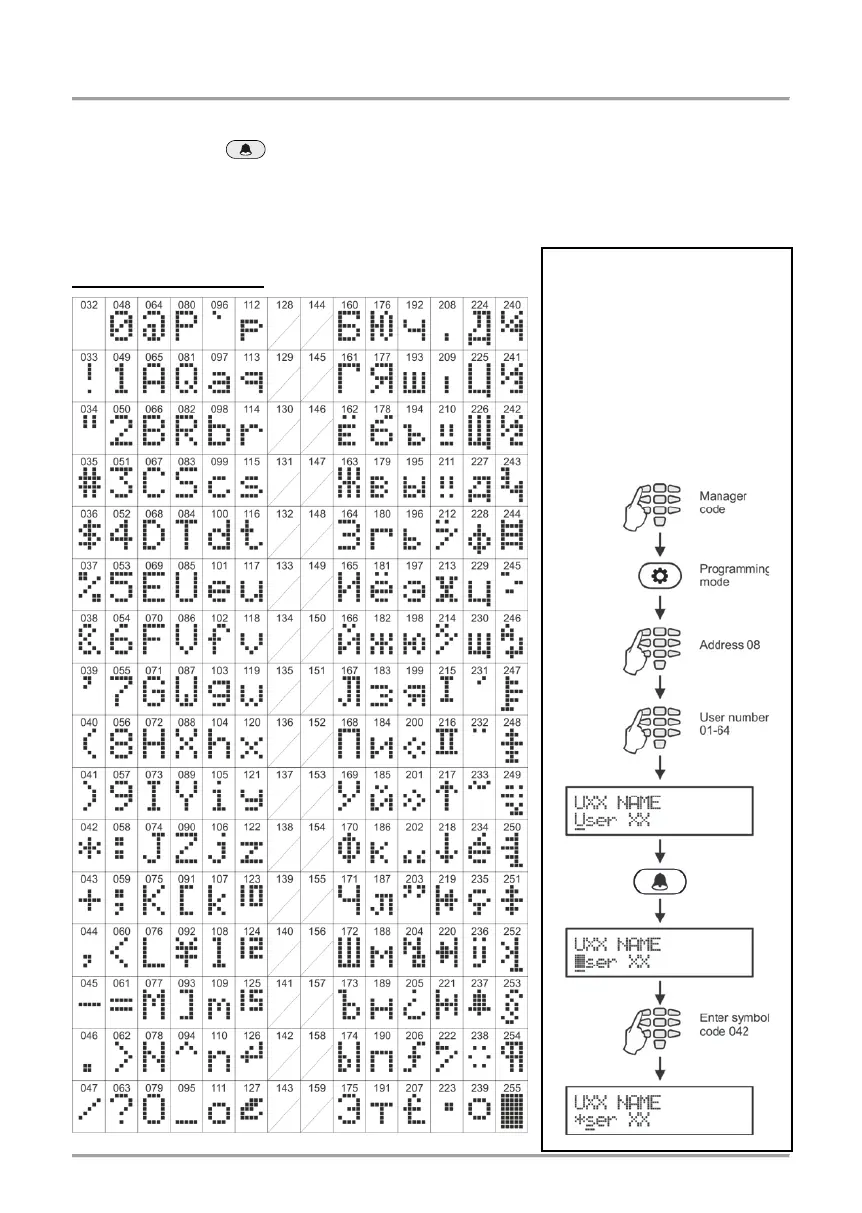
Use the MEMORY button to enter some special symbols and Cyrillic letters.
To enter a specialized symbol, move the cursor to the desired position, press the
MEMORY button (a solid cursor appears) and then using the digit buttons enter the
respective code for the symbol or letter as check in the table below.
Table of the symbols and codes correspondence for
CYR keyboard version:
To enter the “asterisk”
symbol, first press the
MEMORY button (a solid
cursor appears on the
place) and after that enter
code 042. The asterisk
symbol will appear and the
cursor will move one
position to the right.
















 To Next Page