17
User manual TDT +
ENGLISH
5.4 - LEDS
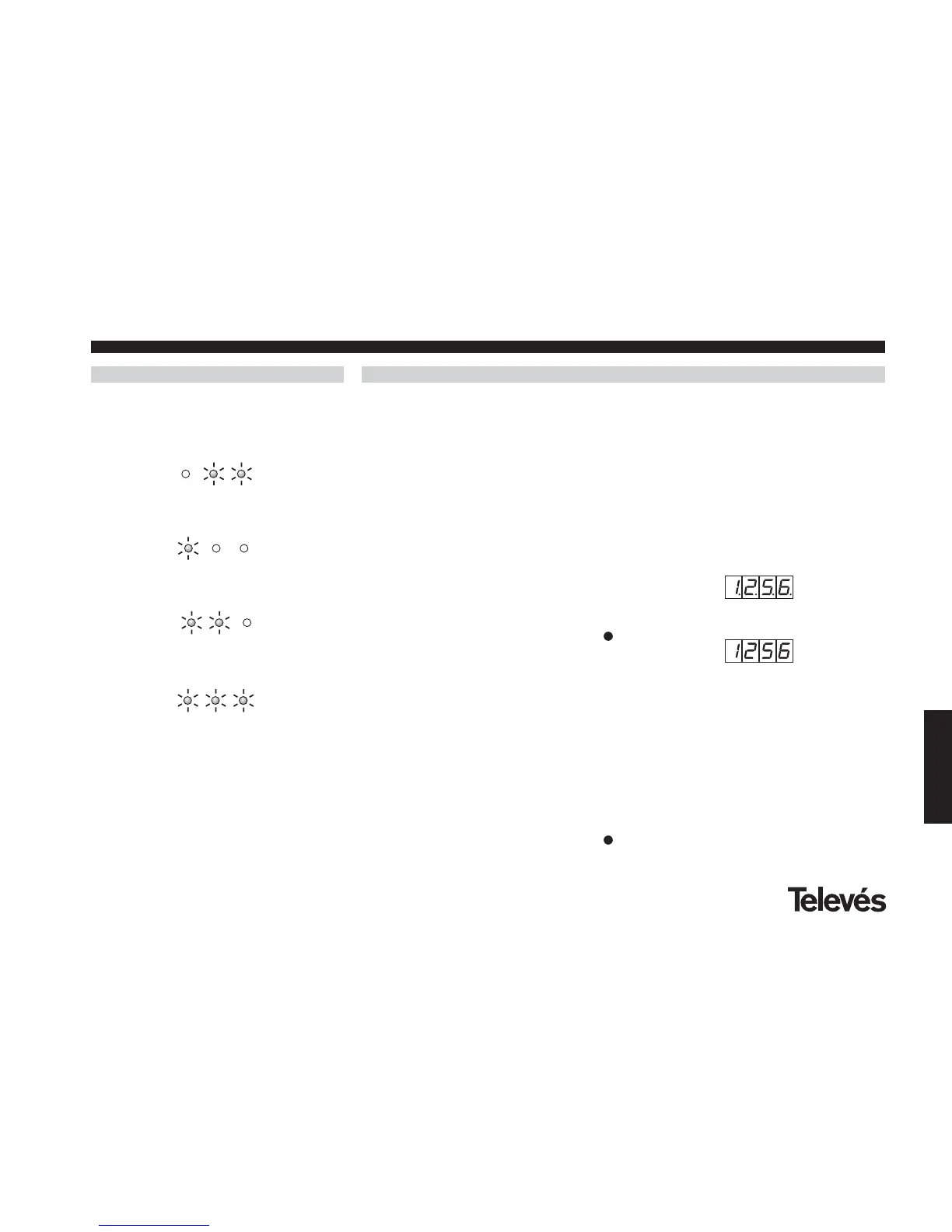
The LEDS indicate the following statuses:
Insufficient input signal/noise ratio
QPSK demodulator unlocking
QAM modulator unlocking
QAM modulator locking
Finally, the front LED incorporates a direct
view of the status of the device, showing a
quick blinking in case of an unlock condition
of the QPSK demodulator or QAM
modulator, which blinking dissapears when
the lock condition is restored.
6.- ACCESS CODE
The controllable TDT+ allows the user to
introduce, if he so wishes, a 4-digit access
code that occupies the unused positions of
the input frequency (0000 - 0949 and 2151 -
9999). This means that there are 8799
different access codes possible.
The access code works in the following way:
6.1.- To enter an access code, it is
necessary to save an input channel in
the unused frequencies range (2151-
9999), The display will begin to flash,
indicating that an access code is being
entered.
6.2.- To validate this code, press the
button for 2 seconds. Once these 2
secs have passed, the central
segments will light up and the input
channel information will appear again.
The TDT+ module is now blocked. The
menus can be seen but it is impossible
to carry out any changes. This status is
indicated by the decimal points that
appear in all the digits of the input
channel.
6.3.- If you do not want to enter a code,
simply select the correct input
frequency again and press the
button for 2 seconds. The system will
understand that the code has not been
validated and therefore the module will
display the input frequency without any
decimal points (unblocked module)
.
6.4.- To unblock the module the user must
save the code as an input frequency
again. When the module has been
unblocked, the input frequency
appears without any decimal points,
thus indicating the unblocked status.
Blocked module
Unblocked module



 To Next Page