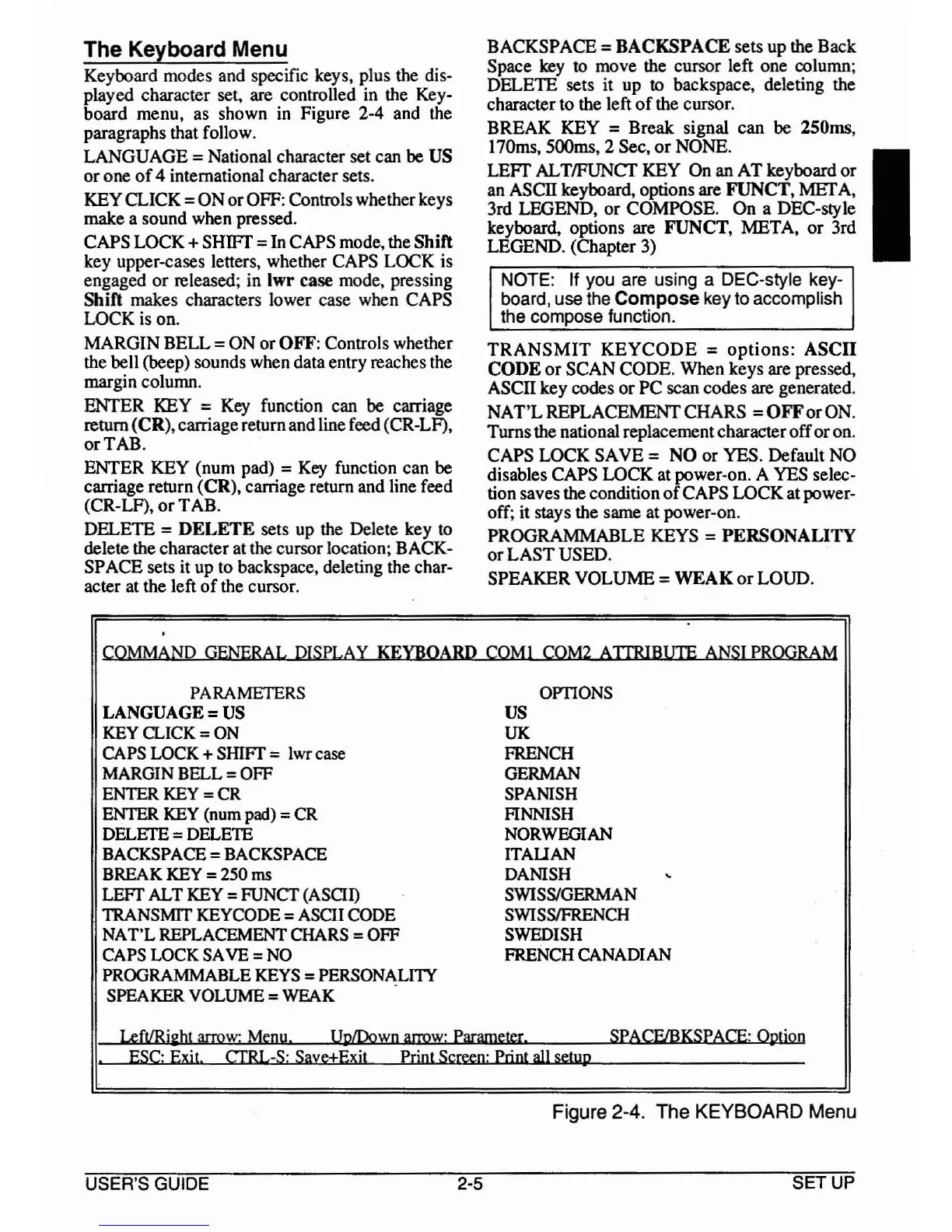
The Keyboard Menu
Keyboard modes and specific keys, plus the dis-
played character set, are controlled
in
the
Key-
board menu, as shown
in
Figure 2-4 and the
paragraphs that follow.
LANGUAGE = National character set
can
be
US
or one
of
4 international character sets.
KEY CLICK =
ON
orOFF: Controls whether keys
make a sound
when
pressed.
CAPS LOCK + SHIFT =
In
CAPS mode, the Shift
key upper-cases letters, whether
CAPS
LOCK is
engaged or released; in Iwr
case mode, pressing
Shift makes characters lower case when CAPS
LOCK is on.
MARGIN BELL =
ON
or OFF: Controls whether
the bell (beep) sounds when data entry reaches the
margin column.
ENTER
KEY
=
Key
function can
be
carriage
return (CR), carriage return and line feed (CR-LF),
or TAB.
ENTER
KEY
(num pad) =
Key
function can
be
carriage return (CR), carriage return and line feed
(CR-LF),
or
TAB.
DELETE = DELETE sets up
the
Delete key to
delete the character
at
the
cursor location; BACK-
SPACE sets it up to backspace, deleting the char-
acter
at
the left
of
the cursor.
BACKSPACE = BACKSPACE sets up the Back
Space
key
to move the cursor left one column;
DELETE sets it up
to backspace, deleting the
character to the left
of
the cursor.
BREAK KEY = Break signal can
be
250ms,
170ms, 500ms, 2 Sec,
or
NONE. I
LEFf
AL
TIFUNCT
KEY
On an AT keyboard or
an
ASCII keyboard, options are FUNCT, MEr
A,
3rd LEGEND, or COMPOSE. On a DEC-style
keyboard, options are FUNCT, META, or 3rd
LEGEND. (Chapter
3)
NOTE: If you are using a DEC-style key-
board, use the
Compose key to accomplish
the compose function.
TRANSMIT
KEYCODE = options: ASCII
CODE or SCAN CODE. When keys are pressed,
ASCII key codes or PC scan codes
are
generated.
NAT'LREPLACEMENTCHARS
=OFForON.
Turnsthe national replacementcharacterofforon.
CAPS LOCK SAVE = NO or YES. Default
NO
disables CAPS LOCK at power-on. A
YES
selec-
tion saves the condition
of
CAPS LOCK at power-
off; it stays the same at power-on.
PROGRAMMABLE
KEYS
= PERSONALITY
or LAST USED.
SPEAKER VOLUME =
WEAK
or
LOUD.
COMMAND
GENERAL
mSPLAY
KEYBOARD
COM!
COM2
AITRIBUIE
ANSI
PROGRAM
PARAMETERS
LANGUAGE =
US
KEY
CLICK
=
ON
CAPS
LOCK
+
SHIff
=
lwr
case
MARGIN
BELL
=
OFF
ENTER
KEY
=
CR
ENTER
KEY
(num
pad)
=
CR
DELETE
=
DELETE
BACKSPACE
=
BACKSPACE
BREAK
KEY
=
250
ens
LEFf
ALT
KEY
= FUNCf
(ASCII)
TRANSMIT
KEYCODE
=
ASCII
CODE
NAT'L
REPLACEMENT
CHARS
=
OFF
CAPS
LOCK
SAVE
=
NO
PROGRAMMABLE
KEYS
=
PERSONALITY
SPEAKER
VOLUME
=
WEAK
OPTIONS
US
UK
FRENCH
GERMAN
SPANISH
FINNISH
NORWEGIAN
ITAUAN
DANISH
SWISs/GERMAN
SWISSIFRENCH
SWEDISH
FRENCH
CANAmAN
LeftIRil:ht
arrow:
Menu.
UplDown
anvw:
Parameter.
SPACE/BKSPACE:
Option
ESC:
Exit.
CfRL-S:
Saye+Exit
Print
Screen:
Print
aJl
setup
Figure 2-4. The KEYBOARD Menu
USER'S GUIDE
2-5
SETUP



 To Next Page