Check your Telstra Go Repeater external antenna is compatible
3
4
To ensure you are getting the best possible 4G experience when 3G closes on 28
October 2024, use the instructions to check if your current antenna is compatible with
the 4G network.
Open the Cel-Fi WAVE app on your
smartphone and ensure you are in close
proximity to your GO Repeater to allow it to
connect through Bluetooth.˜
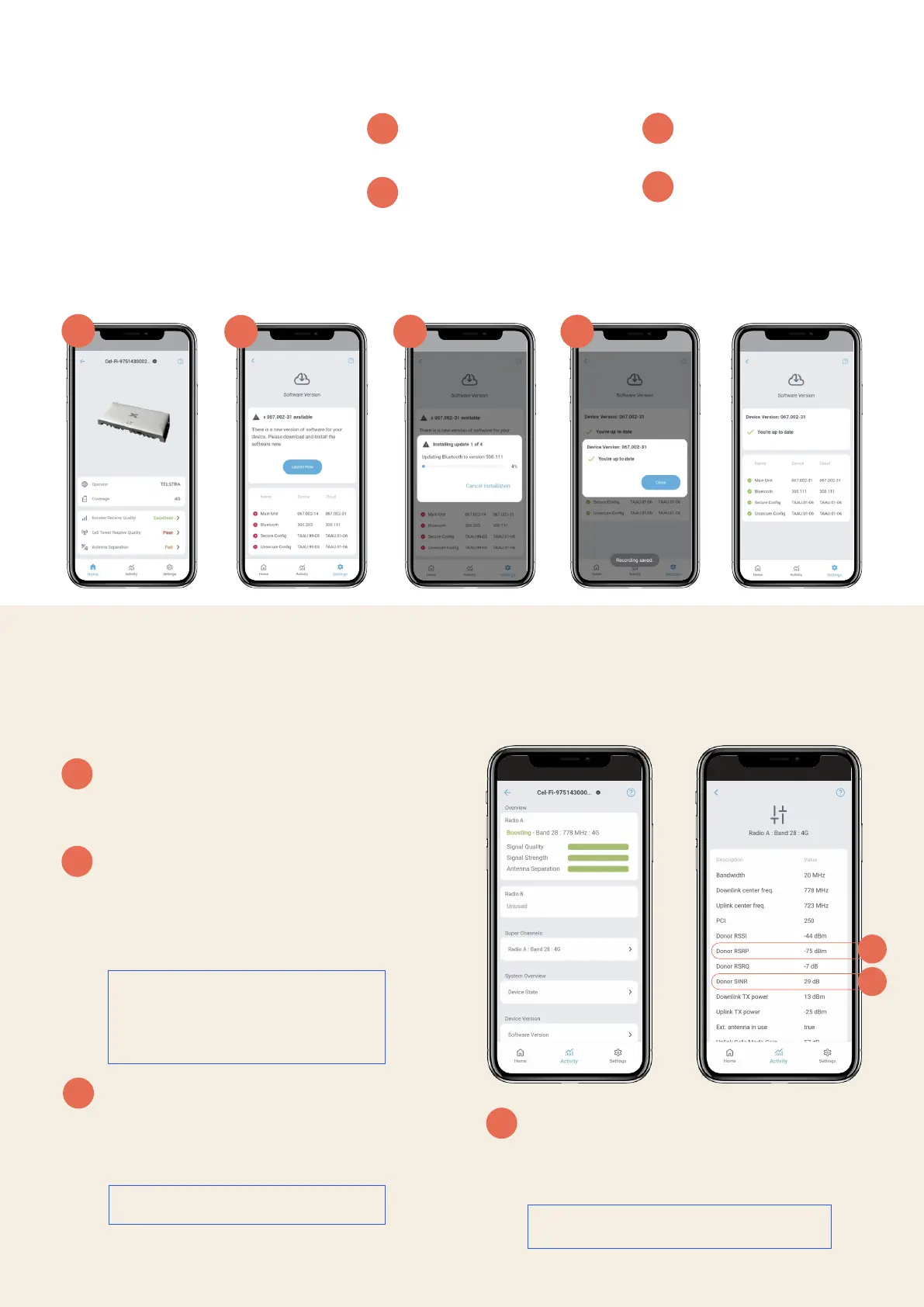
Check your GO Repeater in the Cel-Fi WAVE
app using a smartphone.
• Tap on Activity
• Under Super Channels tap on Radio A:
Band <number*>: 4G˜to see more details
about the boosted˜signal.
Signal Strength Test:
If Donor RSRP level is between -40 and -110
dBm this is good. Anything outside of this
range please contact us on 1800 305 307 to
discuss your options.
Signal Quality Test:
If the Donor SINR is showing 0 dB or a negative
number please contact us on 1800 305 307 to
discuss your options.
1
2
3
4
In this example ‘29 dB’ is good.
In this example ‘-75 dBm’ is good.
*This number may be 3, 28, 1 or 7
depending on your device and the
available frequencies from your local
tower.
Check if your Telstra GO Repeater software is update to date
Download the Cel-Fi WAVE app available
from the Google Play Store or Apple App
Store on your smartphone.
Open the WAVE app on your smartphone
and ensure you are in close proximity to
your GO Repeater to allow it to connect
through bluetooth.˜
Instructions to check your GO
Repeater settings:
2
1
3 4
1
2
Check your GO Repeater in
the Cel-Fi WAVE app using a
smartphone.
Tap on Settings > Software
Version > if there is a Software
Update available, tap on
“Update now” and wait until
the update has been
completed.
3
4
You will be able to
monitor the progress on
the WAVE app.
Congratulations your
GO Repeater has been
updated.












 To Previous Page