EasyManua.ls Logo

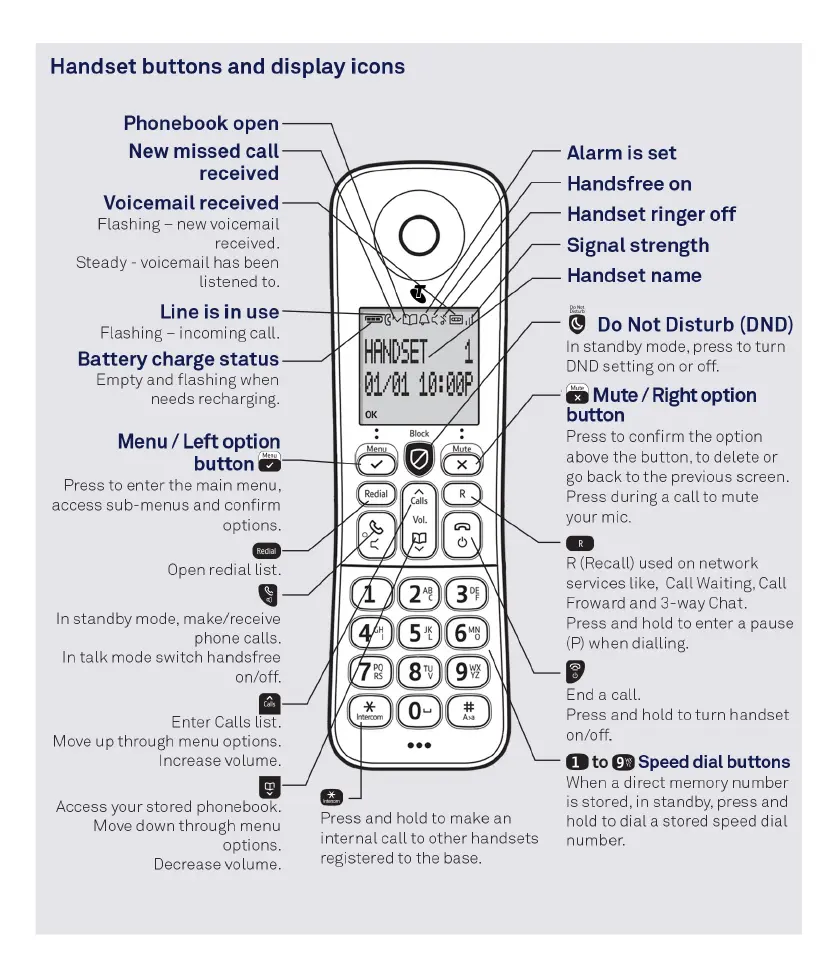
Telstra TEC-C - Handset Overview and Navigation; Button and Icon Guide; Special Function Buttons

Telstra TEC-C
8 pages
Print Icon
To Next Page IconTo Next Page
To Previous Page IconTo Previous Page
Loading...
Handset
buttons
and
display
icons
Phonebook
open
New
missed
call
received
Voicemail
received
Flashing
-
new
voicemail
received.
Steady
-
voicemail
has
been
listened
to.
Line
is
in
use
Flashing
-
incoming
call.
Battery
charge
status
Empty
and
flashing
when
needs
recharging.
Menu/Left
option
button
mute
Press
to
enter
the
main
menu,
access
sub-menus
and
confirm
options
Open
redial
list.
In
standby
mode,
make/receive
phone
calls.
In
talk
mode
switch
handsfree
on/off.
Enter
Calls
list.
Move
up
through menu options.
Increase
volume.
Access
your
stored phonebook.
Press
and
hold
to
make
an
Move
down
through
menu
internal
call
to
other
handsets
options.
registered
to
the
base.
Decrease
volume.
Alarm
is
set
Handsfree
on
Handset
ringer
off
Signal
strength
Handset
name
Do
Not
Disturb
DND)
In
standby
mode,
press
to
turn
DND
setting
on
or
off.
mute Mute/Right option
button
Press
to
confirm
the
option
above
the
button,
to
delete
or
go
back
to
the
previous screen.
Press
during
a
call
to
mute
your
mic.
R
Recall)
used
on
network
services
like,
Call
Waiting,
Call
Froward
and
3-way
Chat.
Press
and
hold
to
enter
a
pause
P)
when
dialling.
End
a
call.
Press
and
hold
to
turn
handset
on/off.
1
to
9
Speed
dial
buttons
When
a
direct
memory
number
is
stored,
in
standby,
press
and
hold
to
dial
a
stored
speed
dial
number.

Related product manuals