User Management
Adding a “Member”
There are 3 types of temi users:
• Owner (limited to one)
• Member
• Guest
All users must have the mobile app installed onto their phone.
The user that activated temi is by default designated as “Owner.”
User Permissions
If you want a family member or colleague to be able to call in to the robot from their mobile device without needing
someone to accept the call on the robot side, they should be added as a member by the robot “Owner” [Owner is
the user which scanned the QR code during activation]
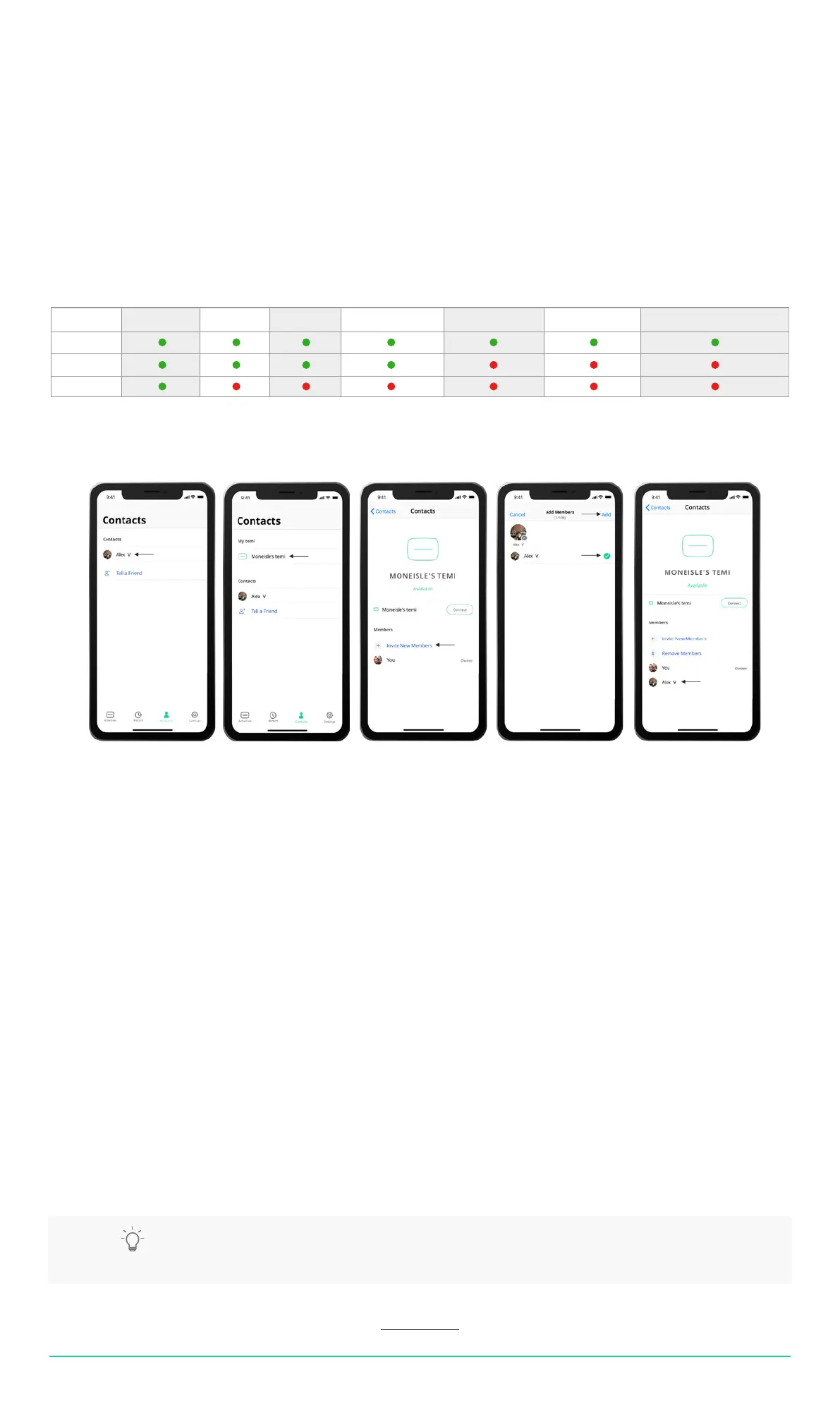
1. First make sure the contact you wish to make a “Member” is a temi app contact – go to the Contacts tab on the
temi mobile app and verify the desired contact appears. [If they don’t – follow the steps above regarding syncing
contacts with the temi mobile app.] [Image 1]
2. Still in the contacts tab on the mobile app scroll up to “My Temi” and select your robot [Image 2]
3. In the lower part of the screen you will see the “Members” area where you will see a “+ Invite New members”
button – Tapping this button will open a screen with all temi contacts [Image 3]
4. Select the desired contacts you wish to make “Members” and tap “Add” once done. [Image 4]
5. You should now see the added “Member” under your robot in the temi app and they should be able to connect to
the robot independently. [Image 5]
• You can invite multiple new members at once.
• A member can remove oneself from a temi at anytime. On the mobile app click on the temi you wish to remove
yourself from, scroll down the contact list and tap “Leave [name of your temi]”
• Admin can be removed only by completing factory reset.
This will also remove all saved data and other members from the temi.
TIP: Due to the fact that members are allowed to hop in to the robot, it is recommended to dene
only core users as “members”
USER MANUAL 09
Back to index
Owner
Member
Guest
Video call temi Hop-in video Add locations Activity stream sync Contact sync Manage members Customize temi’s Homescreen



 To Next Page