Follow mode
USER MANUAL 17
Back to index
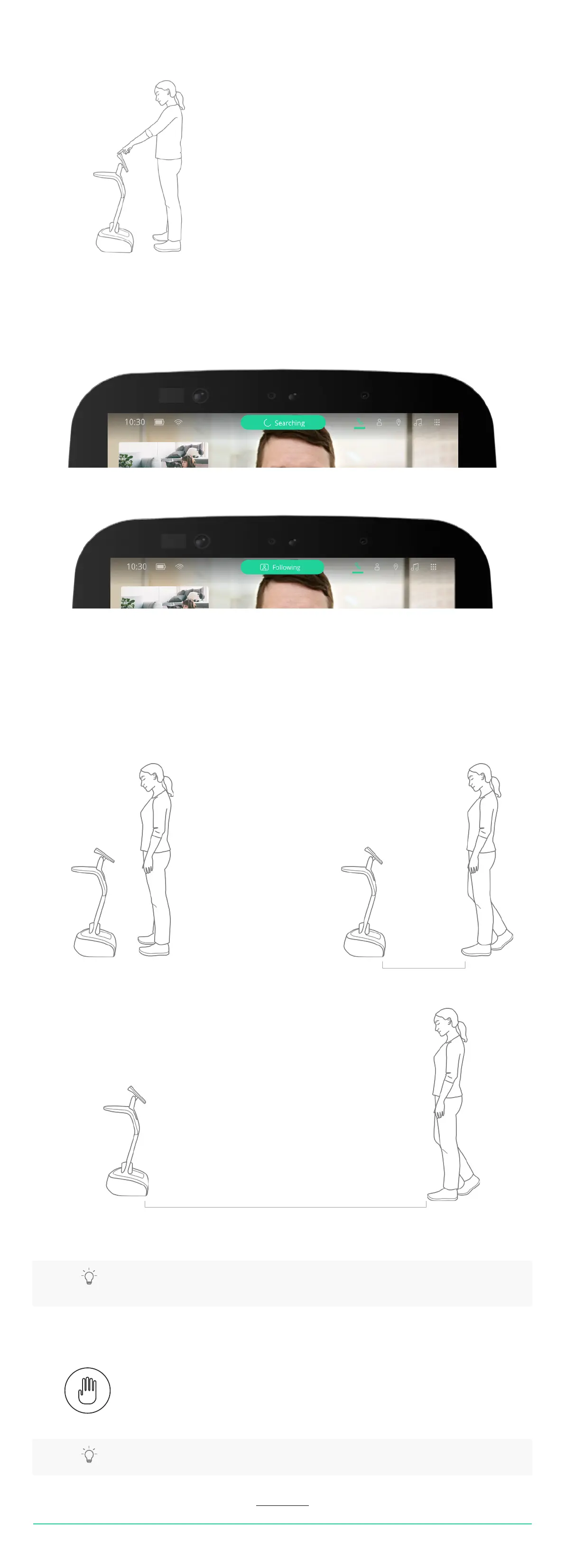
Temi can follow you by tracking your face and body.
To activate follow mode:
• Stand in front of temi and tap the action button on temi’s head
When asked to follow you, temi will briey search for you and display the following:
Once temi has detected you, the top bar will display the following:
Temi’s behavior in follow mode
Temi will adjust its behavior during follow mode depending on the user distance:
• Less than 4 feet: Temi will face the user without driving forward (Image A)
• 4 - 8 feet: Temi will drive to the user and maintain optimal distance (Image B)
• Greater than 8 feet: Temi will wait for the user to get closer (Image C)
B
Optimal Distance
Temi will wait for user to get closer
C
TIP: Lightly tap on the interaction button (on temi’s head) to activate follow mode. Pressing down
on the power button will trigger privacy mode.
TIP: If temi fails to stop, press the power button until temi shuts down.
Stopping
• To stop temi from moving, tap the interaction button.
or
• Say “Hey, temi stop”


 To Next Page