ENG
27
4. REMOVING THE PROPELLER
Changingthepropellercanbeeasilydone,ifnecessary.Seeourtutorial
videocalled«TEMOTutorial:
How to change the propeller and the tunnel of your
hand-heldelectricmotor.»onourYouTubechannelTEMOFrancefora
demonstraon.
Followthestepsbelow:
1.Removethescrewthatholdsthepropeller.
2.Removethewasher.
3.Removethedamagedpropeller.
fromtheshawithoutlosingthepin.
4. Place the new propeller in line with the pin to ensure that
thepropelleriscorrectlyedtothesha.
5. Place the new washer.
6.Sucientlyghtenthescrewsuppliedinthepack.
Usethreadlocker.
Itisadvisedtoremovethepropellerforopmalrinsing,beforewinte-
ring the thruster.
5. REMOVING THE PROPELLER
TUNNEL
Changingthepropellertunnelcanalsobeeasilydone,ifnecessary.
Youjustneedto:
1.Removethepropellerscrew(seeabove).
2.Removethescrewsthatholdthepropellertunnel(x3).
3.Removethedamagedpropellertunnel.
4. Placethe new propeller tunnel in the same posion as the da-
maged one.
5.Screwonthepropellertunnelinthe3exisngholes,withthe
screwsprovided.
6.Reinstallthepropellerbyfollowingthestepsinthepreviousparagraph.
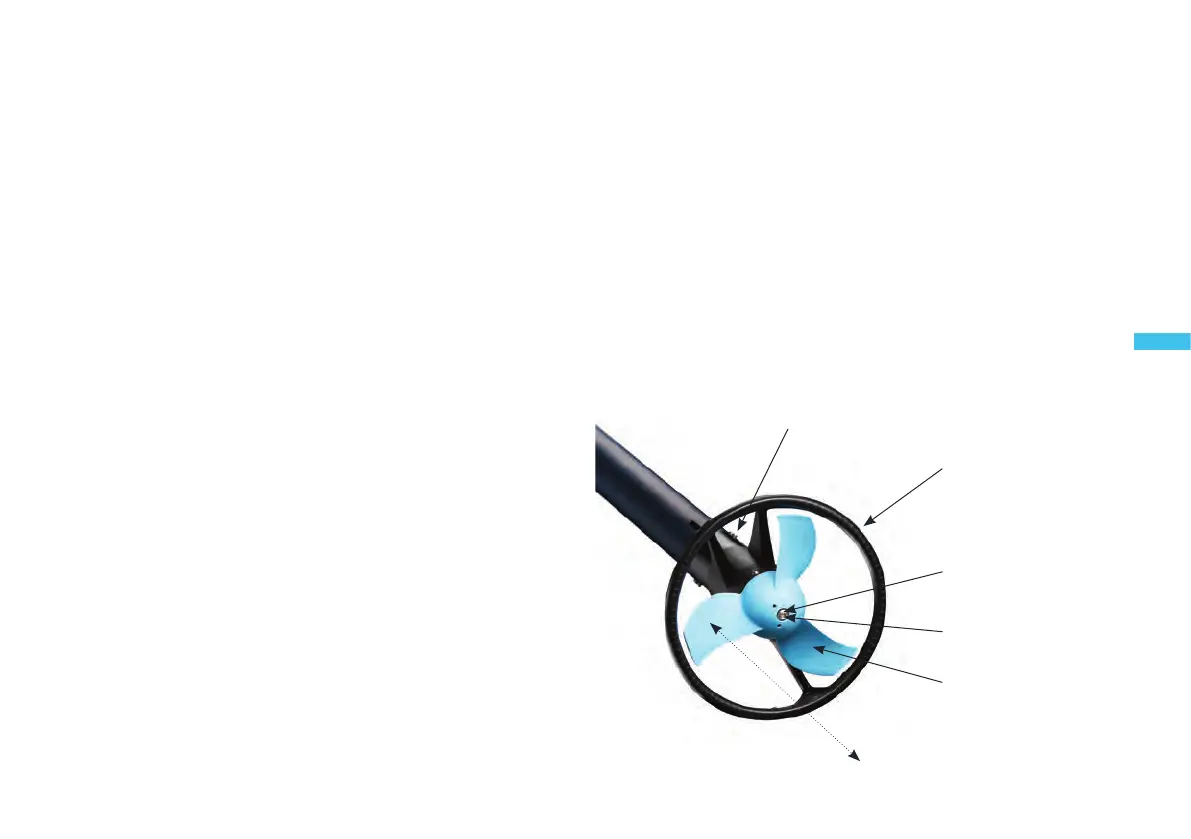
Propeller
tunnel
Propeller
Friction
washer
Screw
Propeller tunnel
screw


 To Next Page