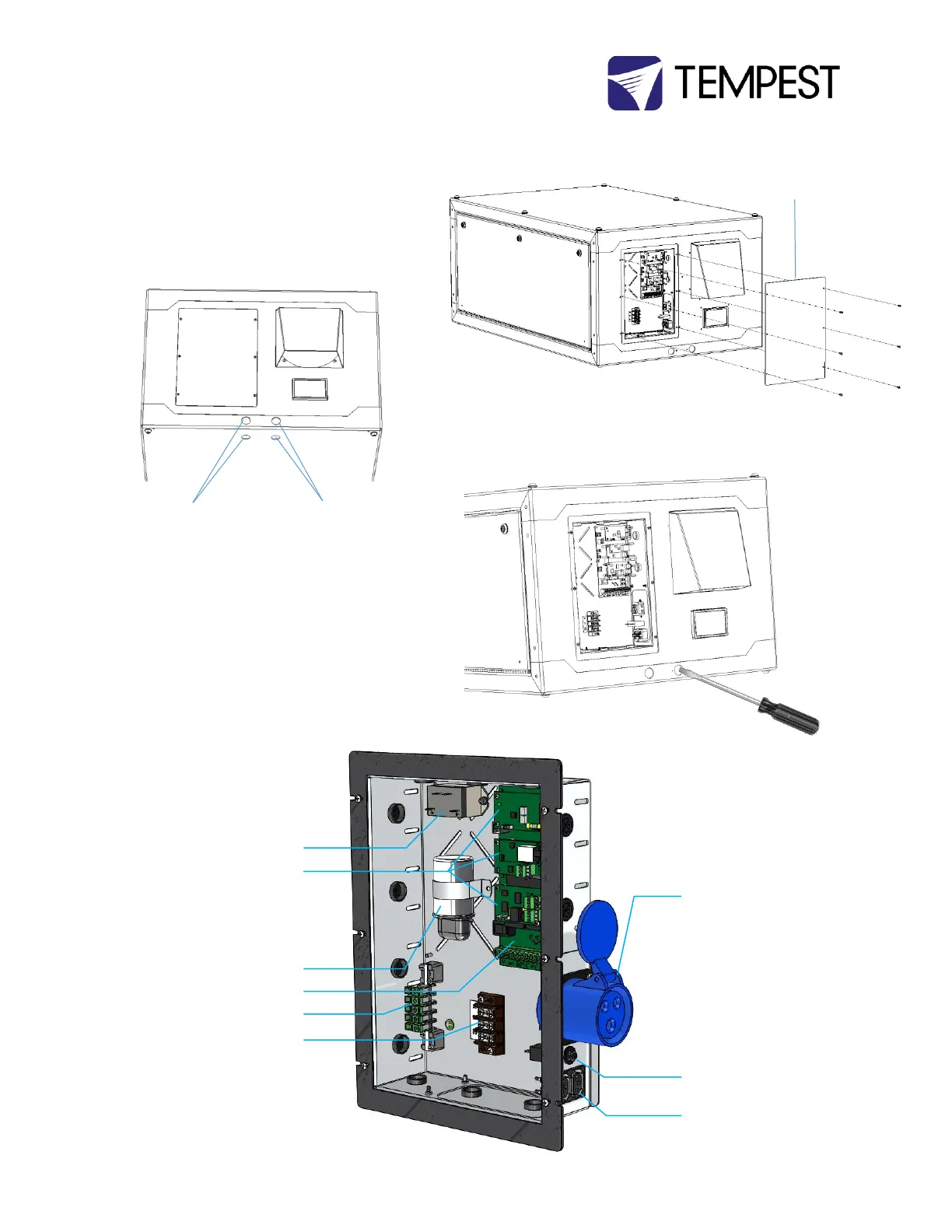
Wiring Access
Remove the wiring access plate on the rear surface.
Locate the conduit entry holes on the back and underside
of the enclosure – you may use either set of conduit
entries, depending on your installation needs.
Use a screwdriver – and tap lightly with a hammer if
needed – to open the conduit knockouts.
Conduit openings accept PG21 (International) and ¾” NPT
(North America) conduit fittings.
Use permanent or flexible outdoor rated conduit to
connect power and signal cables to your Cyclone
enclosure.
ALWAYS RUN POWER AND SIGNAL CABLES IN SEPARATE
CONDUITS.
AC Assist/ActiveCool Relay
(when included)
DEC4 Daughter Board(s)
Up to 3 daughter boards: types
include Fan Control, RS485
Comms, Ethernet
Positive Pressure Fan Capacitor
(when included)
DEC4 Motherboard
Ground/earth Busbar
Power Feed Terminals
Projector Power Outlet (types
vary)
Aux Equipment 10A circuit
breaker
Aux Equipment Power Outlet
(dual C13)


 To Next Page