Cyclone User Manual 73
Projector Mounting – Landscape, Feet-up
You may specify Cyclone enclosures for feet-up (ceiling-style) projector mounting. In this case the sliding tray is mounted under
the enclosure top cover, and the projector hangs from the tray.
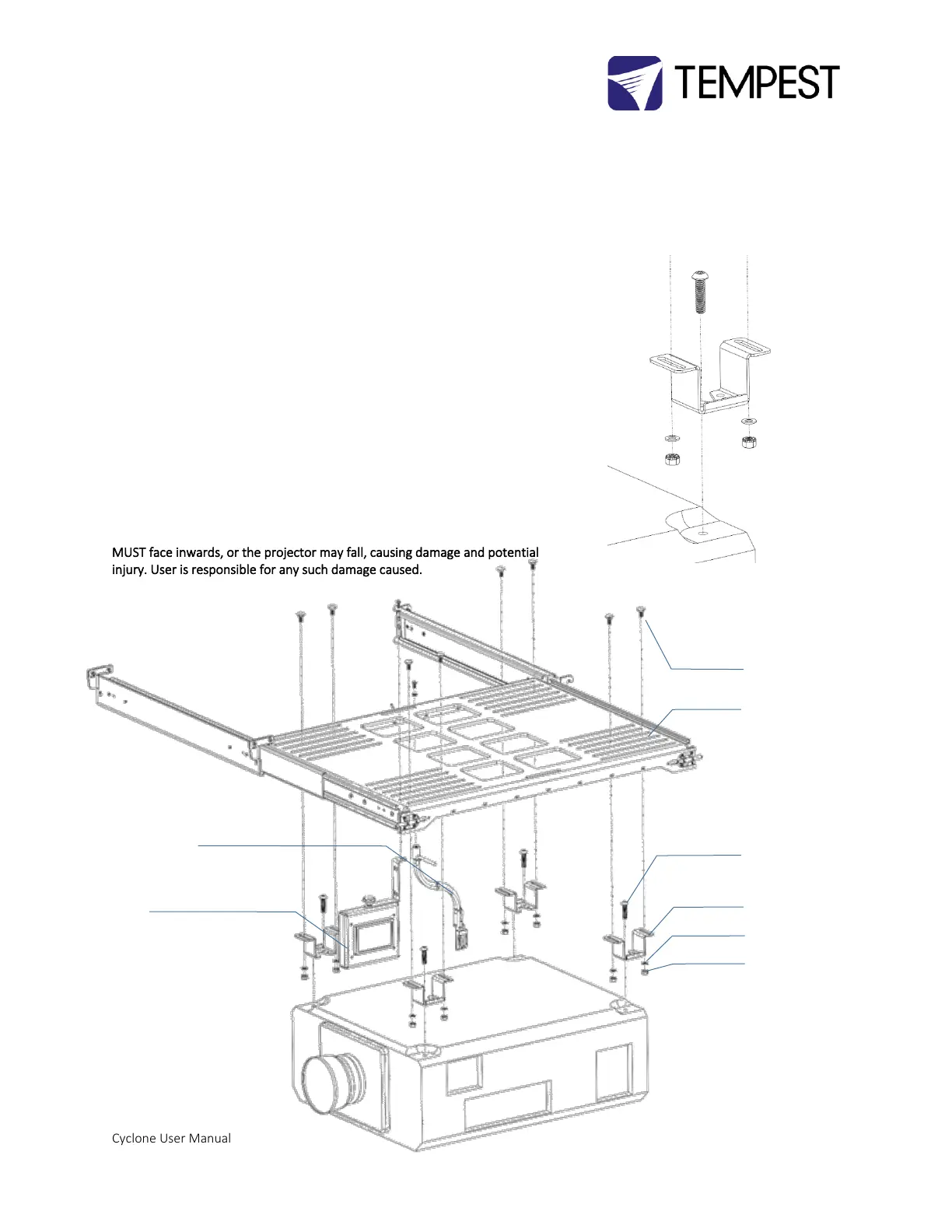
You can secure the projector tray, using the same projector clamps, in two ways:
Recommended – fixed, but no projector feet adjustment:
1. Remove the projector feet
2. Replace each foot with one projector clamp, and an appropriate bolt
(usually M10 or M12)
3. Note that each clamp has a clearance hole for M6, M8, M10 and M12
threads
4. Bolt the four projector clamps to the projector tray, using the eight M8
carriage bolts, washers and nuts provided
With feet adjustment:
1. Leave the projector feet in place and mount the projector in the same
way as shown above (landscape, feet down).
2. Now, the projector feet are hanging inside the projector clamps, and
you may adjust the feet for tilt and roll adjustment.
IMPORTANT: In this case, the V-shaped openings in the projector clamps
MUST face inwards, or the projector may fall, causing damage and potential
injury. User is responsible for any such damage caused.


 To Next Page