Cyclone User Manual 79
Important: Check Lamp-on Current
When the projector is installed and connected, check the current displayed on the User Interface, with the projector lamp(s) OFF.
If the current is 1.0A or higher, set the Lamp On Current to a setting higher than the actual displayed.
Example:
Standby Current = 1.4A
Set Lamp-On Current to 1.7A
If the Lamp-on current is set lower than the projector’s actual standby current, the DEC will think the projector lamp is always on,
and the fan(s) will never turn off.
See Control Menu/Set Lamp-On Point above.
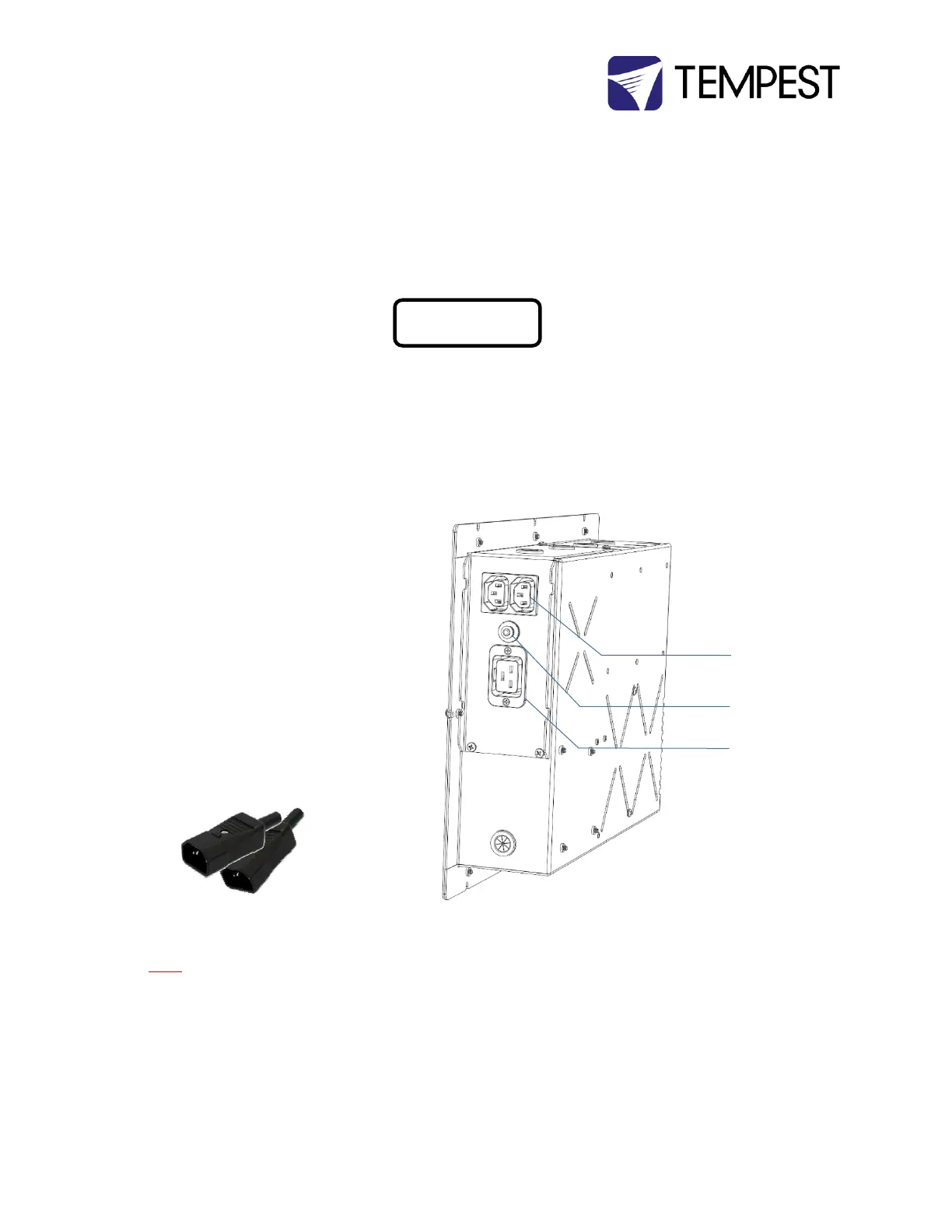
Connect Projector and Aux
Equipment
(1) Feed the projector power and signal
cables through the cable management
track
(2) Connect the projector power cable
into the Projector Outlet
(3) Connect all cables and test projector
(4) Install any auxiliary equipment – there
is usually plenty of room under the
projector tray
(5) Connect aux equipment power
supplies to the C13 outlets on the DEC
box. Use the supplied rewireable C14
plugs if necessary.
YOU MUST CONNECT THE PROJECTOR TO THE
PROJECTOR OUTLET. IF THE PROJECTOR FEED
BYPASSES THE DEC CONTROLLER, THE
VENTILATION SYSTEM WILL NOT WORK AND THE
PROJECTOR WILL OVERHEAT.


 To Next Page