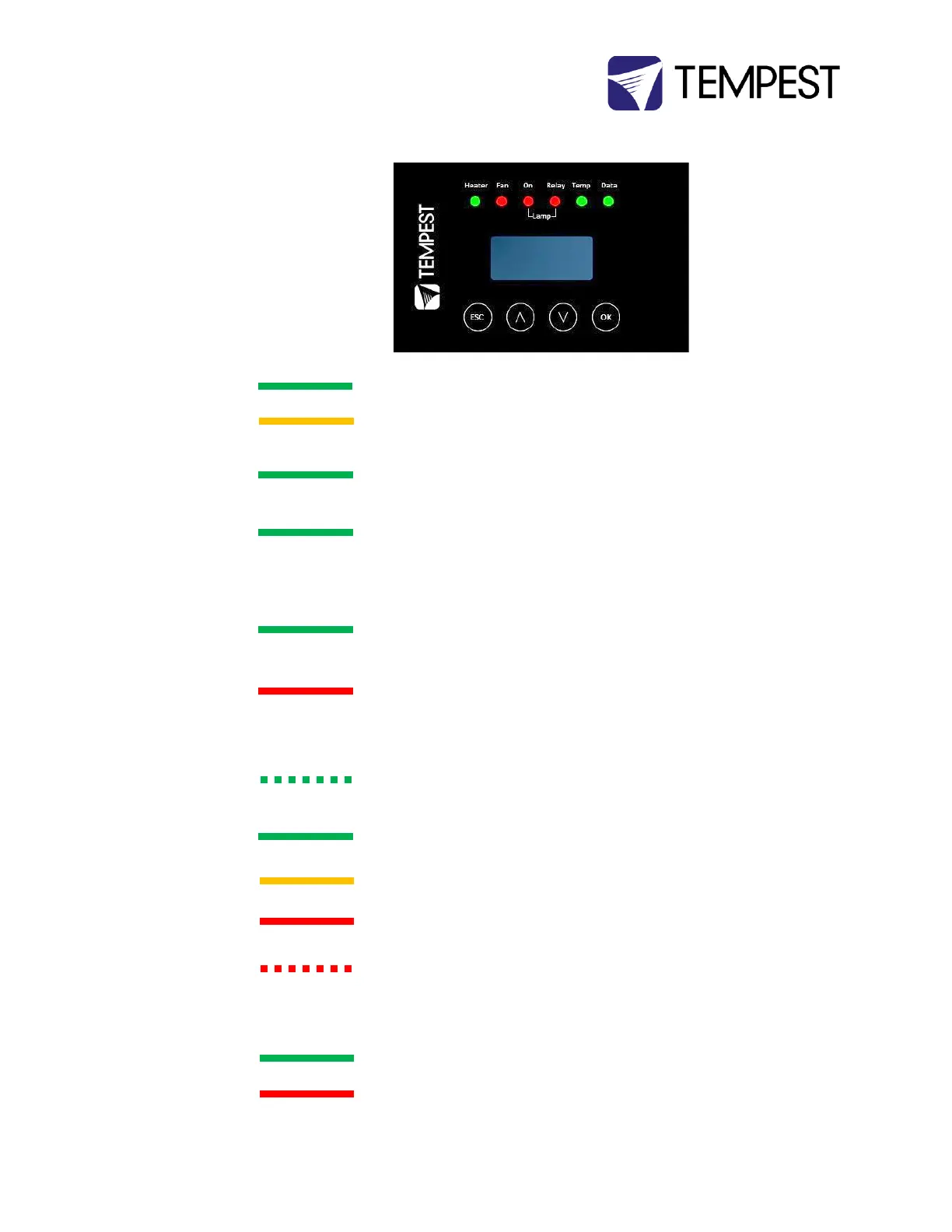
Heater is ON, to maintain lower temperature level or to prevent
condensation
Enclosure is temporarily outside the Goldilocks zone, and DEC is working to
restore it
Lamp is ON, or Temperature is HIGH and fan is cooling enclosure. Short burst
when lamp off indicates fan moving air to stabilize temp/humidity.
NOTE: Fan LED will not light if no fan is detected
Current sensing shows lamp is ON
Lamp hour counter is running
Current sensing shows lamp is OFF
Lamp hour counter is not running
Lamp relay is closed (normal)
Projector power receptacle is energized
Lamp relay is open due to over-temperature event. Projector power
receptacle is isolated.
Temperature is below lower temp setting
Temperature is in normal range
Humidity is above target limit
Temperature is above top setting
Temperature is above Trip level
Projector power is isolated
Data not used in present Mode. OR DEC4 is in RDM + DMX Control Mode and
no valid data packet has been detected.
Good data packet received.
RDM + DMX Control Mode: Data Fail. A previously good data signal has failed.


 To Next Page